Configuring a Filebeat file output sends harvested events to local newline-delimited JSON files instead of a remote destination. That gives operators a controlled event sample when checking inputs, processors, field changes, or handoff data before restoring the normal Elasticsearch, Logstash, Kafka, or Redis output.
The output.file block belongs in the Outputs section of /etc/filebeat/filebeat.yml on packaged Linux installs. Filebeat can publish to only one active output at a time, so the file output replaces the current destination until the original output.* block is restored.
output.file needs a writable directory and a base filename. Filebeat adds a date-based suffix and the .ndjson extension, rotates files according to rotate_every_kb and number_of_files, and writes nothing until an enabled input publishes an event. On DEB and RPM services, systemd applies UMask=0027, so file permissions more permissive than 0640 are ignored.
Steps to configure a Filebeat file output:
- Back up the current Filebeat configuration file.
$ sudo cp /etc/filebeat/filebeat.yml /etc/filebeat/filebeat.yml.bak
Switching outputs stops normal publishing to the current destination until the original output block is restored.
- Create a directory for the generated event files.
$ sudo install -d -o root -g root -m 0750 /var/lib/filebeat/file-output
The directory must be writable by the account that runs Filebeat. Keeping it outside /var/log/filebeat avoids mixing captured events with Filebeat service logs.
- Open the active Filebeat configuration file.
$ sudoedit /etc/filebeat/filebeat.yml
Use the packaged Linux path shown here unless the deployment starts Filebeat with a different -c file.
- Disable the current output and add the file output block.
- /etc/filebeat/filebeat.yml
#output.elasticsearch:
#  hosts: ["https://es.example.net:9200"]

output.file:
  path: "/var/lib/filebeat/file-output"
  filename: "filebeat-events"
  rotate_every_kb: 10240
  number_of_files: 7
  permissions: 0600
  rotate_on_startup: true
Filebeat supports only one enabled output.* block. Comment out output.elasticsearch, output.logstash, output.kafka, output.redis, output.console, or any other active output before enabling output.file.
path is required. The values shown for rotate_every_kb, number_of_files, permissions, and rotate_on_startup match the documented defaults and make the retention behavior visible in the config.
- Test the Filebeat configuration for syntax errors.
$ sudo filebeat test config -c /etc/filebeat/filebeat.yml
Config OK
Current 9.x builds can print JSON log lines before the final Config OK line.
Related: How to test a Filebeat configuration - Restart the Filebeat service to apply the output change.
$ sudo systemctl restart filebeat
- Publish one event from an enabled input.
Use an application log path that Filebeat already harvests, or wait for the next live application event. Configure a short filestream input first when testing a fresh host.
Related: How to configure a filestream input in Filebeat - Verify that Filebeat created the output file.
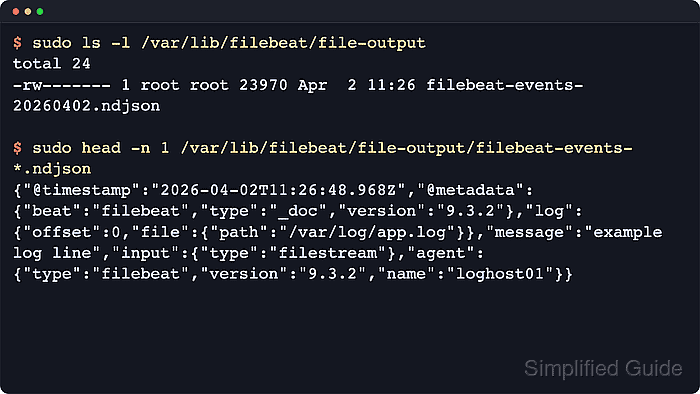
$ sudo ls -l /var/lib/filebeat/file-output
total 4
-rw------- 1 root root 416 Jun 18 06:10 filebeat-events-20260618.ndjson
The generated file name uses the configured filename plus a date-based suffix and the .ndjson extension. No file appears until an enabled input publishes an event.
- Inspect the generated event data from the controlled test file.
$ sudo cat /var/lib/filebeat/file-output/filebeat-events-20260618.ndjson
{"@timestamp":"2026-06-18T06:10:24.962Z","@metadata":{"beat":"filebeat","type":"_doc","version":"9.4.2"},"message":"app started","input":{"type":"filestream"},"log":{"offset":0,"file":{"path":"/var/log/app.log"}},"agent":{"type":"filebeat","version":"9.4.2","name":"loghost01"},"ecs":{"version":"8.0.0"},"host":{"name":"loghost01"}}
Each line is one JSON event. Exact fields vary by input, processors, and harvested source data. Use a pager instead of cat when the file contains more than a short test sample.
Tool: JSON Converter

Mohd Shakir Zakaria is a cloud architect with deep roots in software development and open-source advocacy. Certified in AWS, Red Hat, VMware, ITIL, and Linux, he specializes in designing and managing robust cloud and on-premises infrastructures.


