A filestream input tells Filebeat which log files to harvest with the newer file reader that replaces the legacy log input. Use it when an application writes plain log files and Filebeat should keep tracking them through restarts, renames, and normal rotation without collecting unrelated paths.
Filebeat reads manual inputs from the filebeat.inputs list in /etc/filebeat/filebeat.yml unless the host uses external input loading through filebeat.config.inputs. The filestream input needs a stable id, one or more glob-based paths, and any optional filters or fields that should apply to every file harvested by that input.
Recent Filebeat releases identify files with fingerprint-based identity by default, which waits until a file is larger than the first 1024 bytes before ingestion starts. Keep each id unique and avoid overlapping paths across inputs, because a duplicate ID or changed ID can prevent clean state tracking and can make existing files reread from the beginning.
Steps to configure a filestream input in Filebeat:
- Create a backup copy of the current Filebeat configuration.
$ sudo cp /etc/filebeat/filebeat.yml /etc/filebeat/filebeat.yml.bak
- Open the active Filebeat input configuration.
$ sudoedit /etc/filebeat/filebeat.yml
Check for an existing filebeat.config.inputs block before editing. If it loads files such as /etc/filebeat/inputs.d/*.yml, place the input in that loaded directory instead of adding a second input layer.
- Add a filestream input with a unique id and the target log path pattern.
filebeat.inputs:
  - type: filestream
    id: app-logs
    enabled: true
    paths:
      - /var/log/app/*.log
If filebeat.inputs already exists, add another - type: filestream item under the existing key. For an external input snippet, start the snippet with - type: filestream and omit the outer filebeat.inputs key.
Keep the id stable after Filebeat starts harvesting. Changing it later can make matching files look new and can send duplicate events.
- Confirm the configured paths glob matches the intended files.
$ sudo ls /var/log/app/*.log
/var/log/app/app.log
If the glob matches nothing, Filebeat can still start, but this input will not harvest anything until a file appears at that path.
- Test the Filebeat configuration before restarting the service.
$ sudo filebeat test config -c /etc/filebeat/filebeat.yml
Config OK
Related: How to test a Filebeat configuration
Tool: YAML Validator - Export the resolved configuration and confirm the new input is present.
$ sudo filebeat export config -c /etc/filebeat/filebeat.yml
filebeat:
  inputs:
  - enabled: true
    id: app-logs
    paths:
    - /var/log/app/*.log
    type: filestream
##### snipped #####
This check is useful when /etc/filebeat/filebeat.yml loads external input snippets and you need to confirm the expected snippet was included.
- Restart the Filebeat service.
$ sudo systemctl restart filebeat
- Check that Filebeat returned to an active state.
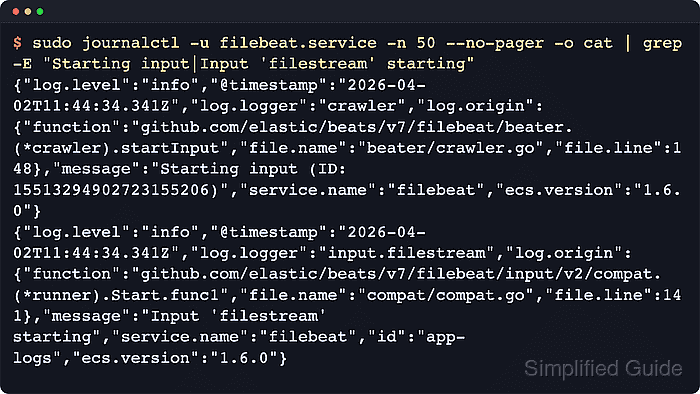
$ sudo systemctl status filebeat --no-pager ● filebeat.service - Filebeat sends log files to Logstash or Elasticsearch. Loaded: loaded (/usr/lib/systemd/system/filebeat.service; enabled; preset: enabled) Active: active (running) since Thu 2026-06-18 06:18:42 UTC; 5s ago Main PID: 3372 (filebeat) Tasks: 12 (limit: 4567) Memory: 54.8M ##### snipped ##### - Review recent Filebeat logs for the filestream startup messages.
$ sudo journalctl -u filebeat.service --since "5 minutes ago" --no-pager -o cat
{"log.level":"info","log.logger":"crawler","message":"Loading Inputs: 1","service.name":"filebeat"}
{"log.level":"info","log.logger":"crawler","message":"Starting input (ID: 2483614405055977962)","service.name":"filebeat"}
{"log.level":"info","log.logger":"crawler","message":"Loading and starting Inputs completed. Enabled inputs: 1","service.name":"filebeat"}
{"log.level":"info","log.logger":"input.filestream","message":"Input 'filestream' starting","service.name":"filebeat","id":"app-logs"}
If Filebeat writes logs to files instead of journald, inspect /var/log/filebeat/ for the same input startup messages. Very small test files can wait until they grow beyond the default 1024-byte fingerprint length before Filebeat ingests them.

Mohd Shakir Zakaria is a cloud architect with deep roots in software development and open-source advocacy. Certified in AWS, Red Hat, VMware, ITIL, and Linux, he specializes in designing and managing robust cloud and on-premises infrastructures.


