How to monitor Docker containers with Checkmk
Monitoring Docker containers with Checkmk uses the mk_docker.py Linux agent plug-in on the Docker host. The plug-in adds Docker daemon, image, network, and container data to the normal host agent output so the Checkmk site can discover services for the Docker node and for selected containers.
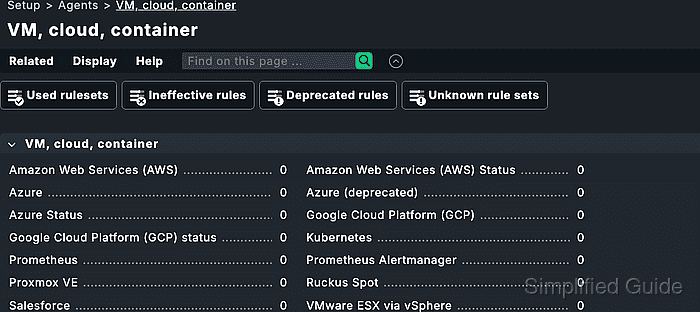
The Docker host must already be monitored as a Linux agent host before the plug-in is installed. The plug-in talks to the Docker API through the local socket by default, so the host also needs the Python docker module and permission for the agent runtime to read Docker status.
Container monitoring uses piggyback data. The Docker node sends container data with its own agent output, Checkmk stores that data under the site piggyback area, and each monitored container needs a matching host object whose name follows the plug-in naming setting.
Steps to monitor Docker containers with Checkmk:
- Confirm that the Checkmk Linux agent runs on the Docker host.
$ sudo check_mk_agent
<<<check_mk>>>
Version: 2.5.0p7
AgentOS: linux
Hostname: docker01
AgentDirectory: /etc/check_mk
PluginsDirectory: /usr/lib/check_mk_agent/plugins
##### snipped #####
The host should already exist in Setup and be registered with the Agent Controller before adding Docker monitoring.
Related: How to install the Checkmk agent on Linux
Related: How to register a Checkmk agent host - Check that Python can import the Docker module.
$ python3 -c 'import docker; print(docker.__version__)'
7.1.0
Install the distribution package that provides the module when this import fails. On Debian or Ubuntu, the package is usually python3-docker. Checkmk recommends package-manager installation before pip because pip can replace distribution-managed Python modules.
- Copy mk_docker.py into the agent plug-in directory.
$ sudo install -m 0755 mk_docker.py /usr/lib/check_mk_agent/plugins/
Download the plug-in from Setup → Agents → Other operating systems → Plugins in Checkmk Community. In commercial editions, deploy it with the Docker node and containers rule in the Agent Bakery when baked agents are used.
Related: How to bake a custom Checkmk agent package - Configure container host names when short container IDs are not desired.
$ sudoedit /etc/check_mk/docker.cfg
- /etc/check_mk/docker.cfg
[DOCKER]
container_id: combined
base_url: unix://var/run/docker.sock
The default container identifier is the 12-character short container ID. The combined setting prefixes the container name with the Docker host name, which helps avoid duplicate host names when several Docker nodes run containers called web or db.
- Run the Docker plug-in directly on the Docker host.
$ sudo python3 /usr/lib/check_mk_agent/plugins/mk_docker.py
<<<docker_node_info>>>
<<<docker_node_disk_usage:sep(44)>>>
<<<docker_node_images>>>
<<<docker_node_network:sep(0)>>>
<<<docker_container_status:sep(0)>>>
##### snipped #####
If the plug-in reports that the host does not look like a Docker host, confirm that Docker Engine is running, that the Docker socket path matches /etc/check_mk/docker.cfg, and that the Python docker module is installed.
- Confirm that the full agent output contains Docker sections.
$ sudo check_mk_agent
<<<check_mk>>>
##### snipped #####
<<<docker_node_info>>>
##### snipped #####
<<<docker_container_status:sep(0)>>>
##### snipped #####
- Discover services for the Docker node from the Checkmk site shell.
OMD[mysite]:~$ cmk -IIv docker01
Discovering services and host labels on: docker01
docker01:
+ FETCHING DATA
+ EXECUTING DISCOVERY PLUGINS (4)
  1 docker_node_info
  1 docker_node_disk_usage
  1 docker_node_images
  1 docker_node_network
SUCCESS - Found 4 services, 1 host labels
The web interface can run the same discovery from Setup → Hosts → the Docker host → Services.
Related: How to run Checkmk service discovery - List piggybacked container host names from the Checkmk site shell.
OMD[mysite]:~$ cmk-piggyback list piggybacked
docker01_web
docker01_db
The names are case-sensitive. They must match the Checkmk host objects exactly unless a host-name translation rule rewrites piggyback names.
- Create a Checkmk host for each container that should be monitored.
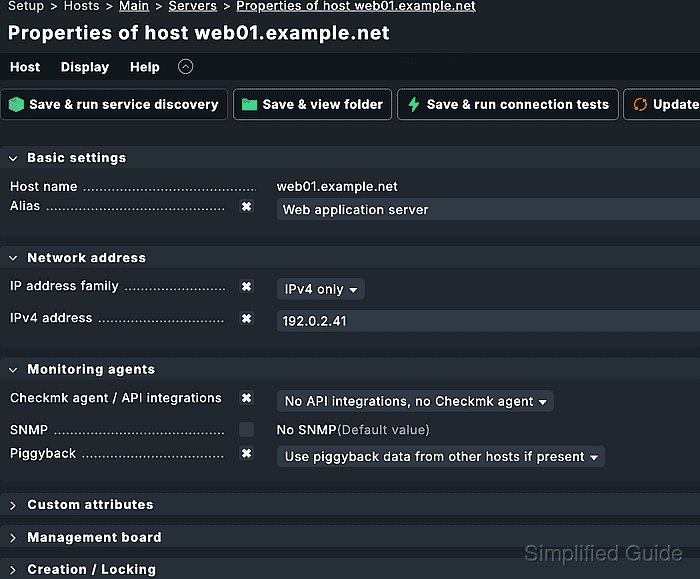
For a normal Docker container without its own address, set IP address family to No IP, set Checkmk agent / API integrations to No API integrations, no Checkmk agent, set Parents to docker01, and set Piggyback to Always use and expect piggyback data.
Related: How to create a Checkmk piggyback host - Create a host check rule for the container hosts.
Open Setup → Hosts → Host monitoring rules → Host check command and set the rule to use the status of the Docker container status service. Limit the rule to the folder, host label, or explicit host names used for Docker containers.
- Discover services for a container host.
OMD[mysite]:~$ cmk -IIv docker01_web
Discovering services and host labels on: docker01_web
docker01_web:
+ FETCHING DATA
+ EXECUTING DISCOVERY PLUGINS (4)
  1 docker_container_status
  1 docker_container_cpu
  1 docker_container_mem
  1 docker_container_diskstat
SUCCESS - Found 4 services, 4 host labels
A missing or empty result usually means the Checkmk host name does not match the piggyback name, the Docker node has not been checked since the plug-in was installed, or the container no longer exists.
- Activate the discovered Docker changes.
OMD[mysite]:~$ cmk -O
Generating configuration for core...
Reloading monitoring core...OK
- Run the container host check from the Checkmk site shell.
OMD[mysite]:~$ cmk -nv docker01_web
+ FETCHING DATA
Container status   OK - running
CPU utilization    OK - 0.4%
Memory usage       OK - 84.00 MB
[piggyback] Success, execution time 0.1 sec
The container is monitored when the Docker container status service reports the running state and the check ends with a piggyback success result.