Table of Contents
How to redirect HTTP to HTTPS in Apache
Redirecting plain HTTP requests to HTTPS keeps login forms, session cookies, API calls, and canonical URLs on the encrypted version of the site. It also prevents port 80 from serving a second public copy of the same content after the secure virtual host is ready.
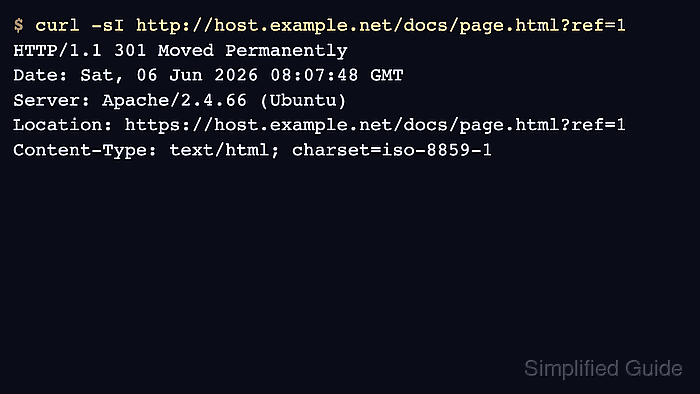
In Apache, a request to the HTTP listener is matched by a port 80 VirtualHost before the site content is served. The redirect response sends a status code and a Location header, and the client repeats the same path on HTTPS. For a whole-site scheme upgrade, a dedicated HTTP VirtualHost with Redirect is the clearest server-level method. Use mod_rewrite only when conditions or exception rules are needed, and use .htaccess when the redirect has to live inside the site tree.
Examples below use the Debian and Ubuntu layout with apache2ctl, /etc/apache2/, and the apache2 service name. The HTTPS virtual host should already work before the redirect is enforced, including a valid certificate and matching hostnames. Test with a temporary redirect first when rollback speed matters, because browsers and proxies can cache 301 redirects aggressively.
Related: How to configure Let's Encrypt SSL in Apache
Related: How to enable HSTS in Apache
Related: How to redirect a bare domain to www in Apache
Tool: HTTP Redirect Checker
Methods to redirect HTTP to HTTPS in Apache:
Steps to redirect HTTP to HTTPS in Apache:
Redirect HTTP to HTTPS in Apache using Redirect directive
The Redirect directive from mod_alias is the simplest way to move an entire HTTP vhost to HTTPS. It is built for straightforward external redirects and avoids loading mod_rewrite for a rule that does not need matching conditions.
Keep this method in a dedicated port 80 VirtualHost that only sends clients to the secure hostname. A bare Redirect is temporary by default, so use permanent or an explicit 301 when the secure URL is ready to become canonical.
- Open the HTTP VirtualHost configuration file.
$ sudo vi /etc/apache2/sites-available/000-default.conf
- Add a permanent redirect inside the port 80 VirtualHost.
<VirtualHost *:80>
    ServerName host.example.net
    Redirect permanent / https://host.example.net/
</VirtualHost>
permanent sends a 301 response. Use temp while testing when a temporary 302 is easier to roll back.
Hardcode the destination hostname when the HTTPS site should always answer on one canonical host.
- Test the Apache configuration before reloading it.
$ sudo apache2ctl configtest
Syntax OK
Related: How to test Apache configuration
- Reload Apache to apply the redirect.
$ sudo systemctl reload apache2
Use sudo systemctl reload httpd on Red Hat-family systems.
- Confirm that the redirect keeps the requested path and query string.
$ curl -sI 'http://host.example.net/docs/page.html?ref=1'
HTTP/1.1 301 Moved Permanently
Date: Sat, 06 Jun 2026 08:07:48 GMT
Server: Apache/2.4.66 (Ubuntu)
Location: https://host.example.net/docs/page.html?ref=1
Content-Type: text/html; charset=iso-8859-1
Use curl or a fresh private browser session when testing because cached 301 responses can make later changes look stuck.
Redirect HTTP to HTTPS in Apache using htaccess
Use .htaccess when the site owner can edit files under the DocumentRoot but cannot edit the main Apache configuration. The rule is evaluated in directory context, so it can upgrade requests to HTTPS without changing the global VirtualHost files.
That convenience has a cost. Apache checks for .htaccess files while serving requests when AllowOverride permits them, so the main server configuration remains the better place for the redirect whenever direct server access is available.
- Enable mod_rewrite if the platform does not already load it.
$ sudo a2enmod rewrite
Enabling module rewrite.
To activate the new configuration, you need to run:
  service apache2 restart
On platforms that do not ship a2enmod, confirm that mod_rewrite is loaded or enabled through the distribution's module configuration.
- Open the HTTP VirtualHost configuration file for the site.
$ sudo vi /etc/apache2/sites-available/000-default.conf
- Confirm that the site directory allows file-based rewrite directives.
<Directory /var/www/html>
    AllowOverride FileInfo
    Require all granted
</Directory>
If AllowOverride is set to None, .htaccess is ignored and the redirect never runs.
Keep existing access rules, handlers, and options that the site already uses.
- Open or create the .htaccess file under the site document root.
$ sudo vi /var/www/html/.htaccess
Use the directory that matches the active HTTP DocumentRoot.
- Add the rewrite rule that upgrades non-TLS requests to the same hostname and path on HTTPS.
RewriteEngine On
RewriteCond %{HTTPS} !=on
RewriteRule ^ https://%{HTTP_HOST}%{REQUEST_URI} [R=301,L]
The rule keeps the current hostname and request path. Replace https://%{HTTP_HOST} with a fixed hostname such as https://www.example.com when the site also needs hostname canonicalization.
If Apache sits behind a TLS-terminating reverse proxy, base the condition on the trusted forwarded scheme header used in that environment instead of relying only on HTTPS.
- Test the main configuration if AllowOverride or module state changed.
$ sudo apache2ctl configtest
Syntax OK
Use sudo apachectl -t or sudo httpd -t on platforms that use those control names.
Related: How to test Apache configuration
- Restart Apache if the module state or main configuration changed.
$ sudo systemctl restart apache2
Apache reads a changed .htaccess file on the next request, but module and AllowOverride changes still require a service restart or reload.
- Confirm that the site now returns a permanent redirect from HTTP to HTTPS.
$ curl -sI 'http://host.example.net/docs/page.html?ref=1'
HTTP/1.1 301 Moved Permanently
Date: Sat, 06 Jun 2026 08:07:48 GMT
Server: Apache/2.4.66 (Ubuntu)
Location: https://host.example.net/docs/page.html?ref=1
Content-Type: text/html; charset=iso-8859-1
Use the HTTP Redirect Checker after DNS and TLS are public to confirm the same route from outside the server.
Redirect HTTP to HTTPS in Apache using mod_rewrite on VirtualHost configuration
A VirtualHost rewrite keeps the redirect in the main server configuration and avoids the per-request .htaccess lookup. Use this pattern when the redirect already belongs with other host-level rewrite rules or when conditional exceptions will be added later.
For a plain “everything on port 80 goes to HTTPS” policy, Redirect permanent is usually simpler. Use mod_rewrite here when the redirect needs rewrite-specific logic rather than because it is the default server-level tool.
- Enable mod_rewrite if it is not already loaded.
$ sudo a2enmod rewrite
Enabling module rewrite.
To activate the new configuration, you need to run:
  service apache2 restart
Verify the loaded module list with apache2ctl -M if the platform uses a different module workflow.
- Open the HTTP VirtualHost configuration file.
$ sudo vi /etc/apache2/sites-available/000-default.conf
- Add a port 80 VirtualHost rule that redirects requests to the matching HTTPS URL.
<VirtualHost *:80>
    ServerName host.example.net
    RewriteEngine On
    RewriteRule ^ https://%{HTTP_HOST}%{REQUEST_URI} [R=301,L]
</VirtualHost>
Replace https://%{HTTP_HOST} with a fixed hostname when the HTTPS site should always answer on one canonical name.
Add RewriteCond lines ahead of the catch-all rule only when the redirect truly needs conditions or exceptions.
- Test the Apache configuration before loading the change.
$ sudo apache2ctl configtest
Syntax OK
Related: How to test Apache configuration
- Reload Apache to apply the validated VirtualHost change.
$ sudo systemctl reload apache2
Use sudo systemctl reload httpd on Red Hat-family systems.
- Confirm the redirect from the HTTP listener.
$ curl -sI 'http://host.example.net/docs/page.html?ref=1'
HTTP/1.1 301 Moved Permanently
Date: Sat, 06 Jun 2026 08:07:48 GMT
Server: Apache/2.4.66 (Ubuntu)
Location: https://host.example.net/docs/page.html?ref=1
Content-Type: text/html; charset=iso-8859-1