How to enable HSTS in Apache
HTTP Strict Transport Security (HSTS) tells browsers to keep using HTTPS for a hostname after the first secure visit. That removes the normal HTTP-to-HTTPS downgrade window, reduces cookie exposure on accidental plain-HTTP requests, and turns certificate failures into a hard stop instead of a bypass prompt.
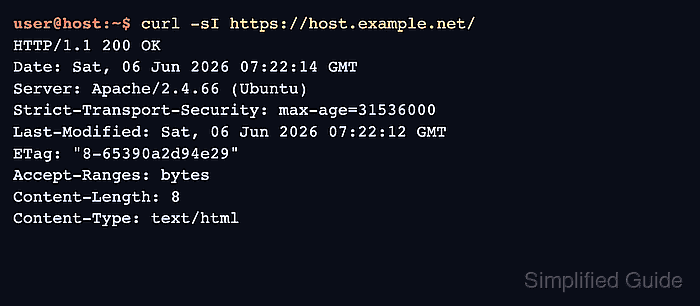
Apache sends HSTS by returning the Strict-Transport-Security response header from the site's HTTPS virtual host. Browsers cache the policy per host, upgrade later HTTP requests to HTTPS automatically, and keep enforcing the rule until the declared max-age expires. Using Header always set keeps the header on HTTPS error responses and internal redirects as well as normal 200 OK responses.
HSTS only takes effect when a browser receives the header over HTTPS, so the TLS site must already work cleanly and port 80 should redirect to HTTPS. Start with a short rollout window before committing to a long policy, and add includeSubDomains or preload only when every subdomain is ready for permanent HTTPS use. The commands use the Debian and Ubuntu Apache layout with /etc/apache2 and the apache2 service; on Red Hat-family systems, the service is usually httpd and site files commonly live under /etc/httpd/conf.d.
Steps to enable HSTS in Apache:
- Confirm the site already answers over HTTPS without certificate errors.
$ curl -sI https://host.example.net/
HTTP/1.1 200 OK
Date: Sat, 06 Jun 2026 07:22:14 GMT
Server: Apache/2.4.66 (Ubuntu)
Last-Modified: Sat, 06 Jun 2026 07:22:12 GMT
ETag: "8-65390a2d94e29"
Accept-Ranges: bytes
Content-Length: 8
Content-Type: text/html
HSTS prevents browsers from clicking through certificate warnings after the policy is cached, so fix certificate errors before enabling it.
- Confirm port 80 redirects to the HTTPS URL for the same host.
$ curl -sI http://host.example.net/
HTTP/1.1 301 Moved Permanently
Date: Sat, 06 Jun 2026 07:22:14 GMT
Server: Apache/2.4.66 (Ubuntu)
Location: https://host.example.net/
Content-Type: text/html; charset=iso-8859-1
If the response does not return a permanent redirect to the HTTPS hostname, fix the port 80 virtual host or upstream load balancer first. Browsers ignore HSTS on insecure HTTP responses.
- Enable the headers module if it is not already loaded.
$ sudo a2enmod headers
Enabling module headers.
To activate the new configuration, you need to run:
  service apache2 restart
On Red Hat-family systems, mod_headers is usually available with httpd and the service name is typically httpd instead of apache2.
- Open the site's HTTPS virtual host configuration file.
$ sudo vi /etc/apache2/sites-available/host.example.net.conf
If HTTPS terminates on a reverse proxy, load balancer, or CDN, make sure that outer HTTPS layer also sets or preserves the HSTS header. The browser only sees the final secure response.
- Add the HSTS header inside the <VirtualHost *:443> block.
<VirtualHost *:443>
        ServerName host.example.net
        ##### snipped #####

        <IfModule mod_headers.c>
                Header always set Strict-Transport-Security "max-age=31536000"
        </IfModule>
</VirtualHost>
For a first rollout, use max-age=300 and increase it after a clean validation window. After the policy is trusted, max-age=31536000 is a common long-lived value.
Add includeSubDomains only when every current and future subdomain already works over HTTPS. Do not add preload by default; it is intended for deliberate preload-list submission, and removal can take months.
If Apache serves multiple HTTPS hostnames from separate virtual hosts, send the header from each host that should enforce HSTS. Browsers store HSTS policies per host.
Related: Apache mod_headers documentation
- Validate the Apache configuration syntax.
$ sudo apache2ctl -t
Syntax OK
Use sudo apachectl -t or sudo httpd -t on platforms that do not ship apache2ctl.
Related: How to test Apache configuration
- Reload the apache2 service to apply the change without dropping active connections.
$ sudo systemctl reload apache2
Although a2enmod suggests a restart, a reload is usually sufficient after a clean syntax check. When systemd is not managing the service, use sudo apache2ctl graceful or the platform-equivalent reload command. On Red Hat-family systems, the unit name is commonly httpd.
- Confirm the HSTS header is present on a normal HTTPS response.
$ curl -sI https://host.example.net/
HTTP/1.1 200 OK
Date: Sat, 06 Jun 2026 07:22:14 GMT
Server: Apache/2.4.66 (Ubuntu)
Strict-Transport-Security: max-age=31536000
Last-Modified: Sat, 06 Jun 2026 07:22:12 GMT
ETag: "8-65390a2d94e29"
Accept-Ranges: bytes
Content-Length: 8
Content-Type: text/html
If the header is missing, check which virtual host answered the request and make sure the change was added to the same HTTPS host that serves the site name.
- Confirm the header is still present on an HTTPS error response.
$ curl -sI https://host.example.net/does-not-exist
HTTP/1.1 404 Not Found
Date: Sat, 06 Jun 2026 07:22:15 GMT
Server: Apache/2.4.66 (Ubuntu)
Strict-Transport-Security: max-age=31536000
Content-Type: text/html; charset=iso-8859-1
The same header on a 404 response confirms that Header always set is covering non-success HTTPS responses too.
To clear a cached HSTS policy before max-age expires, send Strict-Transport-Security: max-age=0 over HTTPS. Removing the header alone does not immediately clear cached browser policy.