Long UI tests can block a local or CI feedback loop when a simulator stalls, a wait never resolves, or application code deadlocks. XCTest test timeouts put a per-test execution limit around those cases so the run fails with a named test instead of waiting indefinitely.
XCTest exposes the limit as an execution time allowance. The active test plan or xcodebuild run enables timeout enforcement and supplies the default allowance, while XCTestCase.executionTimeAllowance can give a specific test class or method more time.
Timeouts are guardrails for stalled tests, not a performance target. Use a short default for UI test feedback, add a higher cap only for known long flows, and keep result bundles so timeout diagnostics remain available after CI finishes.
Related: How to run XCUITest tests locally
Related: How to create an XCUITest test plan
Related: How to save XCUITest result bundles
Steps to set XCUITest timeout allowances:
- Choose the default allowance and the maximum cap for the UI test run.
Values are written in seconds, but XCTest rounds execution allowances up to whole minutes. A value below 60 seconds still becomes a one-minute allowance.
- Add a source-level allowance only to a test class whose limit should stay explicit in source.
import XCTest

final class LoginUITests: XCTestCase {
    override func setUpWithError() throws {
        continueAfterFailure = false
        executionTimeAllowance = 120
    }

    func testSlowLoginDoesNotHangForever() throws {
        let app = XCUIApplication()
        app.launch()

        XCTAssertTrue(app.buttons["Sign In"].waitForExistence(timeout: 10))
    }
}
The element wait still needs its own short timeout. The execution allowance bounds the whole XCTestCase method after timeout enforcement is enabled.
- Run the focused UI test with timeout enforcement enabled.
$ xcodebuild test \
  -workspace MyApp.xcworkspace \
  -scheme MyApp \
  -destination 'platform=iOS Simulator,name=iPhone 16,OS=latest' \
  -only-testing:MyAppUITests/LoginUITests/testSlowLoginDoesNotHangForever \
  -test-timeouts-enabled YES \
  -default-test-execution-time-allowance 120 \
  -maximum-test-execution-time-allowance 300 \
  -resultBundlePath TimeoutRun.xcresult
-test-timeouts-enabled YES turns on timeout behavior for this xcodebuild run. -default-test-execution-time-allowance supplies the run default, and -maximum-test-execution-time-allowance prevents a test from requesting more than the cap.
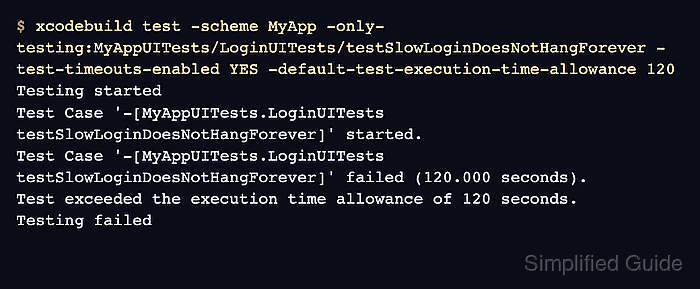
- Confirm a stalled test fails at the configured allowance and names the test.
Testing started
Test Case '-[MyAppUITests.LoginUITests testSlowLoginDoesNotHangForever]' started.
Test Case '-[MyAppUITests.LoginUITests testSlowLoginDoesNotHangForever]' failed (120.000 seconds).
Test exceeded the execution time allowance of 120 seconds.
Testing failed
A timeout failure is expected when deliberately checking the boundary. In CI, treat the named timed-out test as the item to fix or give a justified longer allowance.
- Rerun the focused xcodebuild test after fixing the stall or adjusting the allowance.
Test Case '-[MyAppUITests.LoginUITests testSlowLoginDoesNotHangForever]' passed (42.318 seconds).
** TEST SUCCEEDED **
The test should pass within the selected allowance or fail with a timeout message that points to the exact test case.

Mohd Shakir Zakaria is a cloud architect with deep roots in software development and open-source advocacy. Certified in AWS, Red Hat, VMware, ITIL, and Linux, he specializes in designing and managing robust cloud and on-premises infrastructures.


