Local XCUITest runs let an iOS developer check UI automation before the same change reaches a pull request or CI queue. A simulator run on the development Mac exposes app launch failures, missing accessibility identifiers, timing problems, and assertion failures while the app and test source are still close at hand.
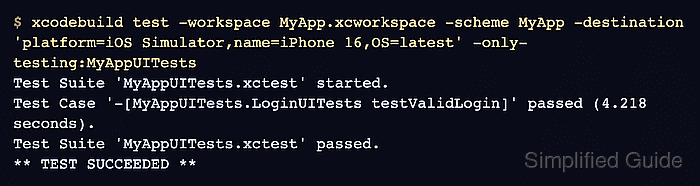
Xcode can run the selected scheme from Product → Test, and xcodebuild test can reproduce that run from Terminal. A terminal run uses the app scheme, an iOS Simulator destination, an optional UI test bundle filter, and a named result bundle so the pass or failure survives after the command exits.
Start from a project that already has a UI Testing Bundle target included in the scheme's Test action. The Mac needs the full Xcode app, not only Command Line Tools, because XCUITest uses the iOS Simulator and XCTest runtime.
Related: How to add an XCUITest UI testing target
Related: How to write a first XCUITest UI test
Related: How to create an XCUITest test plan
Related: How to save XCUITest result bundles
Steps to run XCUITest tests locally with xcodebuild:
- Open a terminal in the project root that contains the Xcode workspace or project.
- List the shared schemes for the workspace.
$ xcodebuild -list -workspace MyApp.xcworkspace
Information about workspace "MyApp":

    Schemes:
        MyApp
Use -project MyApp.xcodeproj instead of -workspace MyApp.xcworkspace when the project does not use a workspace.
- Choose an available iOS Simulator destination.
$ xcrun simctl list devices available
== Devices ==
-- iOS 18.5 --
    iPhone 16 (A1B2C3D4-1111-2222-3333-123456789ABC) (Shutdown)
    iPhone 16 Pro (B2C3D4E5-2222-3333-4444-23456789ABCD) (Booted)
The destination string can use the simulator name with OS=latest, or the simulator id when several devices share the same name.
- Create a local directory for result bundles.
$ mkdir -p TestResults
- Run the UI test bundle against the selected simulator.
$ xcodebuild test \
  -workspace MyApp.xcworkspace \
  -scheme MyApp \
  -destination 'platform=iOS Simulator,name=iPhone 16,OS=latest' \
  -only-testing:MyAppUITests \
  -resultBundlePath TestResults/LocalUITest.xcresult
Test Suite 'MyAppUITests.xctest' started.
Test Case '-[MyAppUITests.LoginUITests testValidLogin]' started.
Test Case '-[MyAppUITests.LoginUITests testValidLogin]' passed (4.218 seconds).
Test Suite 'MyAppUITests.xctest' passed.
** TEST SUCCEEDED **
Remove -only-testing:MyAppUITests to run every test enabled in the scheme's Test action.
- Confirm that xcodebuild wrote the result bundle.
$ ls -d TestResults/LocalUITest.xcresult
TestResults/LocalUITest.xcresult
Open the bundle with open TestResults/LocalUITest.xcresult when a failure needs screenshots, attachments, or the detailed Xcode test report.
Related: How to save XCUITest result bundles - Re-run one test method after fixing a local failure.
$ xcodebuild test \
  -workspace MyApp.xcworkspace \
  -scheme MyApp \
  -destination 'platform=iOS Simulator,name=iPhone 16,OS=latest' \
  -only-testing:MyAppUITests/LoginUITests/testValidLogin \
  -resultBundlePath TestResults/LoginUITests.xcresult
Test Suite 'Selected tests' started.
Test Case '-[MyAppUITests.LoginUITests testValidLogin]' started.
Test Case '-[MyAppUITests.LoginUITests testValidLogin]' passed (3.901 seconds).
** TEST SUCCEEDED **
Use a fresh -resultBundlePath for each local run, or remove the old bundle before reusing the same path.

Mohd Shakir Zakaria is a cloud architect with deep roots in software development and open-source advocacy. Certified in AWS, Red Hat, VMware, ITIL, and Linux, he specializes in designing and managing robust cloud and on-premises infrastructures.


