UI tests are easiest to trust when every case starts from the same app state. Persisted sessions, cached responses, database rows, and defaults can make XCUITest pass or fail because of a previous run instead of the screen being tested.
The safest reset for most app-owned data belongs inside the app under test, gated by a UI-test launch argument. XCUITest sets the flag before launch(), then the app clears only the test-owned stores before its first scene, view controller, or persistence stack is built.
App-scoped reset keeps simulator-wide state out of the main path and avoids erasing unrelated apps on the same destination. Keychain items, Core Data stores, SwiftData stores, and fixture accounts need service-specific cleanup when those stores hold the state being tested; a signed-out or empty first screen is the proof that the reset ran before the UI test continued.
Related: How to use launch arguments in XCUITest
Related: How to run XCUITest tests locally
Steps to reset test data before XCUITest tests:
- Add a test-only reset helper to the app target.
- UITestStateReset.swift
#if DEBUG
import Foundation

enum UITestStateReset {
    static let argument = "-UITestResetData"

    static func runIfRequested() {
        guard ProcessInfo.processInfo.arguments.contains(argument) else {
            return
        }

        if let bundleID = Bundle.main.bundleIdentifier {
            UserDefaults.standard.removePersistentDomain(forName: bundleID)
        }

        URLCache.shared.removeAllCachedResponses()

        let fileManager = FileManager.default
        let supportURL = fileManager.urls(
            for: .applicationSupportDirectory,
            in: .userDomainMask
        )[0]

        for name in ["MyApp.sqlite", "MyApp.sqlite-shm", "MyApp.sqlite-wal"] {
            try? fileManager.removeItem(at: supportURL.appendingPathComponent(name))
        }
    }
}
#endif
Keep the helper in the app target so it runs inside the launched application. Add only the stores the app owns, such as a local database file, cache directory, or test fixture store.
Do not delete a whole container directory unless every file inside it is disposable test state. Keychain cleanup needs a service-specific delete because UserDefaults and file removal do not clear keychain items.
- Call the reset helper before the app builds its first UI or persistence stack.
- MyApp.swift
import SwiftUI

@main
struct MyApp: App {
    init() {
        #if DEBUG
        UITestStateReset.runIfRequested()
        #endif
    }

    var body: some Scene {
        WindowGroup {
            ContentView()
        }
    }
}
For a UIKit app delegate, call the same helper near the start of application(_:didFinishLaunchingWithOptions:). The reset must run before the app reads a saved session or opens the database that the test expects to clear.
- Expose stable selectors for the reset proof screen.
- LoginView.swift
Button("Demo Login") {
    session.signInWithFixtureAccount()
}
.accessibilityIdentifier("demo-login-button")

Button("Sign In") {
    showLoginForm = true
}
.accessibilityIdentifier("sign-in-button")

Text("Account")
    .accessibilityIdentifier("account-home")
Use identifiers that describe the automation contract rather than the marketing text shown to users. Localized labels can change while the UI test selector remains stable.
- Launch the app with the reset argument in UI test setup.
- MyAppUITests/LoginUITests.swift
import XCTest

final class LoginUITests: XCTestCase {
    private var app: XCUIApplication!

    override func setUpWithError() throws {
        continueAfterFailure = false

        app = XCUIApplication()
        app.launchArguments.append("-UITestResetData")
        app.launch()
    }
}
Set launchArguments before app.launch(). Relaunch the app when a test needs to change startup arguments or prove a reset after writing state.
- Add a focused reset verification test.
- MyAppUITests/LoginUITests.swift
func testResetArgumentClearsSavedLogin() throws {
    app.buttons["demo-login-button"].tap()
    XCTAssertTrue(app.staticTexts["account-home"].waitForExistence(timeout: 5))

    app.terminate()

    app = XCUIApplication()
    app.launchArguments.append("-UITestResetData")
    app.launch()

    XCTAssertTrue(app.buttons["sign-in-button"].waitForExistence(timeout: 5))
}
The first launch creates disposable login state, and the second launch proves the reset argument cleared it before the app showed the first screen.
Use a fixture login, local seed data, or a test backend for this proof. A reset test should not create or delete real customer accounts.
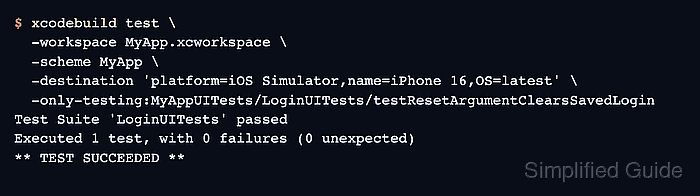
- Run only the reset verification test on an iOS Simulator.
$ xcodebuild test \
  -workspace MyApp.xcworkspace \
  -scheme MyApp \
  -destination 'platform=iOS Simulator,name=iPhone 16,OS=latest' \
  -only-testing:MyAppUITests/LoginUITests/testResetArgumentClearsSavedLogin
Test Suite 'LoginUITests' passed
Executed 1 test, with 0 failures (0 unexpected)
** TEST SUCCEEDED **
A passing run shows that the app accepted the launch argument, created state, relaunched, and returned to the clean sign-in screen. Use the real workspace, scheme, simulator name, UI test target, class, and method from the project.
Related: How to run XCUITest tests locally
Related: How to run XCUITest with xcodebuild in CI

Mohd Shakir Zakaria is a cloud architect with deep roots in software development and open-source advocacy. Certified in AWS, Red Hat, VMware, ITIL, and Linux, he specializes in designing and managing robust cloud and on-premises infrastructures.


