UI test selectors become brittle when they depend on visible copy, view order, or generated text instead of an app-owned automation contract. Stable XCUITest selectors use accessibility identifiers that stay tied to the control while the label, localization, or layout changes.
A selector contract has two sides. The app target assigns identifiers to the controls and state labels that tests need, and the UI test target queries those identifiers through typed XCUIElement collections such as buttons, textFields, and staticTexts.
Keep identifiers unique within the screen state being tested and name them after the automation role, not the current marketing copy. Assertions can still check visible labels when text is the behavior under test, but taps and wait points should use identifiers so unrelated copy changes do not break the path.
Related: How to query UI elements in XCUITest
Related: How to wait for UI elements in XCUITest
Related: How to write a first XCUITest UI test
Steps to stabilize XCUITest selectors:
- Create shared selector constants for the screen.
- LoginAccessibilityID.swift
enum LoginAccessibilityID {
    static let emailField = "login.emailField"
    static let passwordField = "login.passwordField"
    static let submitButton = "login.submitButton"
    static let welcomeTitle = "login.welcomeTitle"
}
Add the file to the app target and the UI test target, or put the constants in a small shared package. The constants keep app-side identifiers and test-side queries from drifting into different string literals.
- Assign the constants to app-owned controls and result labels.
- LoginView.swift
import SwiftUI

struct LoginView: View {
    @State private var email = ""
    @State private var password = ""
    @State private var isSignedIn = false

    var body: some View {
        VStack {
            TextField("Email", text: $email)
                .accessibilityIdentifier(LoginAccessibilityID.emailField)

            SecureField("Password", text: $password)
                .accessibilityIdentifier(LoginAccessibilityID.passwordField)

            Button("Log In") {
                signIn()
            }
            .accessibilityIdentifier(LoginAccessibilityID.submitButton)

            if isSignedIn {
                Text("Welcome")
                    .accessibilityIdentifier(LoginAccessibilityID.welcomeTitle)
            }
        }
    }

    private func signIn() {
        isSignedIn = true
    }
}
The visible button title is Log In, but the selector remains login.submitButton. For UIKit controls, set the same value with view.accessibilityIdentifier = LoginAccessibilityID.submitButton.
- Replace visible-copy queries with identifier queries in the UI test.
- MyAppUITests/LoginUITests.swift
import XCTest

final class LoginUITests: XCTestCase {
    func testLoginUsesStableSelector() throws {
        let app = XCUIApplication()
        app.launch()

        let submitButton = app.buttons[LoginAccessibilityID.submitButton]
        XCTAssertTrue(submitButton.waitForExistence(timeout: 5))
        XCTAssertEqual(
            app.buttons.matching(identifier: LoginAccessibilityID.submitButton).count,
            1
        )

        XCTAssertFalse(app.buttons["Sign In"].exists)
        submitButton.tap()

        let welcomeTitle = app.staticTexts[LoginAccessibilityID.welcomeTitle]
        XCTAssertTrue(welcomeTitle.waitForExistence(timeout: 5))
        XCTAssertEqual(welcomeTitle.label, "Welcome")
    }
}
The Sign In check is a migration guard for a renamed control. Keep it only while proving the old label no longer drives the selector; the permanent selector is the identifier lookup.
Related: How to query UI elements in XCUITest
Related: How to wait for UI elements in XCUITest - Remove hierarchy-dependent selectors from the same flow.
// Avoid selectors that depend on current copy or view order.
app.buttons["Sign In"].tap()
app.buttons.element(boundBy: 2).tap()

// Prefer selectors tied to the app-owned identifier.
app.buttons[LoginAccessibilityID.submitButton].tap()
Use hierarchy indexes only for throwaway debugging. If a repeated list needs a row selector, identify the row by a stable child identifier or by visible text only when the row text is the behavior being tested.
- Create a local directory for the selector migration result bundle.
$ mkdir -p TestResults
- Run only the selector migration UI test.
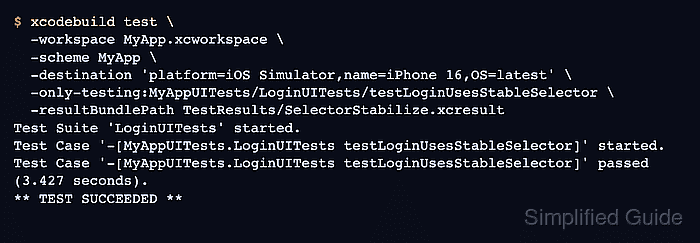
$ xcodebuild test \
  -workspace MyApp.xcworkspace \
  -scheme MyApp \
  -destination 'platform=iOS Simulator,name=iPhone 16,OS=latest' \
  -only-testing:MyAppUITests/LoginUITests/testLoginUsesStableSelector \
  -resultBundlePath TestResults/SelectorStabilize.xcresult
Test Suite 'LoginUITests' started.
Test Case '-[MyAppUITests.LoginUITests testLoginUsesStableSelector]' started.
Test Case '-[MyAppUITests.LoginUITests testLoginUsesStableSelector]' passed (3.427 seconds).
** TEST SUCCEEDED **
A passing run shows that XCUITest found the renamed button by login.submitButton and reached the expected login.welcomeTitle state. Use the real workspace, scheme, simulator name, UI test target, class, and method from the project.

Mohd Shakir Zakaria is a cloud architect with deep roots in software development and open-source advocacy. Certified in AWS, Red Hat, VMware, ITIL, and Linux, he specializes in designing and managing robust cloud and on-premises infrastructures.


