Repeated downloads need an explicit local-file policy when the same URL is fetched again later. Without one, a rerun either creates extra numbered copies that clutter the directory or writes again to a fixed path that another job expects to stay stable.
For ordinary single-file downloads, GNU wget already avoids clobbering the original local filename by saving the next copy as file.1, file.2, and so on. --no-clobber (-nc) changes that behavior by refusing to retrieve the file again, while --timestamping (-N) keeps the original filename and downloads only when the server copy is newer or sized differently. The current GNU Wget manual also notes that -nc cannot be combined with -N.
A fixed destination set with --output-document (-O) follows different rules because wget writes to one exact pathname instead of creating numbered siblings. Use that form only when one stable local filename is required, because plain -O writes the target file again on later runs, -N warns that it does nothing with -O, and -nc with -O only skips the transfer after that fixed file already exists.
Steps to prevent overwriting existing files with wget:
- Download the file once so there is a local copy to protect.
$ wget https://downloads.example.net/exports/2026-04/daily-settlement-2026-04-22.csv
--2026-04-22 11:18:03--  https://downloads.example.net/exports/2026-04/daily-settlement-2026-04-22.csv
Resolving downloads.example.net (downloads.example.net)... 203.0.113.50
Connecting to downloads.example.net (downloads.example.net)|203.0.113.50|:443... connected.
HTTP request sent, awaiting response... 200 OK
Length: 65536 (64K) [text/csv]
Saving to: 'daily-settlement-2026-04-22.csv'

##### snipped #####
2026-04-22 11:18:03 (56.3 MB/s) - 'daily-settlement-2026-04-22.csv' saved [65536/65536]
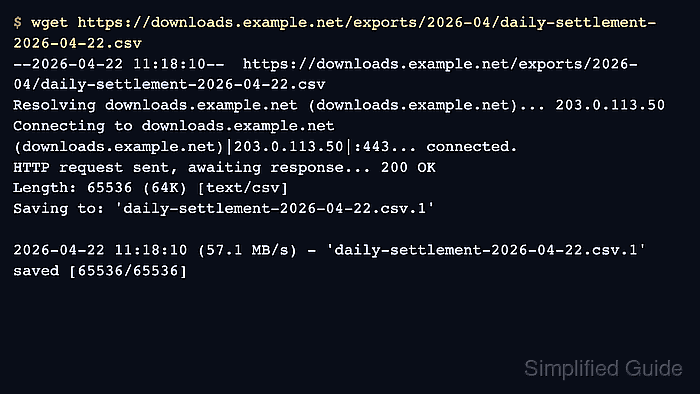
- Repeat the same command once to see the default numbered-copy behavior.
$ wget https://downloads.example.net/exports/2026-04/daily-settlement-2026-04-22.csv
--2026-04-22 11:18:10--  https://downloads.example.net/exports/2026-04/daily-settlement-2026-04-22.csv
Resolving downloads.example.net (downloads.example.net)... 203.0.113.50
Connecting to downloads.example.net (downloads.example.net)|203.0.113.50|:443... connected.
HTTP request sent, awaiting response... 200 OK
Length: 65536 (64K) [text/csv]
Saving to: 'daily-settlement-2026-04-22.csv.1'

##### snipped #####
2026-04-22 11:18:10 (57.1 MB/s) - 'daily-settlement-2026-04-22.csv.1' saved [65536/65536]
For a normal single-file download, the numbered sibling is the default protection against overwriting the original local file.
- Use --no-clobber when a rerun should be skipped instead of saved as another sibling file.
$ wget --no-clobber https://downloads.example.net/exports/2026-04/daily-settlement-2026-04-22.csv
File 'daily-settlement-2026-04-22.csv' already there; not retrieving.
-nc suppresses the automatic .1, .2, and .3 copies for that destination name.
- Use --timestamping when the same filename should be refreshed only after the server copy changes.
$ wget --timestamping https://downloads.example.net/exports/2026-04/daily-settlement-2026-04-22.csv
--2026-04-22 11:18:18--  https://downloads.example.net/exports/2026-04/daily-settlement-2026-04-22.csv
Resolving downloads.example.net (downloads.example.net)... 203.0.113.50
Connecting to downloads.example.net (downloads.example.net)|203.0.113.50|:443... connected.
HTTP request sent, awaiting response... 304 Not Modified
File 'daily-settlement-2026-04-22.csv' not modified on server. Omitting download.
-N is the better fit when unchanged files should be skipped but a newer remote copy should still replace the local file.
- Use --no-clobber with a fixed output filename after that fixed file already exists.
$ wget --no-clobber --output-document=daily-settlement-current.csv https://downloads.example.net/exports/2026-04/daily-settlement-2026-04-22.csv
File 'daily-settlement-current.csv' already there; not retrieving.
-O points to one exact pathname instead of the normal server-derived filename, so plain -O writes that file again on later runs and -N warns that it does nothing in combination with -O.
- Verify the resulting filenames before another script consumes the directory.
$ ls -1
daily-settlement-2026-04-22.csv
daily-settlement-2026-04-22.csv.1
daily-settlement-current.csv
The final listing shows the difference between the three policies: default numbered copy, explicit skip on rerun, and one separately managed fixed output filename.

Mohd Shakir Zakaria is a cloud architect with deep roots in software development and open-source advocacy. Certified in AWS, Red Hat, VMware, ITIL, and Linux, he specializes in designing and managing robust cloud and on-premises infrastructures.


