Some download endpoints keep one stable URL and send the real export name in the HTTP Content-Disposition header. Using wget with --content-disposition saves the file with that header-provided name instead of falling back to the URL path or query string.
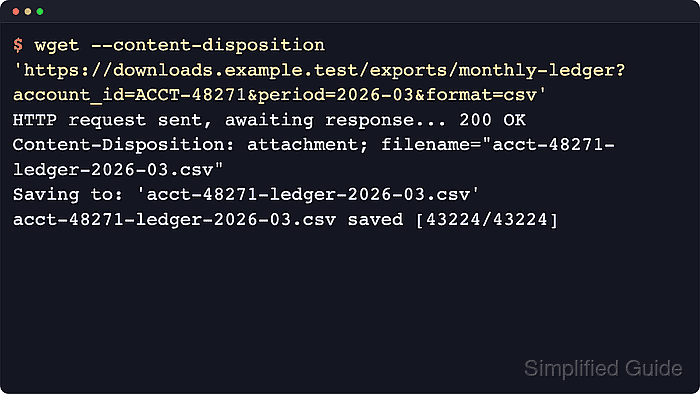
GNU wget 1.25.0 still documents --content-disposition as experimental. When the server sends a filename= value in the header, wget uses it for the local file name. This is separate from --trust-server-names, which follows redirect URLs rather than header-provided filenames.
The remote server chooses the suggested name, so this option is safest on trusted download endpoints and in a dedicated destination directory. The GNU manual also warns that the feature can trigger extra HEAD round-trips in some cases, and -O still overrides the header completely when one fixed local path matters more than the advertised filename.
Steps to honor Content-Disposition filenames in wget:
- Create a dedicated destination directory before accepting a filename suggested by the server.
$ mkdir -p monthly-ledgers
This keeps header-selected filenames away from unrelated files in the current shell directory.
- Download the file with --content-disposition and --server-response so the header-selected name is visible in the same run.
$ wget --content-disposition --server-response \
  --directory-prefix=monthly-ledgers \
  'https://downloads.example.test/exports/monthly-ledger?account_id=ACCT-48271&period=2026-03&format=csv'
##### snipped #####
HTTP request sent, awaiting response...
  HTTP/1.1 200 OK
  Content-Disposition: attachment; filename="acct-48271-ledger-2026-03.csv"
Length: 43224 [text/csv]
Saving to: 'monthly-ledgers/acct-48271-ledger-2026-03.csv'

##### snipped #####

'monthly-ledgers/acct-48271-ledger-2026-03.csv' saved [43224/43224]
The Content-Disposition header and the Saving to: line should agree. If the site renames files only through redirects, use --trust-server-names instead.
- Confirm the chosen local name before handing the file to another script.
$ ls -lh monthly-ledgers/acct-48271-ledger-2026-03.csv
-rw-r--r--  1 user user 42K Mar 29 09:02 monthly-ledgers/acct-48271-ledger-2026-03.csv
This is the quickest way to catch collisions when one URL produces dated or account-specific exports.
- Add content_disposition = on to ~/.wgetrc when most downloads from that account should keep the server-provided name.
~/.wgetrc
content_disposition = on
GNU wget 1.25.0 still documents this behavior as experimental and warns it can trigger extra HEAD requests for some servers.
- Override the header-selected name with -O whenever one fixed local path matters more than the server suggestion.
$ wget --content-disposition \
  --output-document=monthly-ledgers/acct-48271-latest.csv \
  'https://downloads.example.test/exports/monthly-ledger?account_id=ACCT-48271&period=2026-03&format=csv'
HTTP request sent, awaiting response... 200 OK
Length: 43224 [text/csv]
Saving to: 'monthly-ledgers/acct-48271-latest.csv'

##### snipped #####

'monthly-ledgers/acct-48271-latest.csv' saved [43224/43224]
-O wins over --content-disposition every time, so use it when a later job expects one stable local filename.

Mohd Shakir Zakaria is a cloud architect with deep roots in software development and open-source advocacy. Certified in AWS, Red Hat, VMware, ITIL, and Linux, he specializes in designing and managing robust cloud and on-premises infrastructures.


