A Symfony login form connects a browser sign-in page to the Security firewall. It is the normal entry point for web applications that already have password-authenticated users and need anonymous visitors to become an authenticated session before account pages are available.
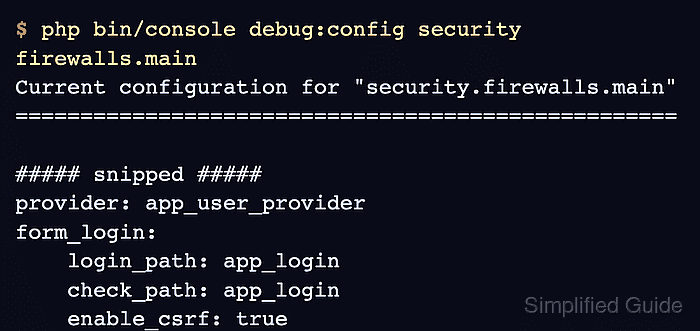
Symfony Maker generates the login controller and Twig template for the built-in form_login authenticator. It also updates /config/packages/security.yaml so the main firewall uses app_login as the route that renders the form and the POST target that checks credentials.
Start from a web application where App\Entity\User is already configured as the security provider and the user table has been migrated. A protected route, one failed password attempt, and one successful browser login prove that the generated form, CSRF protection, password hasher, provider, and session storage agree.
Steps to create a Symfony login form:
- Open a terminal in the Symfony project directory.
Use the directory that contains composer.json, bin/console, and the public document root.
- Confirm that Symfony Security can load users from the application provider.
$ php bin/console debug:config security providers

Current configuration for "security.providers"
==============================================

app_user_provider:
    entity:
        class: App\Entity\User
        property: email
        manager_name: null
Create and migrate the security user first when this provider is missing.
Related: How to create a Symfony security user - Generate the login controller, template, and firewall configuration.
$ php bin/console make:security:form-login

 Choose a name for the controller class (e.g. SecurityController) [SecurityController]:
 >
 Do you want to generate a '/logout' URL? (yes/no) [yes]:
 > no
 Do you want to generate PHPUnit tests? [Experimental] (yes/no) [no]:
 >
 created: src/Controller/SecurityController.php
 created: templates/security/login.html.twig
 updated: config/packages/security.yaml

  Success!

 Next: Review and adapt the login template: security/login.html.twig to suit your needs.
Choose a different controller name only when the project already has a SecurityController or a naming convention for authentication controllers.
- Review the generated login controller.
- SecurityController.php
<?php

namespace App\Controller;

use Symfony\Bundle\FrameworkBundle\Controller\AbstractController;
use Symfony\Component\HttpFoundation\Response;
use Symfony\Component\Routing\Attribute\Route;
use Symfony\Component\Security\Http\Authentication\AuthenticationUtils;

class SecurityController extends AbstractController
{
    #[Route(path: '/login', name: 'app_login')]
    public function login(AuthenticationUtils $authenticationUtils): Response
    {
        $error = $authenticationUtils->getLastAuthenticationError();
        $lastUsername = $authenticationUtils->getLastUsername();

        return $this->render('security/login.html.twig', [
            'last_username' => $lastUsername,
            'error' => $error,
        ]);
    }
}
The controller renders the form and reads the last authentication error. The firewall handles the POST request to the same route.
- Review the generated form fields in the login template.
- login.html.twig
{% if error %}
    <div class="alert alert-danger">
        translated safe error message
    </div>
{% endif %}

<input type="email" name="_username" id="username" required>
<input type="password" name="_password" id="password" required>
<input type="hidden" name="_csrf_token" data-controller="csrf-protection">
The generated template displays error.messageKey, reuses last_username for the email value, and calls csrf_token('authenticate') for the hidden token. Keep error.messageKey for display because the raw exception message can expose details that should not be printed on the login page.
- Confirm that the login route exists.
$ php bin/console debug:router app_login +--------------+---------------------------------------------------------+ | Property | Value | +--------------+---------------------------------------------------------+ | Route Name | app_login | | Path | /login | | Path Regex | {^/login$}sDu | | Host | ANY | | Host Regex | | | Scheme | ANY | | Method | ANY | | Requirements | NO CUSTOM | | Class | Symfony\Component\Routing\Route | | Defaults | _controller: App\Controller\SecurityController::login() | | Options | compiler_class: Symfony\Component\Routing\RouteCompiler | | | utf8: true | +--------------+---------------------------------------------------------+ - Confirm that the main firewall uses form_login.
$ php bin/console debug:config security firewalls.main Current configuration for "security.firewalls.main" =================================================== ##### snipped ##### provider: app_user_provider form_login: login_path: app_login check_path: app_login enable_csrf: true username_parameter: _username password_parameter: _password csrf_parameter: _csrf_token csrf_token_id: authenticate - Create a small protected route when the project does not already have one.
- AccountController.php
<?php

namespace App\Controller;

use Symfony\Component\HttpFoundation\Response;
use Symfony\Component\Routing\Attribute\Route;
use Symfony\Component\Security\Core\User\UserInterface;
use Symfony\Component\Security\Http\Attribute\IsGranted;

class AccountController
{
    #[Route('/account', name: 'app_account')]
    #[IsGranted('ROLE_USER')]
    public function __invoke(UserInterface $user): Response
    {
        return new Response('signed in as '.$user->getUserIdentifier());
    }
}
Use an existing account or dashboard route instead when the application already has a protected page.
Related: How to create a Symfony route - Generate a disposable password hash for a local smoke-test user.
$ php bin/console security:hash-password '' 'App\Entity\User'

Symfony Password Hash Utility
=============================

 Type in your password to be hashed:
 >

 --------------- -----------------------------------------------------------------
  Key             Value
 --------------- -----------------------------------------------------------------
  Hasher used     Symfony\Component\PasswordHasher\Hasher\MigratingPasswordHasher
  Password hash   $2y$13$m/E.4vCbpJHg/ETmFyze7.C2YNWDC2ULU8DaTK94/9ncEP0C0750O
 --------------- -----------------------------------------------------------------

 [OK] Password hashing succeeded
Use a disposable password for the local smoke test. Passing a real password as a shell argument can expose it through shell history and process listings.
- Insert the disposable user row.
$ php bin/console dbal:run-sql "INSERT INTO \"user\" (email, roles, password) VALUES ('reader@example.com', '[]', '\$2y\$13\$m/E.4vCbpJHg/ETmFyze7.C2YNWDC2ULU8DaTK94/9ncEP0C0750O')"

 [OK] 1 rows affected.
Use the project's normal registration, admin, or fixture workflow for real accounts. Adjust table quoting when the database platform does not use SQLite-style double quotes.
Related: How to create a Symfony registration form - Start the local development server.
$ symfony server:start --port=8001 --no-tls --daemon
[OK] Web server listening
     http://127.0.0.1:8001
Use another free port when 8001 is already in use.
Related: How to run a Symfony project locally - Open the protected URL in a browser.
http://127.0.0.1:8001/account
An unauthenticated browser should be redirected to /login. The generated template uses Symfony's CSRF controller in the browser, so raw HTTP clients need the matching CSRF cookie and token instead of the placeholder field value.
- Submit the login form with an incorrect password.
The page should return to /login and display Invalid credentials. while preserving reader@example.com as the last username.
- Submit the login form with the disposable password.
The browser should reach /account and display signed in as reader@example.com.
- Remove the disposable user after the smoke test.
$ php bin/console dbal:run-sql "DELETE FROM \"user\" WHERE email = 'reader@example.com'"

 [OK] 1 rows affected.
- Stop the local development server.
$ symfony server:stop
Stopping PHP-FPM
Stopping Web Server

[OK] Stopped 2 process(es) successfully