A Samba server does not automatically accept every Linux account over SMB. Add a Samba password entry when a person or service needs to authenticate to shares from Windows, macOS, Linux, or smbclient while the server keeps file ownership tied to a local Unix account.
Standalone Samba file servers keep local users in two places. The Linux account supplies the UID, group membership, and filesystem permissions, while the Samba password database stores the SMB password and account flags used by smbd.
Use local accounts on standalone file servers that are not Active Directory domain members or domain controllers. Create a no-login Linux account for SMB-only access, use an existing normal account when the person also needs shell access, and assign share or filesystem permissions before expecting the user to open a protected share.
Related: How to install Samba on Ubuntu
Related: How to create a Samba share on Linux
Related: How to browse SMB shares with smbclient
Steps to add a Samba user:
- Confirm the Samba server tools are installed.
$ smbd --version
Version 4.23.6-Ubuntu-4.23.6+dfsg-1ubuntu2.1
The exact version changes with distribution security updates. A Version line confirms the server package is present.
Related: How to install Samba on Ubuntu - Create a local Linux account for SMB-only access.
$ sudo useradd --system --no-create-home --shell /usr/sbin/nologin fileshare
Replace fileshare with the account name clients will use. Skip this step when the Linux account already exists.
- Confirm the Linux identity exists.
$ id fileshare
uid=999(fileshare) gid=997(fileshare) groups=997(fileshare)
The UID and group IDs vary by host. Samba uses this identity when it checks file ownership and directory permissions.
- Add the account to the Samba password database.
$ sudo smbpasswd -a fileshare
New SMB password:
Retype new SMB password:
Added user fileshare.
Use a password that is not the account name or share name. Let the command prompt for the password instead of placing it on the shell command line. The new password entry is available immediately, but existing client sessions still need to reconnect before they can use it.
- Confirm the Samba account exists.
$ sudo pdbedit -L -u fileshare
fileshare:999:
A row for fileshare confirms the local passdb entry was created. No row means smbpasswd did not add the Samba account.
- Add the account to the group used by the target share when the share relies on group permissions.
$ sudo usermod --append --groups teamshare fileshare
Replace teamshare with the Linux group that owns the shared directory or appears in the share's valid users rule. Skip this step when the share grants access directly to the user.
Related: How to set ACL permissions on a Samba share - List shares with the new Samba account.
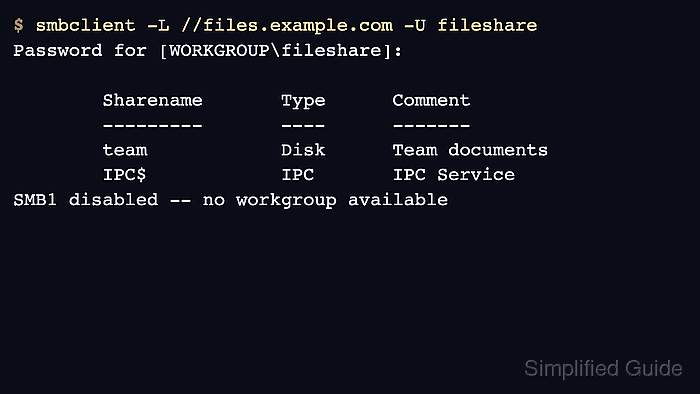
$ smbclient -L //files.example.com -U fileshare
Password for [WORKGROUP\fileshare]:

        Sharename       Type      Comment
        ---------       ----      -------
        team            Disk      Team documents
        IPC$            IPC       IPC Service
SMB1 disabled -- no workgroup available
A share list without NT_STATUS_LOGON_FAILURE proves the Samba password works. If the expected share is missing, review the share's valid users, group membership, and filesystem permissions.
Related: How to browse SMB shares with smbclient

Mohd Shakir Zakaria is a cloud architect with deep roots in software development and open-source advocacy. Certified in AWS, Red Hat, VMware, ITIL, and Linux, he specializes in designing and managing robust cloud and on-premises infrastructures.


