Reloading a Samba server with a malformed configuration file can block new SMB clients even while existing sessions appear unchanged. Run testparm before applying a share or global setting change so parser errors, invalid values, and the parsed share definition are visible before smbd reads the file again.
testparm checks the Samba configuration file for internal correctness and can print the normalized settings that Samba derives from the file. Use its non-interactive mode for repeatable checks, then narrow the output to a share section or single setting when reviewing a small change.
A clean testparm run proves that smbd can load the configuration, not that every share path exists, every filesystem permission allows access, or every client can connect. Treat the parsed output as the pre-reload gate, then run a service or client check when the change affects live access.
Steps to validate Samba configuration with testparm:
- Run testparm against the active Samba configuration before reloading.
$ sudo testparm --suppress-prompt /etc/samba/smb.conf
Load smb config files from /etc/samba/smb.conf
set_variable_helper(maybe): value is not boolean!
Error loading services.
exit status: 1
An exit status of 1 means testparm rejected the file. Fix the first reported setting before reloading Samba.
- Fix the reported setting in /etc/samba/smb.conf.
In this example, read only expects a boolean value such as yes or no, so maybe must be replaced before the configuration can load.
- Re-run testparm until the configuration loads cleanly.
$ sudo testparm --suppress-prompt /etc/samba/smb.conf
Load smb config files from /etc/samba/smb.conf
Loaded services file OK.
Weak crypto is allowed by GnuTLS (e.g. NTLM as a compatibility fallback)

Server role: ROLE_STANDALONE

# Global parameters
[global]
        map to guest = Bad User
        server role = standalone server
        workgroup = EXAMPLE
        idmap config * : backend = tdb

[projects]
        path = /srv/samba/projects
        read only = No
        valid users = @project-team
The weak-crypto line is a Samba compatibility notice, not a syntax failure. Review it as a separate security policy question when legacy clients are in scope.
- Inspect only the share section that changed.
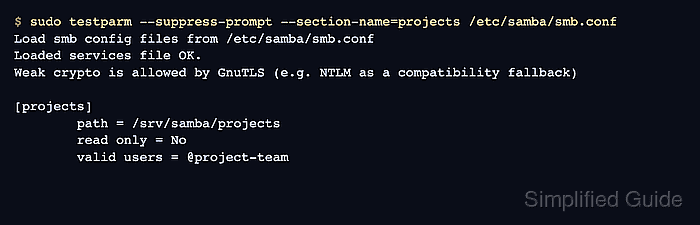
$ sudo testparm --suppress-prompt --section-name=projects /etc/samba/smb.conf
Load smb config files from /etc/samba/smb.conf
Loaded services file OK.
Weak crypto is allowed by GnuTLS (e.g. NTLM as a compatibility fallback)

[projects]
        path = /srv/samba/projects
        read only = No
        valid users = @project-team
Replace projects with the share section name from /etc/samba/smb.conf. The parsed section may omit default-valued settings even when Samba accepted them.
- Check one parsed parameter when the review needs an exact value.
$ sudo testparm --suppress-prompt --section-name=projects --parameter-name='read only' /etc/samba/smb.conf
Load smb config files from /etc/samba/smb.conf
Loaded services file OK.
Weak crypto is allowed by GnuTLS (e.g. NTLM as a compatibility fallback)

No
No means Samba parsed the share as writable at the share layer. Filesystem permissions can still deny a client write request.
Related: How to troubleshoot SMB share permission denied - Reload the running smbd configuration after the clean check.
$ sudo smbcontrol smbd reload-config
smbcontrol sends the reload request directly to the running smbd daemon. Existing client sessions can keep their current share state until they reconnect.
Related: How to check Samba service status

Mohd Shakir Zakaria is a cloud architect with deep roots in software development and open-source advocacy. Certified in AWS, Red Hat, VMware, ITIL, and Linux, he specializes in designing and managing robust cloud and on-premises infrastructures.


