A Samba file server backup has to cover more than /etc/samba/smb.conf. Share definitions live in configuration files, but local Samba users, secrets, and group policy data live in TDB database files under the Samba state directory, so a replacement host can validate cleanly while still missing the accounts clients need.
A standalone Samba file server that uses the packaged tdbsam password database needs checks for the parsed server role, user database, configuration archive, restore permissions, and one client-side share listing after the files are restored.
Stop Samba before copying or replacing database files so the archive is taken from a quiet state and the restore is not overwritten by a running daemon. Active Directory domain controllers need samba-tool domain backup instead of this file-server archive, and replacement hosts should have the same Samba package family, share paths, local users, and file ownership ready before the restored service is started.
Steps to back up and restore Samba configuration:
- Confirm that the server is a standalone Samba file server.
$ sudo testparm -s --parameter-name="server role"
standalone server
The archive path below is for standalone file servers. Use samba-tool domain backup for a Samba Active Directory domain controller.
- Locate the Samba private state directory.
$ sudo testparm -s --parameter-name="private dir"
/var/lib/samba/private
- Record the Samba account that should survive the restore.
$ sudo pdbedit -L -u sguser
sguser:1001:
Replace sguser with a known Samba account. A full server backup can use sudo pdbedit -L to list every local Samba user.
- Create a protected backup directory.
$ sudo install -d -m 0700 /root/samba-backups
- Stop the Samba file server daemons.
$ sudo systemctl stop smbd nmbd
Clients lose access while smbd is stopped. Stop winbind too when the host is a domain member that uses winbind for identity lookup.
- Create the Samba configuration backup archive.
$ sudo tar --create --gzip --verbose --file /root/samba-backups/samba-config-2026-06-16.tar.gz /etc/samba /var/lib/samba/private/passdb.tdb /var/lib/samba/private/secrets.tdb /var/lib/samba/account_policy.tdb /var/lib/samba/group_mapping.tdb
tar: Removing leading `/' from member names
/etc/samba/
/etc/samba/gdbcommands
/etc/samba/smb.conf
/var/lib/samba/private/passdb.tdb
/var/lib/samba/private/secrets.tdb
/var/lib/samba/account_policy.tdb
/var/lib/samba/group_mapping.tdb
Change the date in the archive name. Add other persistent files such as /var/lib/samba/share_info.tdb when the host uses Windows share ACLs and the file exists.
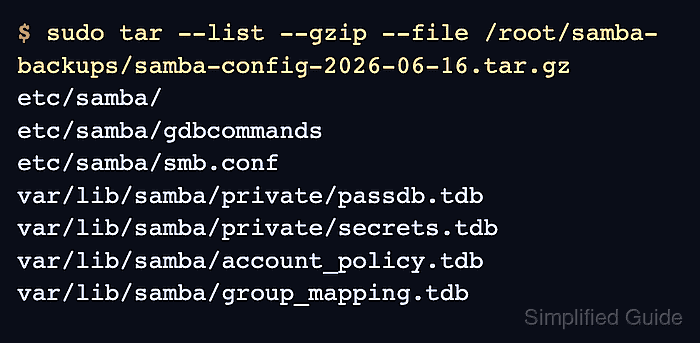
- List the archive contents.
$ sudo tar --list --gzip --file /root/samba-backups/samba-config-2026-06-16.tar.gz
etc/samba/
etc/samba/gdbcommands
etc/samba/smb.conf
var/lib/samba/private/passdb.tdb
var/lib/samba/private/secrets.tdb
var/lib/samba/account_policy.tdb
var/lib/samba/group_mapping.tdb
- Start Samba again if the host is only being backed up now.
$ sudo systemctl start smbd nmbd
- Stop the Samba daemons on the restore target.
$ sudo systemctl stop smbd nmbd
Restore only after the target host has Samba installed and the needed Linux users, groups, share directories, and filesystem ownership in place.
- Save a rollback archive from the target before replacing files.
$ sudo tar --create --gzip --verbose --file /root/samba-backups/samba-before-restore-2026-06-16.tar.gz /etc/samba /var/lib/samba/private/passdb.tdb /var/lib/samba/private/secrets.tdb /var/lib/samba/account_policy.tdb /var/lib/samba/group_mapping.tdb
This rollback copy protects the target's current Samba state if the restored archive belongs to the wrong server or an incompatible Samba release.
- Extract the backup archive onto the restore target.
$ sudo tar --extract --gzip --verbose --file /root/samba-backups/samba-config-2026-06-16.tar.gz --directory /
etc/samba/
etc/samba/gdbcommands
etc/samba/smb.conf
var/lib/samba/private/passdb.tdb
var/lib/samba/private/secrets.tdb
var/lib/samba/account_policy.tdb
var/lib/samba/group_mapping.tdb
- Check the restored ownership and permissions.
$ sudo stat -c "%a %U %G %n" /etc/samba/smb.conf /var/lib/samba/private/passdb.tdb /var/lib/samba/private/secrets.tdb
644 root root /etc/samba/smb.conf
600 root root /var/lib/samba/private/passdb.tdb
600 root root /var/lib/samba/private/secrets.tdb
- Validate the restored share definition.
$ sudo testparm -s --section-name=team
Load smb config files from /etc/samba/smb.conf
Loaded services file OK.
Weak crypto is allowed by GnuTLS (e.g. NTLM as a compatibility fallback)

[team]
        path = /srv/samba/team
        read only = No
        valid users = sguser
Replace team with a share that should exist after the restore.
Related: How to validate Samba configuration with testparm - Confirm the restored Samba user record.
$ sudo pdbedit -L -u sguser
sguser:1001:
- Restart the Samba file server daemons.
$ sudo systemctl restart smbd nmbd
Use the service names from the target distribution. On a domain member, restart winbind after its restored state has been checked.
Related: How to check Samba service status - List shares through SMB as the restored user.
$ smbclient -L //files.example.net -U sguser Password for [WORKGROUP\sguser]: Sharename Type Comment --------- ---- ------- print$ Disk Printer Drivers team Disk IPC$ IPC IPC Service (files server) SMB1 disabled -- no workgroup available - Read a known file from the restored share.
$ smbclient //files.example.net/team -U sguser -c 'ls readme.txt'
Password for [WORKGROUP\sguser]:
  readme.txt                          N       17  Tue Jun 16 02:40:26 2026

                123530212 blocks of size 1024. 107930400 blocks available
Use a read-only listing for the first smoke test. Run a write test only after the share path and filesystem permissions match the original server.

Mohd Shakir Zakaria is a cloud architect with deep roots in software development and open-source advocacy. Certified in AWS, Red Hat, VMware, ITIL, and Linux, he specializes in designing and managing robust cloud and on-premises infrastructures.


