SMB users can delete files from a network share without passing through the desktop recycle bin on the client. The Samba recycle VFS module changes that server-side behavior by moving deleted files into a repository directory inside the share before they disappear from the original path.
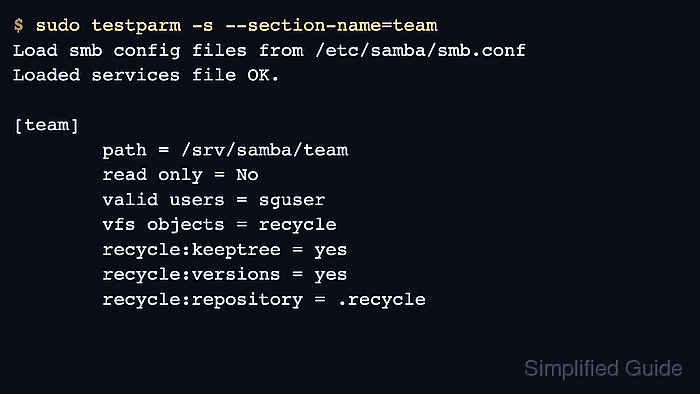
Samba reads VFS module settings from the share definition in /etc/samba/smb.conf. Enabling the module on one share keeps the recovery behavior narrow, and testparm should show vfs objects = recycle plus the recycle options before smbd reloads the configuration.
The repository is created when the first matching file is deleted, not when the configuration is saved. It is a recovery convenience rather than a backup; files can still be removed by cleanup jobs, excluded patterns, size limits, filesystem loss, or anyone who has permission to delete items from the repository.
Steps to enable the Samba recycle bin for a share:
- Confirm the target share section before editing.
$ sudo testparm -s --section-name=team
Load smb config files from /etc/samba/smb.conf
Loaded services file OK.

[team]
        path = /srv/samba/team
        read only = No
        valid users = sguser
Replace team with the share section that should keep deleted files. The share must already allow the same users to write files, or the recycle module has no delete operations to intercept.
- Back up the Samba configuration file.
$ sudo cp --archive /etc/samba/smb.conf /etc/samba/smb.conf.before-recycle
Keep the backup until the SMB delete test succeeds. A malformed share section can stop new client connections after reload.
- Open /etc/samba/smb.conf in a text editor.
$ sudoedit /etc/samba/smb.conf
- Add the recycle module settings inside the target share.
[team]
    path = /srv/samba/team
    read only = no
    valid users = sguser
    create mask = 0660
    directory mask = 0770
    vfs objects = recycle
    recycle:repository = .recycle
    recycle:keeptree = yes
    recycle:versions = yes
    recycle:touch = yes
    recycle:directory_mode = 0770
    recycle:subdir_mode = 0770
    recycle:exclude = *.tmp, ~$*
    recycle:exclude_dir = .recycle
If the share already has a vfs objects line, append recycle to the existing module list instead of replacing modules such as acl_xattr. The 0770 repository modes fit a shared recovery folder controlled by the share's ownership and group; use stricter modes when users should not browse each other's recovered files.
- Test the parsed share configuration.
$ sudo testparm -s --section-name=team
Load smb config files from /etc/samba/smb.conf
Loaded services file OK.

[team]
        create mask = 0660
        directory mask = 0770
        path = /srv/samba/team
        read only = No
        valid users = sguser
        vfs objects = recycle
        recycle:exclude_dir = .recycle
        recycle:exclude = *.tmp, ~$*
        recycle:subdir_mode = 0770
        recycle:directory_mode = 0770
        recycle:touch = yes
        recycle:versions = yes
        recycle:keeptree = yes
        recycle:repository = .recycle
testparm loads the full configuration before printing the share section. The output should include vfs objects = recycle and the recycle options under the same share.
Related: How to validate Samba configuration with testparm - Reload smbd so new client sessions use the recycle settings.
$ sudo smbcontrol smbd reload-config
Existing sessions can keep their previous share configuration until the client reconnects.
Related: How to check Samba service status - Create a local test file for the SMB delete check.
$ printf 'recycle check\n' > recycle-check.txt
- Upload the test file through the share.
$ smbclient //files.example.net/team -U sguser -c 'put recycle-check.txt projects/recycle-check.txt'
Password for [WORKGROUP\sguser]:
putting file recycle-check.txt as \projects\recycle-check.txt (13.7 kB/s) (average 13.7 kB/s)
Use an existing writable folder inside the share. This example uses projects to prove that recycle:keeptree = yes preserves the deleted file's original subdirectory path.
- Delete the test file through SMB.
$ smbclient //files.example.net/team -U sguser -c 'del projects/recycle-check.txt'
Password for [WORKGROUP\sguser]:
- List the recycle repository through the share.
$ smbclient //files.example.net/team -U sguser -c 'cd .recycle/projects; ls'
Password for [WORKGROUP\sguser]:
  .                                   D        0  Tue Jun 16 02:41:07 2026
  ..                                  D        0  Tue Jun 16 02:41:07 2026
  recycle-check.txt                   A       14  Tue Jun 16 02:41:07 2026

                123530212 blocks of size 1024. 107931024 blocks available
The file under .recycle/projects confirms Samba moved the deleted file into the repository instead of removing it from the share immediately.
- Remove the local test file.
$ rm recycle-check.txt
- Remove the recovered test file from the server path if it was only used for validation.
$ sudo rm /srv/samba/team/.recycle/projects/recycle-check.txt
Remove only the known test file. Do not delete a production recycle repository unless the retention policy for that share explicitly allows it.

Mohd Shakir Zakaria is a cloud architect with deep roots in software development and open-source advocacy. Certified in AWS, Red Hat, VMware, ITIL, and Linux, he specializes in designing and managing robust cloud and on-premises infrastructures.


