Sharing a Screen session lets another local Unix account view or control the same terminal workspace during pairing, troubleshooting, or handoff. The owner stays responsible for the session because acladd grants full read, write, and command access until the ACL is narrowed.
GNU Screen multiuser mode is different from opening the same session twice as one Unix account with screen -x. A second operator logs in with a separate account and attaches to the owner's session as owner/session, while the owner controls access with multiuser, acladd, aclchg, and acldel.
Cross-user attach requires GNU Screen multiuser support and administrator-approved setuid-root packaging. The default package policy on some systems leaves /usr/bin/screen without that bit; in that state, the attach attempt fails with Must run suid root for multiuser support. The command output below uses a disposable Ubuntu 26.04 validation container to confirm the failure boundary and the documented ACL flow without changing a live host binary.
Steps to share a Screen session:
- Check that the Screen binary is installed with setuid-root support before granting cross-user access.
$ ls -l /usr/bin/screen
-rwsr-xr-x 1 root root 538768 Feb  9 22:45 /usr/bin/screen
The s in the owner execute position is required for another Unix account to attach to the session. A normal -rwxr-xr-x mode can make cross-user attach fail with Must run suid root for multiuser support, and changing that mode on a shared host is an administrator decision.
- Start a named session as the owner account when a session is not already running.
$ screen -dmS shared sh
Use the existing session name instead when the shell or command to be shared is already running in Screen.
- Enable multiuser mode on the owner session.
$ screen -S shared -X multiuser on
The command is normally silent. The next listing should mark the session as Multi.
- Add the local account that should be allowed to attach.
$ screen -S shared -X acladd reviewer
acladd gives reviewer full access to all windows and Screen commands. Run the next permission steps before sharing with an account that should observe only.
- Remove write permission from all windows when the second account should be read-only.
$ screen -S shared -X aclchg reviewer -w "#"
Skip this step when both accounts should type into the session during live pairing.
- Remove execution permission for ACL-changing commands from a read-only account.
$ screen -S shared -X aclchg reviewer -x "acladd,addacl,aclchg,chacl,acldel,at"
The list includes addacl and chacl because GNU Screen treats them as synonyms for acladd and aclchg.
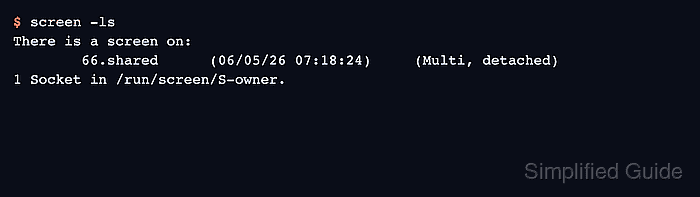
- List sessions from the owner account to confirm multiuser mode is enabled.
$ screen -ls
There is a screen on:
        66.shared       (06/05/26 07:18:24)     (Multi, detached)
1 Socket in /run/screen/S-owner.
The Multi state confirms multiuser mode. The final state may be attached or detached depending on whether a display is connected. Use the full process-qualified name, such as owner/66.shared, if several sessions share the same short name.
- Attach from the second account with the owner and session name.
$ screen -x owner/shared
Replace owner with the Unix account that owns the session and shared with the session name shown by the owner.
- Confirm writable shared control when write permission is intentionally enabled.
$ echo "$STY"
66.shared
The numeric prefix can differ, but the session name should match the shared target selected by the owner. Skip this command for a read-only observer and verify that account from the display list instead.
- Open the display list inside the shared session to verify connected users and permissions.
C-a *
The displays list should show each attached user front-end. The final permission column shows read, write, and execute access for the selected display.
- Detach the second display when sharing is finished.
C-a d
- Remove the second account from the session ACL when access should end.
$ screen -S shared -X acldel reviewer
This prevents reviewer from attaching again until the owner grants access with acladd or aclchg.
- Verify from the removed account that access has ended when a post-share check is needed.
$ screen -S owner/shared -Q windows
Unknown user reviewer tried to send a command!