Data exchange between analysis environments often depends on MATLAB MAT files because they carry arrays and small structures without flattening them into text. SciPy handles the common MAT formats directly, so a Python program can create a file, inspect its variable inventory, and load the saved values without an intermediate conversion format.
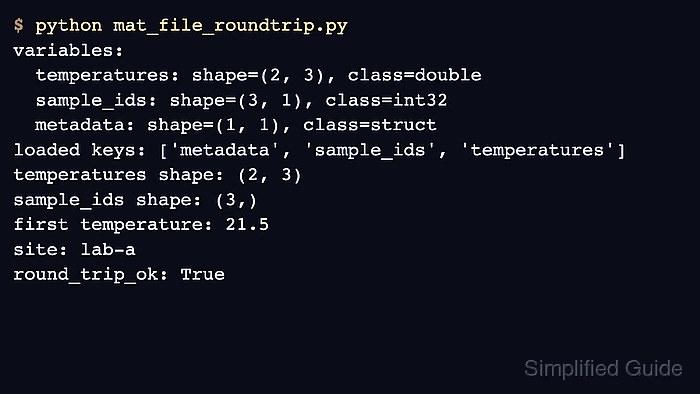
The scipy.io.savemat() function maps dictionary keys to MATLAB variable names. The oned_as option controls whether a one-dimensional NumPy array becomes a row or column vector, while scipy.io.whosmat() exposes each stored name, shape, and data class before the values are loaded.
SciPy's scipy.io.loadmat() supports MATLAB v4, v6, and v7 through v7.2 files. Version 7.3 files use HDF5 storage and require an HDF5 reader such as h5py because SciPy does not implement that interface.
Steps to read and write MATLAB MAT files with SciPy:
- Create mat_file_roundtrip.py with the imports and initial arrays below.
- mat_file_roundtrip.py
import numpy as np
from scipy.io import loadmat, savemat, whosmat

temperatures = np.array([[21.5, 22.1, 22.8], [20.9, 21.7, 22.4]])
sample_ids = np.array([101, 102, 103], dtype=np.int32)
metadata = {"site": "lab-a", "unit": "celsius"}
- Append the MAT-file writer after the source values.
savemat(
    "experiment.mat",
    {
        "temperatures": temperatures,
        "sample_ids": sample_ids,
        "metadata": metadata,
    },
    oned_as="column",
)
oned_as=“column” preserves the intended MATLAB column-vector shape for sample_ids. The oned_as=“row” alternative fits receiving code that expects a row vector.
- Append the variable inventory and reader after the savemat() call.
for name, shape, data_class in whosmat("experiment.mat"):
    print(f"{name}: shape={shape}, class={data_class}")

loaded = loadmat("experiment.mat", simplify_cells=True)
simplify_cells=True also enables dimension squeezing, so the saved (3, 1) column vector loads as a one-dimensional array with shape (3,).
- Append the round-trip checks after the loadmat() call.
np.testing.assert_allclose(loaded["temperatures"], temperatures)
np.testing.assert_array_equal(loaded["sample_ids"], sample_ids)
assert loaded["metadata"]["site"] == metadata["site"]

print(f"first temperature: {loaded['temperatures'][0, 0]}")
print(f"sample IDs: {loaded['sample_ids'].tolist()}")
print(f"site: {loaded['metadata']['site']}")
- Run the completed script to verify the MAT-file round trip.
$ python mat_file_roundtrip.py
temperatures: shape=(2, 3), class=double
sample_ids: shape=(3, 1), class=int32
metadata: shape=(1, 1), class=struct
first temperature: 21.5
sample IDs: [101, 102, 103]
site: lab-a
The assertions stop execution with an error when an array value, vector shape, or metadata field does not survive the save-and-load path.

Mohd Shakir Zakaria is a cloud architect with deep roots in software development and open-source advocacy. Certified in AWS, Red Hat, VMware, ITIL, and Linux, he specializes in designing and managing robust cloud and on-premises infrastructures.


