WAV processing depends on more than the sample values: the sample rate, channel layout, and numeric representation must survive the trip through Python. scipy.io.wavfile exposes those details as ordinary NumPy data and writes the processed array back as an uncompressed WAV file.
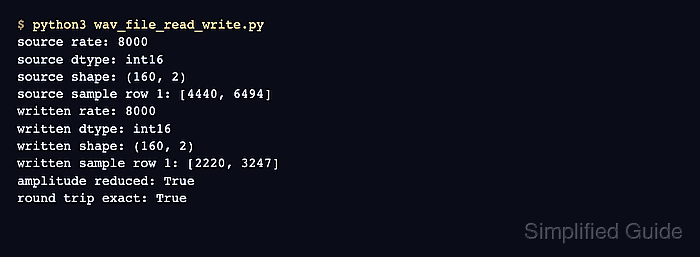
The wavfile.read() function returns a sample-rate integer and an array whose shape distinguishes mono from multichannel audio. wavfile.write() uses that array's dtype to choose the output sample format, so an int16 array produces 16-bit PCM while a float32 array produces 32-bit floating-point WAV data.
A generated stereo tone makes the round trip reproducible without an external recording. The final reload checks the written file rather than trusting the in-memory array, and the comparison can fail if the rate or sample values change during export.
Related: Compute an FFT with SciPy
Related: Create a spectrogram with SciPy
Related: Resample a signal with SciPy
Steps to read and write WAV files with SciPy:
- Create the input section in wav_file_read_write.py.
- wav_file_read_write.py
import numpy as np
from scipy.io import wavfile


sample_rate = 8000
duration = 0.02
time = np.arange(int(sample_rate * duration)) / sample_rate

channels = np.column_stack(
    (
        0.4 * np.sin(2 * np.pi * 440 * time),
        0.4 * np.sin(2 * np.pi * 660 * time),
    )
)
source_pcm = np.round(channels * np.iinfo(np.int16).max).astype(np.int16)
The two columns represent the left and right channels. Converting the values to int16 establishes a 16-bit PCM source for the file round trip.
- Append the source-file round-trip section to wav_file_read_write.py.
wavfile.write("source.wav", sample_rate, source_pcm)

rate, samples = wavfile.read("source.wav")
print(f"read: rate={rate}, dtype={samples.dtype}, shape={samples.shape}")
A mono file loads as a one-dimensional array. Stereo and other multichannel files load with shape (samples, channels).
- Append the amplitude change and output-file write section to wav_file_read_write.py.
quieter_pcm = (samples.astype(np.int32) // 2).astype(np.int16)
wavfile.write("quieter.wav", rate, quieter_pcm)
The wider intermediate dtype prevents 16-bit overflow during arithmetic. Reusing rate preserves playback speed, and converting back to int16 keeps the output as 16-bit PCM.
- Append the output-file reload checks to wav_file_read_write.py.
check_rate, check_samples = wavfile.read("quieter.wav")
print(
    f"written: rate={check_rate}, dtype={check_samples.dtype}, "
    f"shape={check_samples.shape}"
)
print(
    f"peak amplitude: {np.max(np.abs(samples))} -> "
    f"{np.max(np.abs(check_samples))}"
)
print(f"sample rate preserved: {check_rate == rate}")
print(f"written samples match: {np.array_equal(check_samples, quieter_pcm)}")
- Run the completed WAV round-trip script to verify the reloaded file.
$ python3 wav_file_read_write.py
read: rate=8000, dtype=int16, shape=(160, 2)
written: rate=8000, dtype=int16, shape=(160, 2)
peak amplitude: 13107 -> 6554
sample rate preserved: True
written samples match: True
The second peak is half the source amplitude after integer rounding. Both final boolean checks come from reloading quieter.wav, so either becomes False when the written file does not preserve the expected rate or sample array.

Mohd Shakir Zakaria is a cloud architect with deep roots in software development and open-source advocacy. Certified in AWS, Red Hat, VMware, ITIL, and Linux, he specializes in designing and managing robust cloud and on-premises infrastructures.


