Large floating-point weight tensors can dominate a neural network's inference memory footprint. torchao can quantize a PyTorch model's linear weights to int8 on a Linux CPU, reducing their stored size while keeping floating-point inputs and outputs.
Int8 weight-only quantization stores integer weights alongside floating-point scale values. The per-row configuration converts supported Linear weights without requiring activation calibration, while biases and layers such as ReLU remain unchanged.
A smaller tensor footprint does not establish lower peak process memory or faster CPU inference. Comparing the original and quantized model in evaluation mode on identical inputs exposes numerical changes before a trained model is put into service.
Steps to quantize a PyTorch model with torchao:
- Create a new virtual environment for the project.
$ python3 -m venv .venv
These packages install on Python 3.11 through 3.14. An existing environment is unsuitable because the pinned install can replace its PyTorch and leave an incompatible torchvision. On Ubuntu or Debian, install python3-venv first if python3 -m venv reports that ensurepip is unavailable.
Related: How to create a virtual environment for PyTorch
Related: How to upgrade PyTorch - Activate the virtual environment in your shell.
$ source .venv/bin/activate
(.venv) $
- Install the tested PyTorch and torchao CPU packages in the new environment.
(.venv) $ python -m pip install \
  torch==2.15.0 torchao==0.18.0 numpy \
  --index-url https://download.pytorch.org/whl/cpu
The --index-url value selects CPU wheels. Installing NumPy avoids an import warning from PyTorch.
Related: torchao installation documentation - Create a file named
quantize_model.pyin your text editor with the floating-point model and baseline calculation.- quantize_model.py
import copy

import torch
from torch import nn
from torchao.quantization import (
    Int8Tensor,
    Int8WeightOnlyConfig,
    quantize_,
)
from torchao.utils import get_model_size_in_bytes

torch.manual_seed(0)
model = nn.Sequential(
    nn.Linear(128, 256),
    nn.ReLU(),
    nn.Linear(256, 64),
).cpu().eval()
inputs = torch.randn(32, 128)

with torch.inference_mode():
    baseline = model(inputs)
before_bytes = get_model_size_in_bytes(model)
print(f"Float32: {before_bytes:,} bytes")
The small, untrained network accepts 32 rows of 128 floating-point features. For a trained model, the baseline comes from its loaded weights and representative validation inputs with the same preprocessing used in deployment.
Related: How to save and load a PyTorch model - Append the quantization section after the baseline storage print in
quantize_model.py.quantized_model = copy.deepcopy(model) quantize_(quantized_model, Int8WeightOnlyConfig()) for name, layer in quantized_model.named_modules(): if isinstance(layer, nn.Linear): assert isinstance(layer.weight, Int8Tensor) print(f"Layer {name}: {type(layer.weight).__name__}") after_bytes = get_model_size_in_bytes(quantized_model) assert after_bytes < before_bytes print(f"Int8: {after_bytes:,} bytes") reduction = 100 * (1 - after_bytes / before_bytes) print(f"Size reduction: {reduction:.1f}%")
quantize_modifies its argument in place, so the copy preserves the floating-point model. The default configuration stores Int8Tensor weights with per-row scales. The size utility counts the underlying tensors, including quantization metadata and unchanged biases, rather than treating the quantized wrapper as a dense float tensor. This measures tensor storage, excluding Python objects, activations, temporary allocations, and checkpoint-file overhead. Keeping both models during comparison also increases process memory.
Related: Int8WeightOnlyConfig reference - Add the output comparison at the end of
quantize_model.py.with torch.inference_mode(): quantized_output = quantized_model(inputs) max_error = (baseline - quantized_output).abs().max().item() print(f"Output shape: {tuple(quantized_output.shape)}") print(f"Maximum error: {max_error:.6f}") torch.testing.assert_close( quantized_output, baseline, rtol=0.02, atol=0.01 ) print("Outputs within tolerance")
The comparison allows an absolute difference of
0.01plus2%of each baseline value. It raises an AssertionError if the outputs exceed that tolerance. These values suit this small network, so a trained model needsrtolandatolset from its own validation limits. - Save
quantize_model.pyin the current directory. - Run
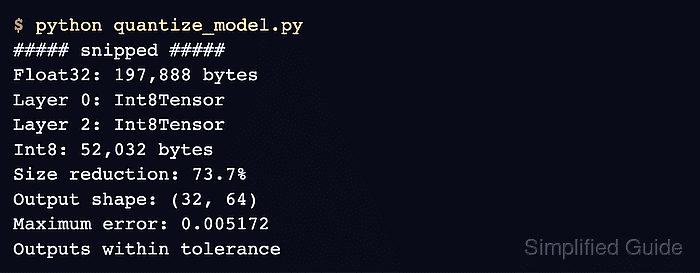
quantize_model.pyto confirm smaller int8 storage and inference outputs within tolerance.(.venv) $ python quantize_model.py ##### snipped ##### Float32: 197,888 bytes Layer 0: Int8Tensor Layer 2: Int8Tensor Int8: 52,032 bytes Size reduction: 73.7% Output shape: (32, 64) Maximum error: 0.005172 Outputs within tolerance
Both linear layers now hold int8 weights, storage is smaller, and the quantized model still produces a
32 × 64output on the original inputs. The first line is a harmless _pytree warning from importing torchao, omitted here. A failed storage assertion, missing Int8Tensor layer, or failed tolerance check means the conversion has not met these acceptance conditions.