A PyTorch model's learned parameters often need to cross the boundary from a training process to a separate inference process. Saving a state_dict keeps that handoff tied to tensor names and shapes instead of the Python location of a pickled module class.
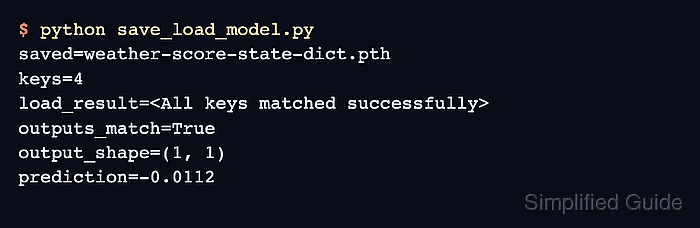
The loading program must recreate the same module structure before it applies the saved tensors. The CPU example compares model output before and after a disk round trip, so an architecture mismatch or failed load cannot pass silently.
Use weights_only=True for state-dictionary files and map_location=“cpu” when the destination should not depend on the source device. Call eval() after loading and before inference so dropout and batch normalization modules use inference behavior.
Steps to save and load a PyTorch model state dictionary:
- Create save_load_model.py with the initial network definition.
- save_load_model.py
import torch
from torch import nn


torch.manual_seed(11)
MODEL_PATH = "weather-score-state-dict.pth"


class WeatherScoreModel(nn.Module):
    def __init__(self):
        super().__init__()
        self.layers = nn.Sequential(
            nn.Linear(3, 5),
            nn.ReLU(),
            nn.Linear(5, 1),
        )

    def forward(self, inputs):
        return self.layers(inputs)
WeatherScoreModel stands in for the project class; its layer names and tensor shapes must match the saved state dictionary.
- Append the sample-input section to save_load_model.py.
sample = torch.tensor([[0.6, 0.2, 0.9]], dtype=torch.float32)
source_model = WeatherScoreModel()
source_model.eval()

with torch.inference_mode():
    expected = source_model(sample)
- Append the state-dictionary save operation to save_load_model.py.
torch.save(source_model.state_dict(), MODEL_PATH)
print(f"saved={MODEL_PATH}")
Projects commonly use either .pth or .pt for state dictionaries. Training-resume checkpoints also contain optimizer and epoch metadata.
Related: How to save and restore a PyTorch training checkpoint - Append the model-loading section to save_load_model.py.
loaded_model = WeatherScoreModel()
state_dict = torch.load(MODEL_PATH, map_location="cpu", weights_only=True)
load_result = loaded_model.load_state_dict(state_dict)
loaded_model.eval()
Untrusted model files can exploit deserialization behavior. weights_only=True narrows the unpickler's capabilities, but it does not prevent denial-of-service or every memory-safety risk.
- Append the loaded-model comparison to save_load_model.py.
with torch.inference_mode():
    actual = loaded_model(sample)

print(f"load_result={load_result}")
print(f"outputs_match={torch.allclose(expected, actual)}")
print(f"output_shape={tuple(actual.shape)}")
print(f"prediction={actual.item():.4f}")
- Run save_load_model.py to verify that the loaded model reproduces the reference inference.
$ python save_load_model.py
saved=weather-score-state-dict.pth
load_result=<All keys matched successfully>
outputs_match=True
output_shape=(1, 1)
prediction=-0.0112
All keys matched successfully proves that the rebuilt module accepted every saved tensor, while outputs_match=True confirms the disk-loaded model reproduced the original inference result.

Mohd Shakir Zakaria is a cloud architect with deep roots in software development and open-source advocacy. Certified in AWS, Red Hat, VMware, ITIL, and Linux, he specializes in designing and managing robust cloud and on-premises infrastructures.


