Third-party packages extend Python beyond the standard library with HTTP clients, database drivers, templating engines, SDKs, and other dependencies that most applications do not ship on their own. Installing them into the correct interpreter context keeps one project's dependency set from leaking into another project, the base Python runtime, or automation tools that rely on a different package mix.
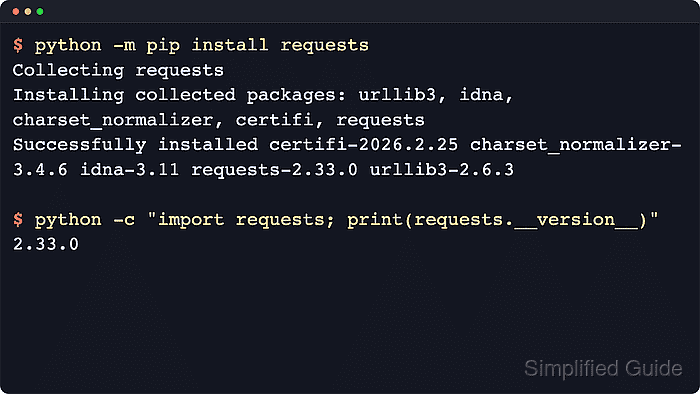
pip resolves a distribution name from the active package index, prefers a compatible wheel when one is available, installs any required dependencies, and records the result in the selected environment. Invoking it through python3 -m pip or python -m pip binds the install to one interpreter instead of whichever standalone pip command happens to be first on PATH.
Modern distro-managed Python builds may mark the base interpreter as externally managed, and pip can also inherit package indexes, credentials, or policy from configuration files and environment variables. The safest default for application dependencies is an activated virtual environment; install missing pip or venv support through the platform package manager first, use --user only outside the virtual environment when a user-site install is intended, and substitute py -m pip on Windows when the launcher is the normal entry point.
Steps to install third-party packages in Python using pip:
- Confirm which interpreter and pip module will receive the package.
$ python3 --version
Python 3.14.4

$ python3 -m pip --version
pip 25.1.1 from /usr/lib/python3/dist-packages/pip (python 3.14)
The path after from identifies the interpreter context that will change.
Use py --version and py -m pip --version on Windows when the py launcher is the normal entry point.
If python3 -m pip is unavailable, install pip through the platform package manager or bootstrap it with python3 -m ensurepip --default-pip when that interpreter ships ensurepip.
Related: How to install pip on Ubuntu
Related: How to install pip on Windows - Create or activate the project virtual environment before installing application dependencies.
$ python3 -m venv .venv

$ source .venv/bin/activate
$ python -m pip --version
pip 25.1.1 from /home/user/project/.venv/lib/python3.14/site-packages/pip (python 3.14)
Activation keeps repeated python and pip commands tied to the project environment instead of the base interpreter.
Use .\.venv\Scripts\activate in Windows PowerShell or Command Prompt.
Do not combine --user with a default virtual environment; pip refuses the install because the user site is not visible inside that environment.
- Install the required package through the active interpreter.
$ python -m pip install requests
Collecting requests
  Downloading requests-2.34.2-py3-none-any.whl.metadata (4.8 kB)
Collecting charset_normalizer<4,>=2 (from requests)
Collecting idna<4,>=2.5 (from requests)
Collecting urllib3<3,>=1.26 (from requests)
Collecting certifi>=2023.5.7 (from requests)
##### snipped #####
Installing collected packages: urllib3, idna, charset_normalizer, certifi, requests

Successfully installed certifi-2026.5.20 charset_normalizer-3.4.7 idna-3.18 requests-2.34.2 urllib3-2.7.0
For a user-local install outside a virtual environment, run python3 -m pip install --user requests.
If externally-managed-environment appears, switch to a virtual environment instead of forcing an interpreter-wide install.
Exact dependency versions, wheel filenames, and cache-hit lines vary by platform and package index state, but the final package list should show the requested distribution and its dependencies.
The active package source may come from --index-url, PIP_INDEX_URL, or pip configuration rather than public PyPI.
- Add a version specifier or published extra only when the application depends on it.
$ python -m pip install "requests==2.34.2"
$ python -m pip install "requests[socks]"
pip installs the latest compatible release by default; pin or constrain a version only when the application, CI policy, or deployment process depends on it.
Extras pull in optional dependencies exposed by the distribution package, such as the socks extra published by requests.
- Verify that the package was installed into the expected environment.
$ python -m pip show requests
Name: requests
Version: 2.34.2
Summary: Python HTTP for Humans.
##### snipped #####
Location: /home/user/project/.venv/lib/python3.14/site-packages
Requires: certifi, charset_normalizer, idna, urllib3
Required-by:

$ python -c "import requests; print(requests.__version__)"
2.34.2
The Location field confirms whether the package landed in the project virtual environment, a user site directory, or another interpreter context.
- Run pip check when the environment already contains other dependencies.
$ python -m pip check
No broken requirements found.
If pip check reports conflicts, reinstall the application's tested dependency set instead of keeping a partially broken environment.

Mohd Shakir Zakaria is a cloud architect with deep roots in software development and open-source advocacy. Certified in AWS, Red Hat, VMware, ITIL, and Linux, he specializes in designing and managing robust cloud and on-premises infrastructures.


