Package troubleshooting often starts with one distribution, not the full Python environment. Showing the installed package metadata confirms the version, install location, dependency edges, and owning interpreter before an upgrade, removal, or import investigation changes anything.
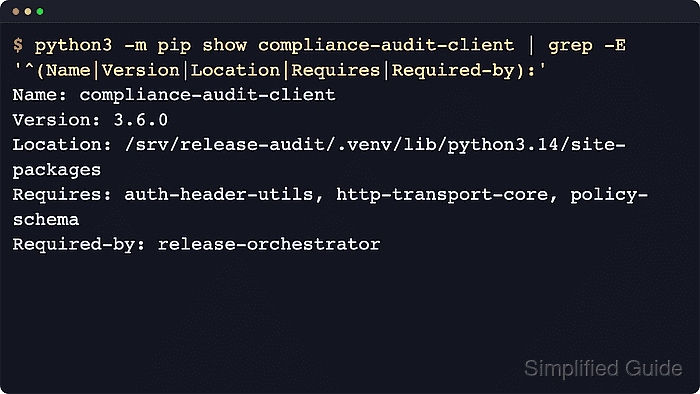
The python3 -m pip show command reads the installed distribution metadata recorded for the active interpreter or virtual environment and prints it in RFC-compliant mail-header format. Fields such as Name, Version, Location, Requires, and Required-by show which distribution is installed, where its files live, and how it fits into the local dependency graph.
The result applies only to the interpreter that owns the current python3 -m pip invocation, so the same host can return different answers from a virtual environment, user-site install, or alternate Python binary. Query the distribution name rather than assuming the import name used in code, expect some fields to be blank when a project does not publish them, and on Windows replace python3 -m pip with py -m pip when the launcher is available.
Related: How to list installed Python packages
Related: How to check outdated Python packages
Related: How to upgrade a Python package with pip
Related: How to remove a Python package
Steps to show installed Python package information with pip:
- Print the interpreter path that will answer the package metadata query.
$ python3 -c "import sys; print(sys.executable)"
/srv/apps/acme-api/.venv/bin/python3
Running pip through the interpreter with python3 -m pip avoids mixing a standalone pip executable with another Python install.
- Confirm that pip belongs to the same environment.
$ python3 -m pip --version
pip 26.1.2 from /srv/apps/acme-api/.venv/lib/python3.14/site-packages/pip (python 3.14)
The path after from should match the interpreter or virtual environment that owns the package being checked.
- Query the standard metadata block for the target distribution package.
$ python3 -m pip show requests
Name: requests
Version: 2.34.2
Summary: Python HTTP for Humans.
Home-page:
Author:
Author-email: Kenneth Reitz <me@kennethreitz.org>
License: Apache-2.0
Location: /srv/apps/acme-api/.venv/lib/python3.14/site-packages
Requires: certifi, charset_normalizer, idna, urllib3
Required-by:
pip show accepts more than one package name, but checking one distribution at a time keeps troubleshooting and environment comparisons easier to scan.
Fields such as Home-page or Author depend on the package metadata published upstream and may be blank even when the distribution is installed correctly.
- Add --verbose when the standard block does not expose enough recorded metadata.
$ python3 -m pip show --verbose requests
Name: requests
Version: 2.34.2
Summary: Python HTTP for Humans.
Home-page:
Author:
Author-email: Kenneth Reitz <me@kennethreitz.org>
License: Apache-2.0
Location: /srv/apps/acme-api/.venv/lib/python3.14/site-packages
Requires: certifi, charset_normalizer, idna, urllib3
Required-by:
Metadata-Version: 2.4
Installer: pip
Classifiers:
  Development Status :: 5 - Production/Stable
  Environment :: Web Environment
  License :: OSI Approved :: Apache Software License
  Programming Language :: Python :: 3.14
##### snipped
Entry-points:
Project-URLs:
  Documentation, https://requests.readthedocs.io
  Source, https://github.com/psf/requests
--verbose is the general pip verbosity flag and expands the metadata block with fields such as Metadata-Version, Installer, classifiers, entry points, and project URLs when the distribution records them.
- Add --files when the installed file list is needed for auditing, cleanup, or package tracing.
$ python3 -m pip show --files requests
Name: requests
Version: 2.34.2
Summary: Python HTTP for Humans.
Home-page:
Author:
Author-email: Kenneth Reitz <me@kennethreitz.org>
License: Apache-2.0
Location: /srv/apps/acme-api/.venv/lib/python3.14/site-packages
Requires: certifi, charset_normalizer, idna, urllib3
Required-by:
Files:
  requests-2.34.2.dist-info/INSTALLER
  requests-2.34.2.dist-info/METADATA
  requests-2.34.2.dist-info/RECORD
  requests-2.34.2.dist-info/REQUESTED
  requests-2.34.2.dist-info/WHEEL
  requests-2.34.2.dist-info/licenses/LICENSE
  requests/__init__.py
  requests/api.py
  requests/sessions.py
##### snipped
The file list comes from the package metadata recorded at install time, which makes it useful for tracing exactly which paths the current interpreter owns for that distribution.
- Check a dependency package when the ownership question is about which installed package requires it.
$ python3 -m pip show idna
Name: idna
Version: 3.18
Summary: Internationalized Domain Names in Applications (IDNA)
Home-page:
Author:
Author-email: Kim Davies <kim+pypi@gumleaf.org>
License-Expression: BSD-3-Clause
Location: /srv/apps/acme-api/.venv/lib/python3.14/site-packages
Requires:
Required-by: requests
The Required-by field is helpful before removing a dependency because it shows installed packages that declare a dependency on the target distribution.
- Check the warning path when the requested distribution is not installed in the current interpreter context.
$ python3 -m pip show does-not-exist
WARNING: Package(s) not found: does-not-exist
pip show exits non-zero when the requested package is missing, so shell scripts can treat the result as a failure instead of a partial success. If the package should exist, confirm the active interpreter first and verify that the distribution name matches the installed project name rather than only the import name used in code.

Mohd Shakir Zakaria is a cloud architect with deep roots in software development and open-source advocacy. Certified in AWS, Red Hat, VMware, ITIL, and Linux, he specializes in designing and managing robust cloud and on-premises infrastructures.


