Installing PHP-FPM on CentOS Stream, Fedora, or Red Hat Enterprise Linux (RHEL) adds a dedicated FastCGI manager for PHP requests instead of running application code inside the web-server process. That packaged layout is the normal path for Nginx and for Apache hosts that proxy dynamic requests through proxy_fcgi.
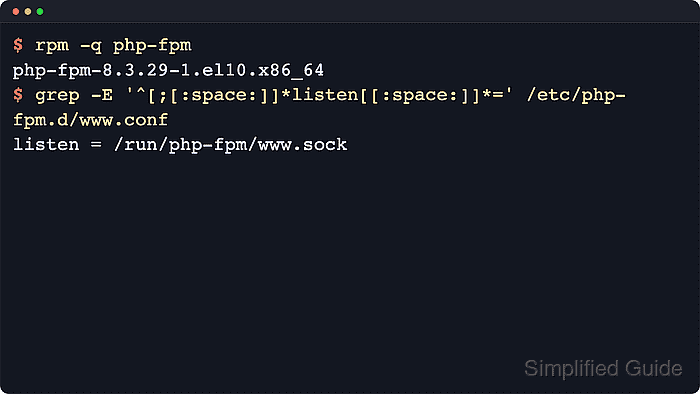
The distro package is php-fpm. It installs the main PHP-FPM configuration in
/etc/php-fpm.conf
, keeps pool files in
/etc/php-fpm.d/
, and exposes the unversioned php-fpm.service unit. The packaged www pool listens on
/run/php-fpm/www.sock
, and the distro packages also install Apache and Nginx integration files that expect that socket.
The package branch depends on the distro release. Current Fedora 44 resolves php-fpm to a PHP 8.5 build, current CentOS Stream 10 and the default unversioned RHEL 10.2 path resolve it to PHP 8.3, and the default RHEL 9.8 path still resolves it to PHP 8.0 while exposing newer php module streams. Minimal containers and chroots can install the package without a runnable systemd service, so do the final enable, start, and socket checks on the host that will serve PHP traffic.
Related: Install the base PHP runtime
Related: Create an additional PHP-FPM pool
Steps to install PHP-FPM on CentOS, Fedora, or Red Hat:
- Check which PHP-FPM package branch the enabled repositories currently expose.
$ sudo dnf info php-fpm
Available Packages
Name         : php-fpm
Version      : 8.3.31
Release      : 1.el10
Architecture : aarch64
Repository   : appstream
Summary      : PHP FastCGI Process Manager
The exact package changes with the distro release and enabled repositories. Current checks showed Fedora 44 exposing 8.5.6, CentOS Stream 10 and the default RHEL 10.2 path exposing 8.3.31, and the default RHEL 9.8 path exposing 8.0.30.
If dnf info php-fpm reports no matching package on RHEL, confirm that the normal AppStream or UBI repositories are reachable before continuing.
- List the optional PHP module streams on RHEL 9 before changing away from the default branch.
$ sudo dnf module list php
Red Hat Universal Base Image 9 (RPMs) - AppStream
Name Stream Profiles               Summary
php  8.1    common, devel, minimal PHP scripting language
php  8.2    common, devel, minimal PHP scripting language
php  8.3    common, devel, minimal PHP scripting language
Skip this step on Fedora, CentOS Stream 10, or RHEL 10. On RHEL 9, the common profile includes php-fpm for web-serving workloads, while minimal omits it.
RHEL 10 uses non-modular package names instead of php module streams. RHEL 10.2 also adds a separate PHP 8.4 package family in full AppStream repositories, so keep the PHP runtime, extensions, and FPM package on the same branch if host policy selects that path.
- Install the distro-packaged PHP-FPM service.
$ sudo dnf install --assumeyes php-fpm
Current Fedora, CentOS Stream 10, and RHEL 10 use this direct path. On RHEL 9, the same command installs the default 8.0 package set.
When a clean RHEL 9 host needs a newer supported branch with PHP-FPM included, install the matching common profile instead, for example sudo dnf module install --assumeyes php:8.3/common.
- Verify the installed package, packaged paths, and default listener.
$ rpm -q php-fpm
php-fpm-8.3.31-1.el10.aarch64

$ ls -1 /etc/php-fpm.conf /etc/php-fpm.d/www.conf /usr/lib/systemd/system/php-fpm.service
/etc/php-fpm.conf
/etc/php-fpm.d/www.conf
/usr/lib/systemd/system/php-fpm.service

$ grep '^listen = ' /etc/php-fpm.d/www.conf
listen = /run/php-fpm/www.sock
The exact package string changes with the distro branch and update level, but current Red Hat family packages keep the same main config path, pool path, and unversioned php-fpm.service unit.
The socket file itself does not exist until the service starts and systemd creates the runtime directory for php-fpm.
Related: Find PHP configuration files
- Test the packaged PHP-FPM configuration before starting the service.
$ sudo php-fpm -t
[05-Jun-2026 21:43:47] NOTICE: configuration file /etc/php-fpm.conf test is successful
Do not point Apache or Nginx at a new pool until the PHP-FPM configuration test succeeds.
- Enable and start the PHP-FPM service.
$ sudo systemctl enable --now php-fpm
The unit name is unversioned on current Fedora, CentOS Stream, and RHEL packages, so later service commands use php-fpm rather than a versioned unit name.
Container and chroot installs often lack a running systemd instance, so perform this step on the actual host that will serve the PHP workload.
Related: Manage the PHP-FPM service
- Confirm that the service is enabled, active, and exposing the default socket.
$ sudo systemctl is-enabled php-fpm
enabled

$ sudo systemctl is-active php-fpm
active

$ sudo test -S /run/php-fpm/www.sock && echo socket-ready
socket-ready
If the socket check fails, confirm the listen path in
/etc/php-fpm.d/www.conf
and inspect the unit logs with sudo journalctl --unit=php-fpm --no-pager --lines=50 before changing the web-server configuration.
Related: Manage the PHP-FPM service

Mohd Shakir Zakaria is a cloud architect with deep roots in software development and open-source advocacy. Certified in AWS, Red Hat, VMware, ITIL, and Linux, he specializes in designing and managing robust cloud and on-premises infrastructures.


