Tabular handoffs often need more than rows separated by text because downstream jobs also depend on typed columns and selective reads. Parquet gives pandas a compressed columnar file that can move between Python and analytics systems without reconstructing every value from CSV strings.
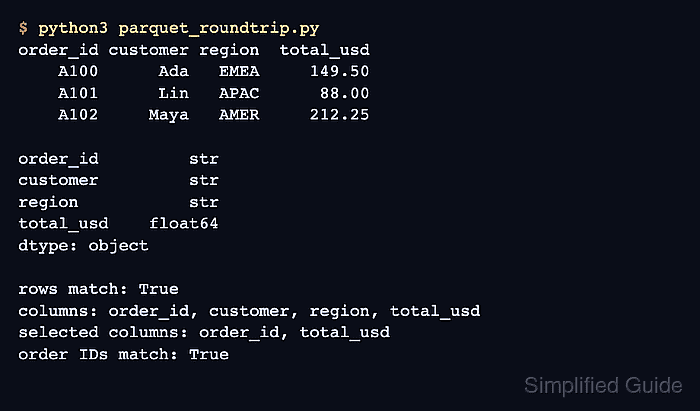
Pandas delegates Parquet serialization to an engine rather than implementing the format itself. The PyArrow engine handles both directions here, which keeps engine behavior consistent while demonstrating a projected read that loads only requested columns.
A meaningful round trip compares the DataFrame returned from disk with the one sent to disk; merely finding orders.parquet is not enough. The stored schema is also read independently with PyArrow, so the pandas result and the physical Parquet fields are both checked.
Related: How to read CSV files with pandas
Related: How to write a CSV file with pandas
Related: How to read and write JSON with pandas
Steps to read and write Parquet files with pandas:
- Install PyArrow in the active Python environment used to run the Parquet script.
$ python3 -m pip install pyarrow
The Parquet read and write calls select engine=“pyarrow”, so fastparquet alone cannot run parquet_roundtrip.py.
Related: How to install pandas with pip - Verify that the PyArrow package and its Parquet module are available in the active Python environment.
$ python3 -c 'import pyarrow; import pyarrow.parquet; print(pyarrow.__version__)'
25.0.0
- Create parquet_roundtrip.py with the imports and output path.
- parquet_roundtrip.py
from pathlib import Path

import pandas as pd


parquet_path = Path("orders.parquet")
- Append the typed source DataFrame below the parquet_path assignment.
orders = pd.DataFrame(
    {
        "order_id": ["A100", "A101", "A102"],
        "customer": ["Ada", "Lin", "Maya"],
        "region": ["EMEA", "APAC", "AMER"],
        "total_usd": [149.50, 88.00, 212.25],
    }
).astype({"order_id": "string"})
The explicit string dtype prevents order identifiers from becoming numeric values when a real dataset contains digits only.
- Append the Parquet write call below the orders DataFrame.
orders.to_parquet(
    parquet_path,
    engine="pyarrow",
    compression="snappy",
    index=False,
)
compression=“snappy” applies the default pandas compression choice. index=False omits row labels because the sample DataFrame uses positional row labels.
- Append the full and projected Parquet reads below the write call.
round_trip = pd.read_parquet(parquet_path, engine="pyarrow")
selected = pd.read_parquet(
    parquet_path,
    engine="pyarrow",
    columns=["order_id", "total_usd"],
)
The columns argument limits the projected read to the named fields instead of loading the complete table.
- Append the round-trip validation block below the read calls.
pd.testing.assert_frame_equal(round_trip, orders)
pd.testing.assert_frame_equal(
    selected,
    orders.loc[:, ["order_id", "total_usd"]],
)

print(round_trip.to_string(index=False))
print()
print(round_trip.dtypes)
print()
print(selected.to_string(index=False))
Either comparison raises an AssertionError when values, column order, or dtypes differ, so the script cannot report a successful table after a mismatched read.
- Run the completed script to perform the Parquet round trip.
$ python3 parquet_roundtrip.py order_id customer region total_usd A100 Ada EMEA 149.50 A101 Lin APAC 88.00 A102 Maya AMER 212.25 order_id string customer str region str total_usd float64 dtype: object order_id total_usd A100 149.50 A101 88.00 A102 212.25 - Verify the stored Parquet fields without pandas metadata.
$ python3 -c 'import pyarrow.parquet as pq; print(pq.read_schema("orders.parquet").remove_metadata())'
order_id: large_string
customer: large_string
region: large_string
total_usd: double
The schema contains the four data fields and no index field, confirming the index=False write reached the Parquet file.

Mohd Shakir Zakaria is a cloud architect with deep roots in software development and open-source advocacy. Certified in AWS, Red Hat, VMware, ITIL, and Linux, he specializes in designing and managing robust cloud and on-premises infrastructures.


