Installing pandas with pip adds the official PyPI package to a Python environment so scripts and notebooks can import DataFrame tools without switching package managers.
Use python -m pip instead of a bare pip command so the installer runs from the interpreter that will import pandas. A virtual environment keeps pandas, NumPy, and python-dateutil under the project .venv directory instead of the system Python installation.
The install is complete only when the same interpreter can import pandas and run a small DataFrame operation. Optional extras such as pandas[excel] belong to follow-up file I/O tasks; the base install is enough for in-memory DataFrame work and CSV tasks.
Related: How to read CSV files with pandas
Related: How to read an Excel file with pandas
Steps to install pandas with pip:
- Create a virtual environment for the pandas project.
$ python3 -m venv .venv
The venv module creates a private Python environment in the project directory without changing the system Python installation.
- Activate the virtual environment.
$ source .venv/bin/activate
(.venv) $
On Windows PowerShell, use .\.venv\Scripts\Activate.ps1 and run py -m pip if python points at another interpreter.
- Confirm that pip belongs to the active environment.
(.venv) $ python -m pip --version
pip 26.1.2 from /home/user/project/.venv/lib/python3.13/site-packages/pip (python 3.13)
The path should include .venv or the environment name. If it points to a system path, reactivate the environment before installing pandas.
- Upgrade pip inside the active environment.
(.venv) $ python -m pip install --upgrade pip
Requirement already satisfied: pip in ./.venv/lib/python3.13/site-packages (26.1.2)
- Install pandas from PyPI.
(.venv) $ python -m pip install pandas
Collecting pandas
##### snipped #####
Successfully installed numpy-2.4.6 pandas-3.0.3 python-dateutil-2.9.0.post0 six-1.17.0
pip installs required runtime packages such as NumPy and python-dateutil with pandas. Add optional extras later only when a task needs them, such as pandas[excel] for Excel I/O.
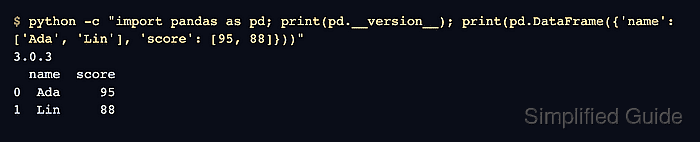
- Import pandas and run a DataFrame smoke test.
(.venv) $ python -c "import pandas as pd; print(pd.__version__); print(pd.DataFrame({'name': ['Ada', 'Lin'], 'score': [95, 88]}))"
3.0.3
  name  score
0  Ada     95
1  Lin     88
A version line plus a printed DataFrame confirms that the package imports and basic tabular construction works in the active environment.
Related: How to create a pandas DataFrame

Mohd Shakir Zakaria is a cloud architect with deep roots in software development and open-source advocacy. Certified in AWS, Red Hat, VMware, ITIL, and Linux, he specializes in designing and managing robust cloud and on-premises infrastructures.


