Reading a CSV file with pandas turns a delimited text export into a DataFrame that Python can filter, group, clean, or write to another format. A clear import step matters when the first row, missing values, and text-like identifiers need to arrive as the columns and dtypes the next analysis expects.
The pandas.read_csv() function accepts local paths, URLs, and file-like objects, and it uses the first row as headers by default. A small local CSV keeps the behavior visible while separating the default import from an explicit import that renames columns, selects a subset, and parses dates.
Header and dtype choices should be made before downstream cleaning starts. Use header=0 with names when replacing existing headers, usecols when only part of the file is needed, and dtype for identifiers that must stay as text instead of being inferred as numbers.
Steps to read CSV files with pandas:
- Save a small CSV file with one header row.
- sales.csv
order_id,customer,region,total,order_date
1001,Ada Lovelace,EMEA,149.50,2026-06-01
1002,Lin Chen,APAC,,2026-06-02
1003,Maya Patel,AMER,212.00,2026-06-03
Use the same pattern with the real file path after confirming that the delimiter and first row match the source export.
Tool: Comma-Separated Values (CSV) Converter - Read the CSV once with default read_csv() inference.
$ python3 - <<'PY'
import pandas as pd

df = pd.read_csv("sales.csv")
print(df.head(2).to_string(index=False))
print()
print(df.dtypes)
PY
 order_id     customer region  total order_date
     1001 Ada Lovelace   EMEA  149.5 2026-06-01
     1002     Lin Chen   APAC    NaN 2026-06-02

order_id        int64
customer          str
region            str
total         float64
order_date        str
dtype: object
The default import reads every column, uses the first row as column names, infers numeric fields, and leaves order_date as text until a date parser is requested.
- Create the explicit CSV reader script.
- read_sales_csv.py
import pandas as pd

df = pd.read_csv(
    "sales.csv",
    header=0,
    names=["order_id", "customer_name", "region", "total_usd", "order_date"],
    usecols=["order_id", "customer_name", "total_usd", "order_date"],
    dtype={"order_id": "string", "customer_name": "string"},
    parse_dates=["order_date"],
)

print(df.to_string(index=False))
print()
print(df.dtypes)
print()
print(f"Rows: {len(df)}")
print(f"Columns: {', '.join(df.columns)}")
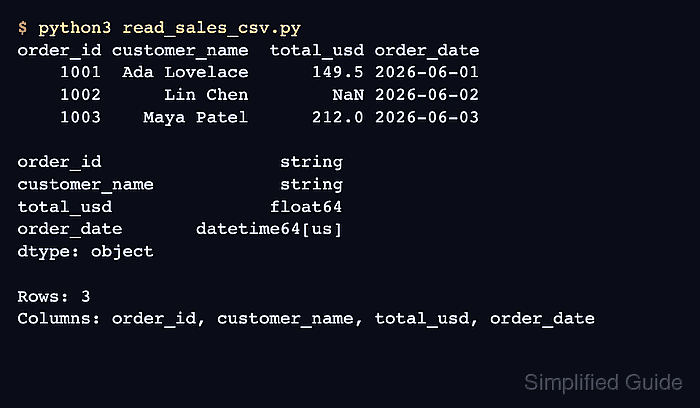
header=0 consumes the original header row before names replaces the column labels. usecols uses the active names, so select the renamed labels after names is applied.
- Run the explicit reader script.
$ python3 read_sales_csv.py
order_id customer_name  total_usd order_date
    1001  Ada Lovelace      149.5 2026-06-01
    1002      Lin Chen        NaN 2026-06-02
    1003    Maya Patel      212.0 2026-06-03

order_id                 string
customer_name            string
total_usd               float64
order_date       datetime64[us]
dtype: object

Rows: 3
Columns: order_id, customer_name, total_usd, order_date
The output should show three rows, four selected columns, string identifiers, and a parsed date column.
- Remove the sample files after the import behavior is confirmed.
$ rm sales.csv read_sales_csv.py

Mohd Shakir Zakaria is a cloud architect with deep roots in software development and open-source advocacy. Certified in AWS, Red Hat, VMware, ITIL, and Linux, he specializes in designing and managing robust cloud and on-premises infrastructures.


