Duplicate rows in a pandas DataFrame can double-count orders, inflate totals, or send repeated records into an export. Removing them with drop_duplicates() keeps one row per chosen match rule while leaving enough evidence to confirm what changed.

DataFrame.drop_duplicates() compares all columns by default. Passing subset limits matching to business keys such as order_id, and keep controls whether pandas keeps the first matching row, keeps the last matching row, or removes every member of a duplicate group.

drop_duplicates() returns a new DataFrame unless inplace=True is used. Assign the returned object when the original frame should remain available for audit or rollback, and use ignore_index=True when downstream output needs fresh row labels.

Steps to remove duplicate rows from a pandas DataFrame:

  1. Save a short duplicate-removal script.
    remove_duplicate_rows.py
    import pandas as pd
     
    orders = pd.DataFrame(
        {
            "order_id": [1001, 1002, 1002, 1003, 1004, 1004, 1005],
            "customer": ["Ada", "Lin", "Lin", "Maya", "Omar", "Omar", "Nia"],
            "region": ["EMEA", "APAC", "APAC", "AMER", "EMEA", "EMEA", "APAC"],
            "status": ["paid", "paid", "paid", "open", "paid", "refunded", "open"],
            "total_usd": [150.0, 240.0, 240.0, 875.0, 95.0, 95.0, 360.0],
        }
    )
     
    print(f"pandas {pd.__version__}")
    print()
     
    print("BASE")
    print(orders.to_string(index=True))
    print()
     
    exact = orders.drop_duplicates()
    print("DROP_EXACT_ROWS")
    print(exact.to_string(index=True))
    print()
     
    latest_per_order = orders.drop_duplicates(
        subset=["order_id"],
        keep="last",
        ignore_index=True,
    )
    print("KEEP_LAST_BY_ORDER")
    print(latest_per_order.to_string(index=False))
    print()
     
    unique_order_only = orders.drop_duplicates(
        subset=["order_id"],
        keep=False,
        ignore_index=True,
    )
    print("DROP_ALL_DUPLICATE_ORDER_IDS")
    print(unique_order_only.to_string(index=False))
    print()
     
    print("VERIFY")
    print(f"original rows: {len(orders)}")
    print(f"exact rows: {len(exact)}")
    print(f"latest order_ids: {latest_per_order['order_id'].tolist()}")
    print(f"latest row index labels: {latest_per_order.index.tolist()}")
    print(f"unique order_ids only: {unique_order_only['order_id'].tolist()}")
    print(f"source rows unchanged: {len(orders)}")

    Replace the sample orders object with the DataFrame already loaded in the working script.

  2. Run the script and compare the duplicate counts.
    $ python3 remove_duplicate_rows.py
    pandas 3.0.3
    
    BASE
       order_id customer region    status  total_usd
    0      1001      Ada   EMEA      paid      150.0
    1      1002      Lin   APAC      paid      240.0
    2      1002      Lin   APAC      paid      240.0
    3      1003     Maya   AMER      open      875.0
    4      1004     Omar   EMEA      paid       95.0
    5      1004     Omar   EMEA  refunded       95.0
    6      1005      Nia   APAC      open      360.0
    
    DROP_EXACT_ROWS
       order_id customer region    status  total_usd
    0      1001      Ada   EMEA      paid      150.0
    1      1002      Lin   APAC      paid      240.0
    3      1003     Maya   AMER      open      875.0
    4      1004     Omar   EMEA      paid       95.0
    5      1004     Omar   EMEA  refunded       95.0
    6      1005      Nia   APAC      open      360.0
    
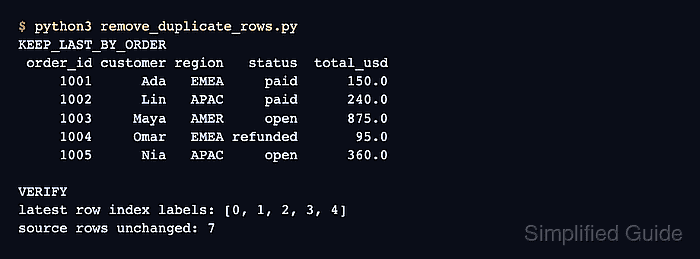
    KEEP_LAST_BY_ORDER
     order_id customer region   status  total_usd
         1001      Ada   EMEA     paid      150.0
         1002      Lin   APAC     paid      240.0
         1003     Maya   AMER     open      875.0
         1004     Omar   EMEA refunded       95.0
         1005      Nia   APAC     open      360.0
    
    DROP_ALL_DUPLICATE_ORDER_IDS
     order_id customer region status  total_usd
         1001      Ada   EMEA   paid      150.0
         1003     Maya   AMER   open      875.0
         1005      Nia   APAC   open      360.0
    
    VERIFY
    original rows: 7
    exact rows: 6
    latest order_ids: [1001, 1002, 1003, 1004, 1005]
    latest row index labels: [0, 1, 2, 3, 4]
    unique order_ids only: [1001, 1003, 1005]
    source rows unchanged: 7
  3. Remove rows that are exact duplicates across every column.
    exact = orders.drop_duplicates()

    pandas ignores row index labels when it decides whether rows are duplicates.

  4. Keep the last row for each duplicate business key.
    latest_per_order = orders.drop_duplicates(
        subset=["order_id"],
        keep="last",
        ignore_index=True,
    )

    subset limits duplicate matching to selected columns. ignore_index=True resets output labels to 0, 1, 2, ....

  5. Remove every row that belongs to a repeated key group.
    unique_order_only = orders.drop_duplicates(
        subset=["order_id"],
        keep=False,
        ignore_index=True,
    )

    keep=False removes all rows for duplicated keys, not just the second copy. Use it only when any repeated key makes the whole group invalid.

  6. Verify the row counts, output labels, and unchanged source frame.
    print(f"original rows: {len(orders)}")
    print(f"exact rows: {len(exact)}")
    print(f"latest order_ids: {latest_per_order['order_id'].tolist()}")
    print(f"latest row index labels: {latest_per_order.index.tolist()}")
    print(f"unique order_ids only: {unique_order_only['order_id'].tolist()}")
    print(f"source rows unchanged: {len(orders)}")
  7. Remove the temporary duplicate-removal script.
    $ rm remove_duplicate_rows.py