A pandas DataFrame often needs sorting before review, ranking, export, or downstream grouping. sort_values() orders rows from one or more column values so totals, dates, regions, or statuses appear in the order the next analysis expects.
By default, sort_values() returns a new DataFrame and leaves the source row order available. The ascending argument can apply one direction to all sort keys or a separate direction for each column, and na_position controls whether missing values sort before or after non-missing values.
Index labels stay attached to their rows unless ignore_index=True resets the output labels to a new integer range. Use sort_index() when row labels, not data columns, should determine the order, especially after setting an index from a business key or date.
Related: How to create a pandas DataFrame
Related: How to filter rows in a pandas DataFrame
Related: How to set an index in pandas
Steps to sort pandas DataFrame rows:
- Save a short sorting script.
- sort_dataframe.py
import pandas as pd orders = pd.DataFrame( { "order_id": [1005, 1001, 1004, 1002, 1006, 1003], "customer": ["Nia", "Ada", "Omar", "Lin", "Kai", "Maya"], "region": ["APAC", "EMEA", "EMEA", "APAC", "AMER", "AMER"], "order_date": pd.to_datetime( [ "2026-02-03", "2026-02-01", "2026-02-04", "2026-02-02", "2026-02-05", "2026-02-01", ] ), "ship_date": pd.to_datetime( [ None, "2026-02-03", "2026-02-06", "2026-02-04", "2026-02-08", "2026-02-05", ] ), "total_usd": [360.0, 150.0, 95.0, 240.0, 420.0, 875.0], } ).set_index("order_id", drop=False) print(f"pandas {pd.__version__}") print() print("BASE") print( orders[ ["customer", "region", "order_date", "ship_date", "total_usd"] ].to_string() ) print() by_total = orders.sort_values("total_usd", ascending=False) print("SORT_TOTAL_DESC") print(by_total.loc[:, ["customer", "region", "total_usd"]].to_string()) print() by_region_date = orders.sort_values( ["region", "order_date"], ascending=[True, False], ) print("SORT_REGION_DATE") print(by_region_date.loc[:, ["customer", "region", "order_date", "total_usd"]].to_string()) print() missing_ship_first = orders.sort_values("ship_date", na_position="first") print("SORT_MISSING_SHIP_FIRST") print(missing_ship_first.loc[:, ["customer", "ship_date", "total_usd"]].to_string()) print() ranked = orders.sort_values("total_usd", ascending=False, ignore_index=True) print("SORT_RESET_INDEX") print(ranked.loc[:, ["order_id", "customer", "total_usd"]].to_string()) print() by_index = orders.sort_index() print("SORT_INDEX") print(by_index.loc[:, ["customer", "region", "total_usd"]].to_string()) print() print("VERIFY") print(f"highest total order_id: {by_total.iloc[0]['order_id']}") print(f"region/date order_ids: {by_region_date['order_id'].tolist()}") print(f"missing ship_date first: {missing_ship_first.iloc[0]['ship_date']}") print(f"reset index labels: {ranked.index.tolist()}") print(f"source index order unchanged: {orders.index.tolist()}")
Replace the orders object with the DataFrame already loaded in the working script. Keep a visible row key when sorted output must still identify each record.
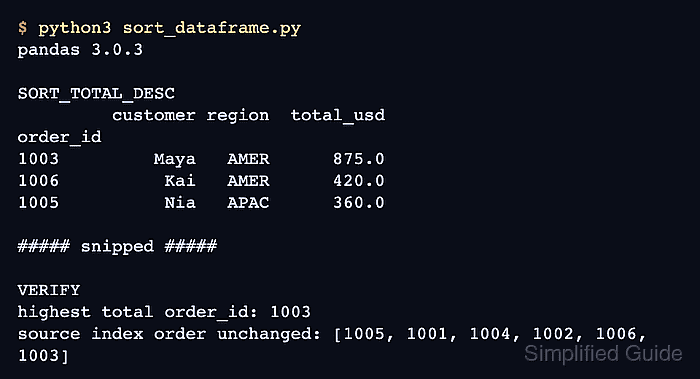
- Run the script and confirm the sorted sections and verification lines.
$ python3 sort_dataframe.py pandas 3.0.3 BASE customer region order_date ship_date total_usd order_id 1005 Nia APAC 2026-02-03 NaT 360.0 1001 Ada EMEA 2026-02-01 2026-02-03 150.0 1004 Omar EMEA 2026-02-04 2026-02-06 95.0 1002 Lin APAC 2026-02-02 2026-02-04 240.0 1006 Kai AMER 2026-02-05 2026-02-08 420.0 1003 Maya AMER 2026-02-01 2026-02-05 875.0 SORT_TOTAL_DESC customer region total_usd order_id 1003 Maya AMER 875.0 1006 Kai AMER 420.0 1005 Nia APAC 360.0 1002 Lin APAC 240.0 1001 Ada EMEA 150.0 1004 Omar EMEA 95.0 SORT_REGION_DATE customer region order_date total_usd order_id 1006 Kai AMER 2026-02-05 420.0 1003 Maya AMER 2026-02-01 875.0 1005 Nia APAC 2026-02-03 360.0 1002 Lin APAC 2026-02-02 240.0 1004 Omar EMEA 2026-02-04 95.0 1001 Ada EMEA 2026-02-01 150.0 SORT_MISSING_SHIP_FIRST customer ship_date total_usd order_id 1005 Nia NaT 360.0 1001 Ada 2026-02-03 150.0 1002 Lin 2026-02-04 240.0 1003 Maya 2026-02-05 875.0 1004 Omar 2026-02-06 95.0 1006 Kai 2026-02-08 420.0 SORT_RESET_INDEX order_id customer total_usd 0 1003 Maya 875.0 1 1006 Kai 420.0 2 1005 Nia 360.0 3 1002 Lin 240.0 4 1001 Ada 150.0 5 1004 Omar 95.0 SORT_INDEX customer region total_usd order_id 1001 Ada EMEA 150.0 1002 Lin APAC 240.0 1003 Maya AMER 875.0 1004 Omar EMEA 95.0 1005 Nia APAC 360.0 1006 Kai AMER 420.0 VERIFY highest total order_id: 1003 region/date order_ids: [1006, 1003, 1005, 1002, 1004, 1001] missing ship_date first: NaT reset index labels: [0, 1, 2, 3, 4, 5] source index order unchanged: [1005, 1001, 1004, 1002, 1006, 1003] - Sort rows by one numeric column in descending order.
by_total = orders.sort_values("total_usd", ascending=False)
sort_values() returns a new DataFrame unless inplace=True is used. Assign the returned object when the original row order should remain available.
- Sort rows by multiple columns with separate sort directions.
by_region_date = orders.sort_values( ["region", "order_date"], ascending=[True, False], )
The ascending list must match the columns passed to by. In this case, region sorts A to Z and order_date sorts newest to oldest within each region.
- Move missing dates to the beginning of the sorted output.
missing_ship_first = orders.sort_values("ship_date", na_position="first")
na_position=“last” is the default. Use na_position=“first” when blank, NaN, or NaT values need review before complete rows.
- Reset the output labels when the sorted table should use a fresh integer index.
ranked = orders.sort_values("total_usd", ascending=False, ignore_index=True)
ignore_index=True changes the output index to 0, 1, 2, .... Keep identifier columns such as order_id in the data when sorted exports still need record IDs.
- Sort by existing row labels when the index carries the intended order.
by_index = orders.sort_index()
sort_index() uses index labels instead of column values. It is useful after set_index() moves order IDs, dates, or grouped keys into the row index.
Related: How to set an index in pandas - Verify the top sorted row, reset labels, and unchanged source order.
print(f"highest total order_id: {by_total.iloc[0]['order_id']}") print(f"reset index labels: {ranked.index.tolist()}") print(f"source index order unchanged: {orders.index.tolist()}")
- Remove the temporary sorting script after confirming the sort behavior.
$ rm sort_dataframe.py
Mohd Shakir Zakaria is a cloud architect with deep roots in software development and open-source advocacy. Certified in AWS, Red Hat, VMware, ITIL, and Linux, he specializes in designing and managing robust cloud and on-premises infrastructures.