Dropping missing values in pandas removes records or fields that cannot be used safely in a cleanup, analysis, or export step. DataFrame.dropna() is the direct cleanup method when incomplete rows should be excluded instead of filled with replacement values.
dropna() returns a new DataFrame by default, so the original variable remains available for comparison unless the result is assigned back. Row cleanup is the default; column cleanup requires axis=“columns” and should usually target fields that are completely empty or outside the analysis scope.
Choose the rule before deleting data. Use subset for required fields, thresh when a row needs a minimum number of present values, and how=“all” when only fully empty rows or columns should be removed.
Related: How to find missing values in pandas
Related: How to fill missing values in pandas
Steps to drop missing values in pandas:
- Start the Python 3 interpreter in an environment with pandas installed.
$ python3
Python 3.13.14
>>>
- Import pandas and NumPy.
>>> import pandas as pd
>>> import numpy as np
- Create or load the DataFrame that needs missing-value cleanup.
>>> df = pd.DataFrame(
...     {
...         "order_id": pd.Series(["1001", "1002", "1003", None, "1005"], dtype="string"),
...         "customer": pd.Series(["Ava", "Ben", "Cy", "Dana", "Eli"], dtype="string"),
...         "region": pd.Series(["EMEA", "APAC", pd.NA, "EMEA", "AMER"], dtype="string"),
...         "total": [125.50, np.nan, 89.00, 42.75, 0.00],
...         "shipped_at": [
...             pd.Timestamp("2026-06-01"),
...             pd.NaT,
...             pd.Timestamp("2026-06-03"),
...             pd.Timestamp("2026-06-04"),
...             pd.NaT,
...         ],
...         "legacy_note": [np.nan, np.nan, np.nan, np.nan, np.nan],
...     }
... )
Use the same variable name for an imported CSV, Excel, SQL, or Parquet DataFrame when cleaning real data.
- Display the starting rows before dropping anything.
>>> df
  order_id customer region   total shipped_at  legacy_note
0     1001      Ava   EMEA  125.50 2026-06-01          NaN
1     1002      Ben   APAC     NaN        NaT          NaN
2     1003       Cy   <NA>   89.00 2026-06-03          NaN
3     <NA>     Dana   EMEA   42.75 2026-06-04          NaN
4     1005      Eli   AMER    0.00        NaT          NaN
- Count missing values by column.
>>> df.isna().sum()
order_id       1
customer       0
region         1
total          1
shipped_at     2
legacy_note    5
dtype: int64
dropna() follows pandas missing-value detection. None, NaN, NaT, and pd.NA are missing; empty strings remain ordinary values unless they are converted first.
- Set the columns that must be present for a row to stay.
>>> required = ["order_id", "total"]
- Drop rows that are missing any required column.
>>> clean_orders = df.dropna(subset=required, ignore_index=True)
>>> clean_orders
  order_id customer region  total shipped_at  legacy_note
0     1001      Ava   EMEA  125.5 2026-06-01          NaN
1     1003       Cy   <NA>   89.0 2026-06-03          NaN
2     1005      Eli   AMER    0.0        NaT          NaN
subset=required checks only those columns. ignore_index=True renumbers the remaining rows from zero after the drop.
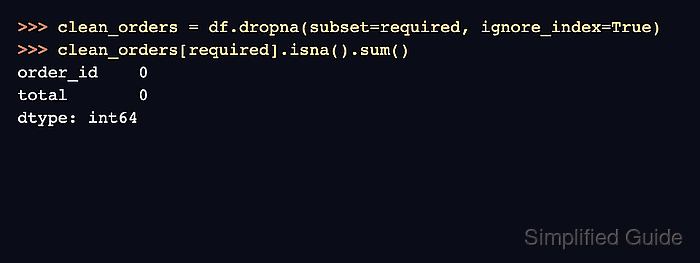
- Verify the required columns no longer contain missing cells.
>>> clean_orders[required].isna().sum()
order_id    0
total       0
dtype: int64
- Keep rows that have at least four non-missing values when row completeness matters more than a fixed required-column list.
>>> df.dropna(thresh=4)
  order_id customer region   total shipped_at  legacy_note
0     1001      Ava   EMEA  125.50 2026-06-01          NaN
2     1003       Cy   <NA>   89.00 2026-06-03          NaN
3     <NA>     Dana   EMEA   42.75 2026-06-04          NaN
4     1005      Eli   AMER    0.00        NaT          NaN
thresh=4 keeps rows with at least four present cells. Do not combine thresh and how in the same dropna() call.
- Remove columns that are entirely missing.
>>> df.dropna(axis="columns", how="all")
  order_id customer region   total shipped_at
0     1001      Ava   EMEA  125.50 2026-06-01
1     1002      Ben   APAC     NaN        NaT
2     1003       Cy   <NA>   89.00 2026-06-03
3     <NA>     Dana   EMEA   42.75 2026-06-04
4     1005      Eli   AMER    0.00        NaT
axis=“columns”, how=“any” removes every column that has even one missing cell. Use it only when partially populated columns should be discarded.

Mohd Shakir Zakaria is a cloud architect with deep roots in software development and open-source advocacy. Certified in AWS, Red Hat, VMware, ITIL, and Linux, he specializes in designing and managing robust cloud and on-premises infrastructures.


