DataFrame indexes can carry business identifiers that remain meaningful after rows are reordered, while integer positions describe only the current layout. Choosing the matching pandas indexer prevents a row label from being mistaken for an offset when extracting a smaller table.
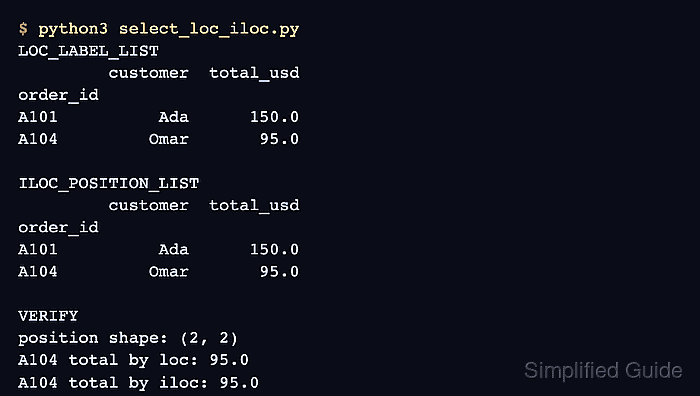
The loc indexer accepts row and column labels. A label slice includes both endpoints, so a range from A102 through A104 returns all three labeled rows when they occur in that order.
The iloc indexer accepts zero-based positions and follows Python slicing, which excludes the stop position. Positions 1:4 therefore select the second through fourth rows, and lists of positions select columns independently of their labels.
Related: How to create a pandas DataFrame
Related: How to filter rows in a pandas DataFrame
Related: How to set an index in pandas
Steps to select pandas DataFrame rows and columns with loc and iloc:
- Create select_loc_iloc.py with an indexed orders DataFrame.
- select_loc_iloc.py
import pandas as pd

orders = pd.DataFrame(
    {
        "order_id": ["A101", "A102", "A103", "A104", "A105"],
        "customer": ["Ada", "Lin", "Maya", "Omar", "Nia"],
        "region": ["EMEA", "APAC", "AMER", "EMEA", "APAC"],
        "qty": [3, 12, 7, 2, 15],
        "total_usd": [150.0, 240.0, 875.0, 95.0, 360.0],
    }
).set_index("order_id")

print("ORDERS")
print(orders)
The example orders object stands in for a DataFrame already loaded by the working program. Its distinct order_id index keeps labels such as A104 visibly different from row position 3.
- Append the loc selection after the existing print(orders) call.
label_subset = orders.loc["A102":"A104", ["customer", "total_usd"]]

print("\nLOC A102:A104")
print(label_subset)
The row slice includes A104 because loc treats the stop value as a label and includes it. Both requested column labels must exist or pandas raises KeyError.
- Append the positional selection block beneath the loc output.
position_subset = orders.iloc[1:4, [0, 3]]

print("\nILOC 1:4")
print(position_subset)
The row slice includes positions 1, 2, and 3 but excludes position 4. Column positions 0 and 3 select customer and total_usd in the current column order.
- Append the dynamic equality check after the iloc output block.
selections_match = label_subset.equals(position_subset)

print(f"\nSelections match: {selections_match}")
assert selections_match
- Run the completed selection script with Python.
$ python3 select_loc_iloc.py
ORDERS
         customer region  qty  total_usd
order_id
A101          Ada   EMEA    3      150.0
A102          Lin   APAC   12      240.0
A103         Maya   AMER    7      875.0
A104         Omar   EMEA    2       95.0
A105          Nia   APAC   15      360.0

LOC A102:A104
         customer  total_usd
order_id
A102          Lin      240.0
A103         Maya      875.0
A104         Omar       95.0

ILOC 1:4
         customer  total_usd
order_id
A102          Lin      240.0
A103         Maya      875.0
A104         Omar       95.0

Selections match: True
Both subsets contain the same rows and columns, but loc reaches them through labels while iloc reaches them through their current positions. The assertion exits with an error if either selection changes.

Mohd Shakir Zakaria is a cloud architect with deep roots in software development and open-source advocacy. Certified in AWS, Red Hat, VMware, ITIL, and Linux, he specializes in designing and managing robust cloud and on-premises infrastructures.


