Tabular analysis often starts with records that already exist in Python rather than in a file. A pandas DataFrame gives those records labeled rows and columns so later selection, type conversion, and export operations can address each field consistently.
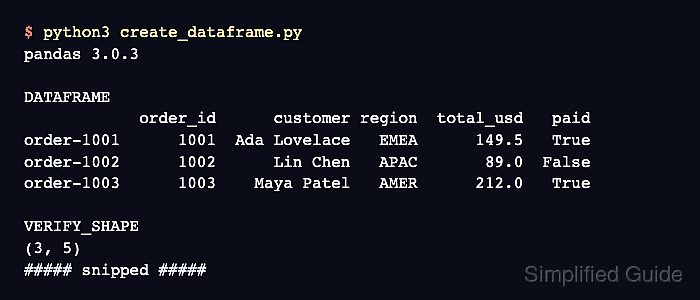
A list of dictionaries fits row-oriented data because each dictionary represents one record. The columns argument selects and orders the fields, while index supplies meaningful row labels instead of the default numeric range.
Custom row labels make individual records easy to inspect with .loc, but the labels should remain unique when each lookup must identify one row. Shape, axis labels, and a known field value together expose missing records, reordered fields, and incorrect indexing.
Related: How to read CSV files with pandas
Related: How to create columns in pandas
Related: How to convert data types in pandas
Steps to create a pandas DataFrame:
- Save the pandas import and row records in create_dataframe.py.
- create_dataframe.py
import pandas as pd

records = [
    {
        "order_id": 1001,
        "customer": "Ada Lovelace",
        "region": "EMEA",
        "total_usd": 149.50,
        "paid": True,
    },
    {
        "order_id": 1002,
        "customer": "Lin Chen",
        "region": "APAC",
        "total_usd": 89.00,
        "paid": False,
    },
    {
        "order_id": 1003,
        "customer": "Maya Patel",
        "region": "AMER",
        "total_usd": 212.00,
        "paid": True,
    },
]
Each dictionary becomes one row, and consistent keys produce the same fields across those rows.
- Append the column order and row labels below the records.
column_order = ["order_id", "customer", "region", "total_usd", "paid"]
row_labels = ["order-1001", "order-1002", "order-1003"]
The label lists make the intended axes explicit before construction. columns also excludes input keys that are not listed.
- Construct the DataFrame below the axis definitions.
df = pd.DataFrame(records, columns=column_order, index=row_labels)
- Append the verification section after the constructor.
assert df.shape == (3, 5)
assert df.columns.tolist() == [
    "order_id",
    "customer",
    "region",
    "total_usd",
    "paid",
]
assert df.index.tolist() == ["order-1001", "order-1002", "order-1003"]
assert df.loc["order-1002", "total_usd"] == 89.0

print(df)
print()
print(f"shape={df.shape}")
print(f"columns={df.columns.tolist()}")
print(f"index={df.index.tolist()}")
print(f"order-1002 total_usd={df.loc['order-1002', 'total_usd']}")
The assertions stop the program when the row count, column order, custom index, or selected value differs from the intended table.
- Run the completed create_dataframe.py script.
$ python3 create_dataframe.py
            order_id      customer region  total_usd   paid
order-1001      1001  Ada Lovelace   EMEA      149.5   True
order-1002      1002      Lin Chen   APAC       89.0  False
order-1003      1003    Maya Patel   AMER      212.0   True

shape=(3, 5)
columns=['order_id', 'customer', 'region', 'total_usd', 'paid']
index=['order-1001', 'order-1002', 'order-1003']
order-1002 total_usd=89.0

Mohd Shakir Zakaria is a cloud architect with deep roots in software development and open-source advocacy. Certified in AWS, Red Hat, VMware, ITIL, and Linux, he specializes in designing and managing robust cloud and on-premises infrastructures.


