Setting an index in pandas moves row labels from the default integer range to meaningful values such as order IDs, dates, or compound business keys. A named index makes label-based selection, alignment, grouping, joining, and time-series work target the rows the data actually represents.
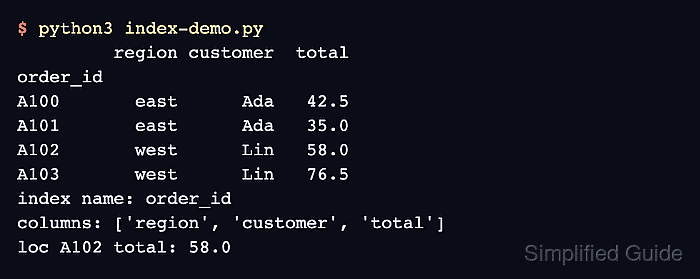
DataFrame.set_index() returns a new DataFrame by default. The selected column is removed from regular columns unless drop=False is used, and passing more than one column creates a MultiIndex with one level per key.
Use unique labels when a row key must identify one record. Repeated index labels are valid in pandas, but label selection can return several rows, so check the index before downstream code assumes that each label maps to one result.
Steps to set a pandas DataFrame index:
- Save the demo as
index-demo.py
with order_id set as the row label.
import pandas as pd

orders = pd.DataFrame(
    {
        "order_id": ["A100", "A101", "A102", "A103"],
        "region": ["east", "east", "west", "west"],
        "customer": ["Ada", "Ada", "Lin", "Lin"],
        "total": [42.50, 35.00, 58.00, 76.50],
    }
)

indexed = orders.set_index("order_id")

print(indexed)
print("index name:", indexed.index.name)
print("columns:", indexed.columns.tolist())
print("loc A102 total:", indexed.loc["A102", "total"])
set_index() leaves the original orders DataFrame unchanged because inplace=False is the default.
- Run the script and confirm the index name, remaining columns, and label selection.
$ python3 index-demo.py
         region customer  total
order_id
A100       east      Ada   42.5
A101       east      Ada   35.0
A102       west      Lin   58.0
A103       west      Lin   76.5
index name: order_id
columns: ['region', 'customer', 'total']
loc A102 total: 58.0
loc uses the new order_id labels, so A102 selects by row label rather than by integer position.
- Keep the key column only when downstream code still needs it as normal data.
with_key = orders.set_index("order_id", drop=False)
columns_to_show = ["order_id", "total"]
print(with_key.loc[:, columns_to_show])
         order_id  total
order_id
A100         A100   42.5
A101         A101   35.0
A102         A102   58.0
A103         A103   76.5
The default drop=True removes the key from regular columns. Use drop=False when export, display, or later column operations still need the key column.
- Create a MultiIndex when more than one column identifies a row.
multi = orders.set_index(["region", "order_id"]).sort_index()
print(multi)
print("index names:", list(multi.index.names))
                customer  total
region order_id
east   A100          Ada   42.5
       A101          Ada   35.0
west   A102          Lin   58.0
       A103          Lin   76.5
index names: ['region', 'order_id']
sort_index() is optional for correctness, but sorted MultiIndex output is easier to read and often easier to slice by level.
- Select a MultiIndex row with the full key tuple.
print(multi.loc[("west", "A103"), "total"])
76.5
A partial label such as multi.loc["west"] selects all rows in that first index level.
- Check whether each index label is unique before treating labels as one-record keys.
print(indexed.index.is_unique)
True
Duplicate index labels are allowed. If this check returns False, loc can return multiple rows for one label.
- Reset the index when the labels need to become columns again.
restored = indexed.reset_index()
print(restored)
  order_id region customer  total
0     A100   east      Ada   42.5
1     A101   east      Ada   35.0
2     A102   west      Lin   58.0
3     A103   west      Lin   76.5
reset_index() is the reverse of set_index() for this shape, restoring the default integer index and moving order_id back into a column.

Mohd Shakir Zakaria is a cloud architect with deep roots in software development and open-source advocacy. Certified in AWS, Red Hat, VMware, ITIL, and Linux, he specializes in designing and managing robust cloud and on-premises infrastructures.


