Wide tables often place one repeated measure in each column, which makes periods or categories part of the schema instead of row data. Converting those columns into rows gives plotting, grouping, and joins a consistent variable column and a single value column.
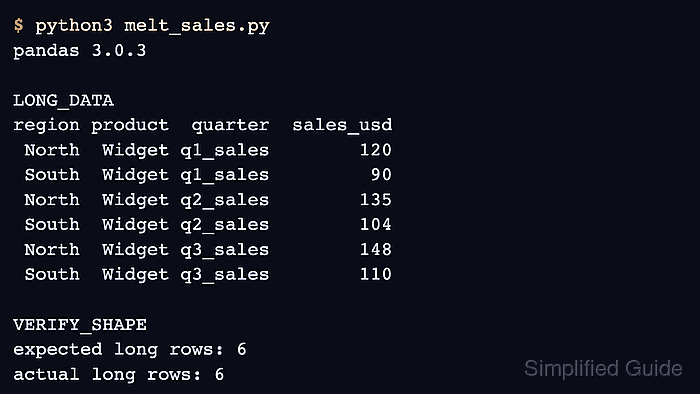
Pandas preserves columns named in id_vars and unpivots columns named in value_vars when DataFrame.melt() runs. The selected column labels become values in the var_name column, while their cells become values in the value_name column.
The sales table keeps region and product as identifiers and reshapes three quarterly columns. Assertions check the expected row count, the quarter labels, and the preserved sales total before the script prints the long-form table.
Related: How to create a pandas DataFrame
Related: How to aggregate data with pandas groupby
Related: How to create a pivot table in pandas
Steps to reshape a pandas DataFrame from wide to long with melt:
- Create melt_sales.py with the wide sales table.
- melt_sales.py
import pandas as pd

wide = pd.DataFrame(
    {
        "region": ["North", "South"],
        "product": ["Widget", "Widget"],
        "q1_sales": [120, 90],
        "q2_sales": [135, 104],
        "q3_sales": [148, 110],
    }
)
- Append the identifier and measurement column lists to melt_sales.py.
id_columns = ["region", "product"]
value_columns = ["q1_sales", "q2_sales", "q3_sales"]
- Append the melt operation with names for the generated columns.
long = wide.melt(
    id_vars=id_columns,
    value_vars=value_columns,
    var_name="quarter",
    value_name="sales_usd",
)
value_name must not match an existing column label. Omitting value_vars melts every column not listed in id_vars.
- Append the outcome checks and long-table display.
expected_rows = len(wide) * len(value_columns)
assert len(long) == expected_rows
assert set(long["quarter"]) == set(value_columns)
assert long["sales_usd"].sum() == wide[value_columns].sum().sum()

print(long.to_string(index=False))
print()
print(f"rows: {len(long)}")
print(f"columns: {', '.join(long.columns)}")
print(f"sales total: {long['sales_usd'].sum()}")
- Run melt_sales.py to verify the reshaped rows and preserved sales total.
$ python3 melt_sales.py
region product  quarter  sales_usd
 North  Widget q1_sales        120
 South  Widget q1_sales         90
 North  Widget q2_sales        135
 South  Widget q2_sales        104
 North  Widget q3_sales        148
 South  Widget q3_sales        110

rows: 6
columns: region, product, quarter, sales_usd
sales total: 707

Mohd Shakir Zakaria is a cloud architect with deep roots in software development and open-source advocacy. Certified in AWS, Red Hat, VMware, ITIL, and Linux, he specializes in designing and managing robust cloud and on-premises infrastructures.


