Long-form datasets keep one observation per row, while reports often need totals arranged across two dimensions. A pandas pivot table turns those records into a matrix that can be read by region and quarter without changing the source rows.
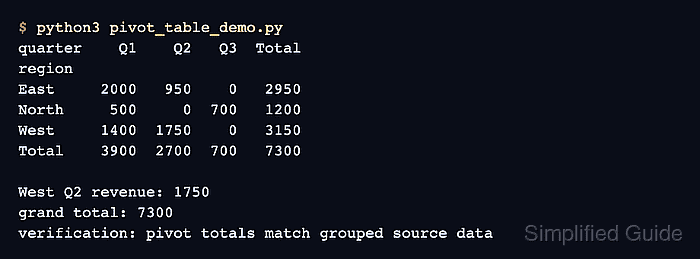
The pd.pivot_table() function groups records by the fields assigned to index and columns before applying aggfunc to the selected values field. Duplicate region-quarter pairs are valid input because their revenue values are combined into one result cell.
Revenue is additive, so sum is the appropriate aggregation for this dataset. Missing region-quarter combinations become zeros for reporting, while margins add row and column totals that can be checked against the original revenue records.
Related: How to read CSV files with pandas
Related: How to aggregate data with pandas groupby
Steps to create a pandas pivot table:
- Define the source sales records in pivot_table_demo.py.
- pivot_table_demo.py
import pandas as pd

sales = pd.DataFrame(
    {
        "region": ["East", "East", "East", "West", "West", "West", "North", "North"],
        "quarter": ["Q1", "Q1", "Q2", "Q1", "Q2", "Q2", "Q1", "Q3"],
        "revenue": [1200, 800, 950, 1400, 1100, 650, 500, 700],
    }
)
The repeated East-Q1 and West-Q2 pairs make the aggregation visible instead of merely reshaping unique records.
- Construct the revenue pivot below the sales definition.
pivot = pd.pivot_table(
    sales,
    values="revenue",
    index="region",
    columns="quarter",
    aggfunc="sum",
    fill_value=0,
    margins=True,
    margins_name="Total",
)
index creates the region rows, columns creates the quarter columns, and margins adds totals calculated with the same sum aggregation. The pivot() function is the non-aggregating alternative for unique row-column pairs.
- Calculate comparison values directly from the source records below the pivot definition.
expected_west_q2 = sales.loc[
    (sales["region"] == "West") & (sales["quarter"] == "Q2"),
    "revenue",
].sum()
expected_total = sales["revenue"].sum()
The filtered sum checks a cell built from duplicate records, while the source-column sum checks the pivot table's grand total.
- Add the assertions and report output below the comparison values.
assert pivot.loc["West", "Q2"] == expected_west_q2
assert pivot.loc["Total", "Total"] == expected_total

print(pivot.to_string())
print(f"\nWest Q2 pivot/source: {pivot.loc['West', 'Q2']}/{expected_west_q2}")
print(f"Grand total pivot/source: {pivot.loc['Total', 'Total']}/{expected_total}")
Either assertion stops the script before it prints a successful comparison when the pivot cell or grand total differs from the source data.
- Run the completed pivot_table_demo.py script to confirm the pivot cell and grand total match the source records.
$ python3 pivot_table_demo.py
quarter    Q1    Q2   Q3  Total
region
East     2000   950    0   2950
North     500     0  700   1200
West     1400  1750    0   3150
Total    3900  2700  700   7300

West Q2 pivot/source: 1750/1750
Grand total pivot/source: 7300/7300
The matching pairs show that the aggregated West-Q2 cell and the grand total agree with values calculated independently from the source records.

Mohd Shakir Zakaria is a cloud architect with deep roots in software development and open-source advocacy. Certified in AWS, Red Hat, VMware, ITIL, and Linux, he specializes in designing and managing robust cloud and on-premises infrastructures.


