Fine texture and sensor noise can overwhelm thresholding, edge detection, and contour analysis even when larger objects remain easy to see. Gaussian smoothing reduces those small variations while keeping the image dimensions unchanged for the next OpenCV stage.
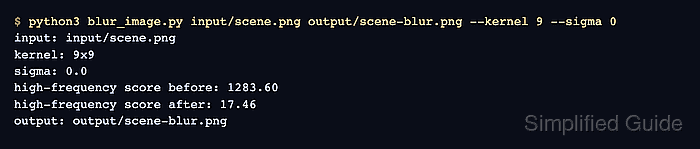
The cv2.GaussianBlur() function weights nearby pixels with a Gaussian kernel. Kernel width and height must be positive odd values, and a zero sigma lets OpenCV derive the standard deviation from the selected kernel size.
A nine-pixel kernel makes the smoothing visible on the textured sample without erasing its major shapes. Increase the kernel only when small detail still disrupts the downstream operation, because every larger neighborhood also softens real boundaries.
Steps to blur an image with OpenCV:
- Place the source image at input/scene.png.
Color images with visible texture make smoothing strength easier to compare. cv2.imread() must support the file format.
- Create blur_image.py with imports and odd-kernel validation.
- blur_image.py
#!/usr/bin/env python3
import argparse
from pathlib import Path

import cv2


def odd_kernel(value: str) -> int:
    kernel = int(value)
    if kernel < 1 or kernel % 2 == 0:
        raise argparse.ArgumentTypeError("kernel must be a positive odd integer")
    return kernel
- Append command-line parsing and guarded image loading to blur_image.py.
- blur_image.py
parser = argparse.ArgumentParser(description="Apply Gaussian blur to an image.")
parser.add_argument("input_image", type=Path)
parser.add_argument("output_image", type=Path)
parser.add_argument("--kernel", type=odd_kernel, default=9)
parser.add_argument("--sigma", type=float, default=0.0)
args = parser.parse_args()

image = cv2.imread(str(args.input_image), cv2.IMREAD_COLOR)
if image is None:
    raise SystemExit(f"could not read image: {args.input_image}")
- Append Gaussian filtering to blur_image.py.
- blur_image.py
blurred = cv2.GaussianBlur(
    image,
    (args.kernel, args.kernel),
    args.sigma,
)
- Append guarded output writing to blur_image.py.
- blur_image.py
args.output_image.parent.mkdir(parents=True, exist_ok=True)
if not cv2.imwrite(str(args.output_image), blurred):
    raise SystemExit(f"could not write image: {args.output_image}")
- Append result reporting to blur_image.py.
- blur_image.py
print(f"blurred: {args.input_image} -> {args.output_image}")
print(f"dimensions: {image.shape[1]}x{image.shape[0]}")
print(f"kernel: {args.kernel}x{args.kernel}")
print(f"sigma: {args.sigma:.1f}")
- Compare the assembled blur_image.py with the consolidated file.
- blur_image.py
#!/usr/bin/env python3
import argparse
from pathlib import Path

import cv2


def odd_kernel(value: str) -> int:
    kernel = int(value)
    if kernel < 1 or kernel % 2 == 0:
        raise argparse.ArgumentTypeError("kernel must be a positive odd integer")
    return kernel


parser = argparse.ArgumentParser(description="Apply Gaussian blur to an image.")
parser.add_argument("input_image", type=Path)
parser.add_argument("output_image", type=Path)
parser.add_argument("--kernel", type=odd_kernel, default=9)
parser.add_argument("--sigma", type=float, default=0.0)
args = parser.parse_args()

image = cv2.imread(str(args.input_image), cv2.IMREAD_COLOR)
if image is None:
    raise SystemExit(f"could not read image: {args.input_image}")

blurred = cv2.GaussianBlur(
    image,
    (args.kernel, args.kernel),
    args.sigma,
)

args.output_image.parent.mkdir(parents=True, exist_ok=True)
if not cv2.imwrite(str(args.output_image), blurred):
    raise SystemExit(f"could not write image: {args.output_image}")

print(f"blurred: {args.input_image} -> {args.output_image}")
print(f"dimensions: {image.shape[1]}x{image.shape[0]}")
print(f"kernel: {args.kernel}x{args.kernel}")
print(f"sigma: {args.sigma:.1f}")
- Run blur_image.py with a nine-pixel Gaussian kernel.
$ python3 blur_image.py input/scene.png output/scene-blur.png --kernel 9 --sigma 0
blurred: input/scene.png -> output/scene-blur.png
dimensions: 720x480
kernel: 9x9
sigma: 0.0

Both paths can point to project files. --kernel remains positive and odd; a lower value preserves more boundary detail.
- Verify the saved blur with an independent OpenCV comparison.
$ python3 - <<'PY'
import cv2

source = cv2.imread("input/scene.png", cv2.IMREAD_COLOR)
blurred = cv2.imread("output/scene-blur.png", cv2.IMREAD_COLOR)
if source is None or blurred is None:
    raise SystemExit("source or blurred image could not be read")
if source.shape != blurred.shape:
    raise SystemExit("output dimensions differ from source dimensions")

source_gray = cv2.cvtColor(source, cv2.COLOR_BGR2GRAY)
blurred_gray = cv2.cvtColor(blurred, cv2.COLOR_BGR2GRAY)
source_variance = cv2.Laplacian(source_gray, cv2.CV_64F).var()
blurred_variance = cv2.Laplacian(blurred_gray, cv2.CV_64F).var()
mean_change = cv2.absdiff(source, blurred).mean()

if mean_change <= 0:
    raise SystemExit("blurred image does not differ from source image")
if blurred_variance >= source_variance:
    raise SystemExit("blurred image did not reduce Laplacian variance")

print(f"dimensions preserved: {source.shape[1]}x{source.shape[0]}")
print(f"mean pixel change: {mean_change:.2f}")
print(f"Laplacian variance: {source_variance:.2f} -> {blurred_variance:.2f}")
PY
dimensions preserved: 720x480
mean pixel change: 11.65
Laplacian variance: 2567.91 -> 27.68
A textured image should keep the same dimensions, change at least some pixels, and show lower Laplacian variance after smoothing. A flat image may have little high-frequency detail to reduce.

Mohd Shakir Zakaria is a cloud architect with deep roots in software development and open-source advocacy. Certified in AWS, Red Hat, VMware, ITIL, and Linux, he specializes in designing and managing robust cloud and on-premises infrastructures.


