A grayscale image can carry more tonal detail than contouring, measurement, or masking needs. Thresholding reduces that range to two pixel classes, separating a dark subject from a light background in a form that later OpenCV operations can consume directly.
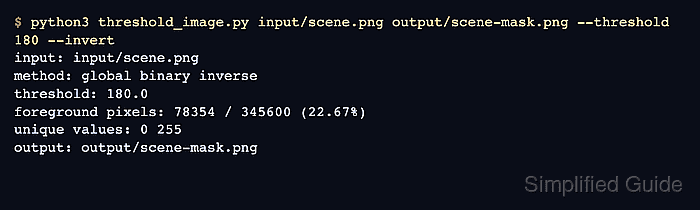
Otsu's method in cv.threshold() selects one cutoff from the image histogram. It avoids guessing a fixed value when the foreground and background form distinct intensity groups.
The inverse binary mode assigns dark pixels to white foreground. The saved PNG is ready only when it matches the source dimensions and contains both 0 and 255; a one-value image indicates that the threshold did not separate two classes.
Related: How to blur an image with OpenCV
Related: How to apply morphology to an image with OpenCV
Related: How to find contours with OpenCV
Steps to threshold an image with OpenCV:
- Place the source image at input/scene.png.
Otsu thresholding suits images with distinct dark and light intensity groups. Uneven illumination may need a locally calculated threshold instead.
- Create threshold_image.py with paths and guarded grayscale loading.
- threshold_image.py
#!/usr/bin/env python3
from pathlib import Path

import cv2 as cv
import numpy as np


input_path = Path("input/scene.png")
output_path = Path("output/scene-mask.png")

gray = cv.imread(str(input_path), cv.IMREAD_GRAYSCALE)
if gray is None:
    raise SystemExit(f"could not read image: {input_path}")
- Append inverse Otsu thresholding beneath the image-read check in threshold_image.py.
- threshold_image.py
threshold_value, mask = cv.threshold(
    gray,
    0,
    255,
    cv.THRESH_BINARY_INV | cv.THRESH_OTSU,
)
- Append binary-value validation beneath the threshold call in threshold_image.py.
- threshold_image.py
values = np.unique(mask)
if not np.array_equal(values, np.array([0, 255], dtype=np.uint8)):
    raise SystemExit(f"expected a two-value mask, got: {values.tolist()}")
- Append PNG writing and result reporting beneath the validation block in threshold_image.py.
- threshold_image.py
output_path.parent.mkdir(parents=True, exist_ok=True)
if not cv.imwrite(str(output_path), mask):
    raise SystemExit(f"could not write mask: {output_path}")

foreground_pixels = cv.countNonZero(mask)
foreground_percent = foreground_pixels / mask.size * 100
print(f"threshold: {threshold_value:.1f}")
print(f"foreground: {foreground_pixels} / {mask.size} ({foreground_percent:.2f}%)")
print(f"values: {' '.join(str(int(value)) for value in values)}")
print(f"saved: {output_path}")
- Run threshold_image.py to create the inverse binary mask.
$ python3 threshold_image.py
threshold: 147.0
foreground: 98540 / 345600 (28.51%)
values: 0 255
saved: output/scene-mask.png
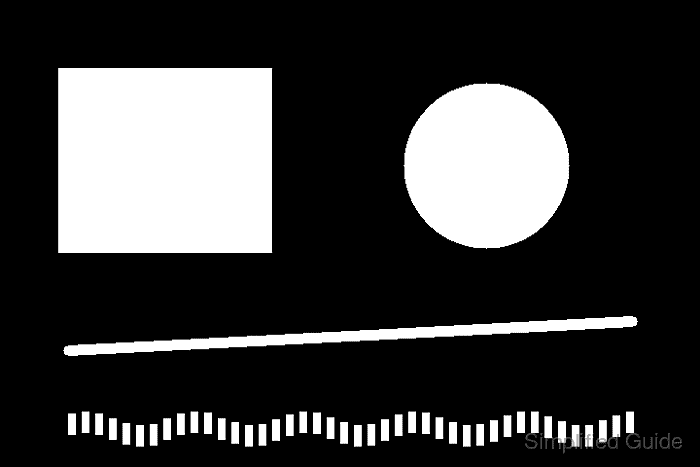
White pixels are the dark foreground selected by cv.THRESH_BINARY_INV; black pixels are the lighter background.
- Compare output/scene-mask.png with input/scene.png through an independent readability, dimension, and binary-value check.
$ python3 - <<'PY'
import cv2 as cv
import numpy as np

source = cv.imread('input/scene.png', cv.IMREAD_GRAYSCALE)
if source is None:
    raise SystemExit('could not read input/scene.png')
mask = cv.imread('output/scene-mask.png', cv.IMREAD_GRAYSCALE)
if mask is None:
    raise SystemExit('could not read output/scene-mask.png')
if mask.shape != source.shape:
    raise SystemExit(f'expected mask shape {source.shape}, got: {mask.shape}')
values = np.unique(mask)
if not np.array_equal(values, np.array([0, 255], dtype=np.uint8)):
    raise SystemExit(f'expected both binary values, got: {values.tolist()}')
print(f'source shape: {source.shape}')
print(f'mask shape: {mask.shape}')
print(f'values: {values.tolist()}')
PY
source shape: (480, 720)
mask shape: (480, 720)
values: [0, 255]

Mohd Shakir Zakaria is a cloud architect with deep roots in software development and open-source advocacy. Certified in AWS, Red Hat, VMware, ITIL, and Linux, he specializes in designing and managing robust cloud and on-premises infrastructures.


