Image file input and output is the first checkpoint in most OpenCV Python projects. A script that can load a known image, confirm its dimensions, and write a new file shows that later crop, resize, mask, or detection code is starting from a readable source and a writable output path.
cv.imread() decodes a file into a NumPy array, and normal color images arrive in OpenCV BGR channel order. In Python, a missing path, unreadable file, or unsupported image format returns None, so the script must test that state before reading shape or passing the image to another operation.
cv.imwrite() saves according to the output filename extension and returns a boolean status. The smoke script keeps the output as PNG, then reopens the written file to confirm that the saved image can be decoded again before it becomes input for another OpenCV step.
Related: How to install OpenCV on Ubuntu
Related: How to convert image color spaces with OpenCV
Related: How to crop an image with OpenCV
Steps to read and write an image with OpenCV:
- Create folders for the input and written image.
$ mkdir -p input output
- Copy the source image into the input folder.
$ cp scene.png input/scene.png
Replace scene.png with the image to load. Keep input/scene.png when using the default script command.
- Create the image read/write script.
- read_write_image.py
from argparse import ArgumentParser
from pathlib import Path

import cv2 as cv


parser = ArgumentParser()
parser.add_argument("--input", default="input/scene.png", help="Source image")
parser.add_argument("--output", default="output/scene-copy.png", help="Output image")
args = parser.parse_args()

input_path = Path(args.input)
output_path = Path(args.output)
output_path.parent.mkdir(parents=True, exist_ok=True)

image = cv.imread(str(input_path), cv.IMREAD_COLOR)
if image is None:
    raise SystemExit(f"could not read input image: {input_path}")

if not cv.imwrite(str(output_path), image):
    raise SystemExit(f"could not write output image: {output_path}")

written = cv.imread(str(output_path), cv.IMREAD_COLOR)
if written is None:
    raise SystemExit(f"could not read written image: {output_path}")

if written.shape != image.shape:
    raise SystemExit(f"shape changed: source={image.shape} written={written.shape}")

source_height, source_width = image.shape[:2]
written_height, written_width = written.shape[:2]
source_channels = 1 if image.ndim == 2 else image.shape[2]
written_channels = 1 if written.ndim == 2 else written.shape[2]

print(f"read: {input_path}")
print(f"source: {source_width}x{source_height} channels={source_channels} dtype={image.dtype}")
print(f"wrote: {output_path}")
print(f"verified: {written_width}x{written_height} channels={written_channels} dtype={written.dtype}")
The image is None check catches unreadable input before image.shape raises an attribute error. The cv.imwrite() return check catches writer failures such as unsupported extensions or unwritable output paths.
- Run the script with the default paths.
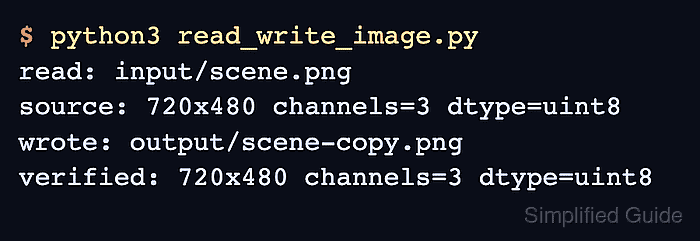
$ python3 read_write_image.py
read: input/scene.png
source: 720x480 channels=3 dtype=uint8
wrote: output/scene-copy.png
verified: 720x480 channels=3 dtype=uint8
- Review the written image.

The file should show the same scene because the script writes the loaded matrix directly. Use a new output name before adding processing steps that change pixels.
- Remove the sample script after moving the read/write checks into the project code.
$ rm read_write_image.py

Mohd Shakir Zakaria is a cloud architect with deep roots in software development and open-source advocacy. Certified in AWS, Red Hat, VMware, ITIL, and Linux, he specializes in designing and managing robust cloud and on-premises infrastructures.


