Edge maps isolate rapid brightness changes so object boundaries can feed contour finding, shape analysis, or visual inspection. OpenCV implements the Canny detector as cv.Canny(), which produces thin white edges on a black background.
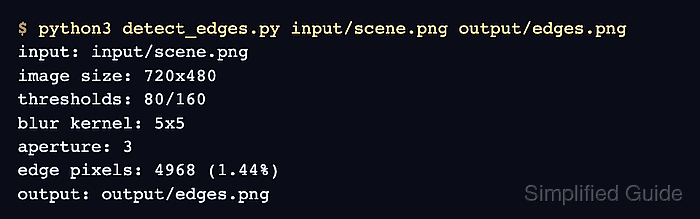
Noise can create short unwanted edges before the detector evaluates gradient strength. A small Gaussian blur reduces that noise, while the lower and upper Canny thresholds decide which weak gradients remain connected to strong edges.
The Python program reads one grayscale PNG and saves the edge map as another PNG, so it works without a desktop window. Thresholds of 80 and 160 are a useful starting pair for the sample scene; images with faint boundaries or heavy texture may need different values.
Related: How to read and write an image with OpenCV
Related: How to blur an image with OpenCV
Related: How to find contours with OpenCV
Steps to detect image edges with OpenCV:
- Place the source image at input/scene.png.
Images with visible brightness changes around objects or structures provide suitable boundaries for the edge map.
- Create detect_edges.py with the input contract and grayscale image check.
- detect_edges.py
from pathlib import Path

import cv2 as cv


input_path = Path("input/scene.png")
output_path = Path("output/edges.png")

gray = cv.imread(str(input_path), cv.IMREAD_GRAYSCALE)
if gray is None:
    raise SystemExit(f"could not read image: {input_path}")
- Append the smoothing and Canny stages below the image-read check in detect_edges.py.
- detect_edges.py
smoothed = cv.GaussianBlur(gray, (5, 5), 0)
edges = cv.Canny(smoothed, 80, 160)
The 5 x 5 Gaussian kernel reduces isolated noise before Canny evaluates gradients. The lower threshold keeps weak edges only when they connect to edges that reach the upper threshold.
- Append the PNG save and edge-count output below the cv.Canny() call in detect_edges.py.
- detect_edges.py
output_path.parent.mkdir(parents=True, exist_ok=True)
if not cv.imwrite(str(output_path), edges):
    raise SystemExit(f"could not write image: {output_path}")

edge_pixels = cv.countNonZero(edges)
edge_percent = edge_pixels / edges.size * 100

print(f"input: {input_path}")
print(f"image size: {gray.shape[1]}x{gray.shape[0]}")
print("thresholds: 80/160")
print(f"edge pixels: {edge_pixels} ({edge_percent:.2f}%)")
print(f"output: {output_path}")
- Compare detect_edges.py with the completed edge-detection program.
- detect_edges.py
from pathlib import Path

import cv2 as cv


input_path = Path("input/scene.png")
output_path = Path("output/edges.png")

gray = cv.imread(str(input_path), cv.IMREAD_GRAYSCALE)
if gray is None:
    raise SystemExit(f"could not read image: {input_path}")

smoothed = cv.GaussianBlur(gray, (5, 5), 0)
edges = cv.Canny(smoothed, 80, 160)

output_path.parent.mkdir(parents=True, exist_ok=True)
if not cv.imwrite(str(output_path), edges):
    raise SystemExit(f"could not write image: {output_path}")

edge_pixels = cv.countNonZero(edges)
edge_percent = edge_pixels / edges.size * 100

print(f"input: {input_path}")
print(f"image size: {gray.shape[1]}x{gray.shape[0]}")
print("thresholds: 80/160")
print(f"edge pixels: {edge_pixels} ({edge_percent:.2f}%)")
print(f"output: {output_path}")
- Run the completed program to write the Canny edge map.
$ python3 detect_edges.py
input: input/scene.png
image size: 720x480
thresholds: 80/160
edge pixels: 3832 (1.11%)
output: output/edges.png
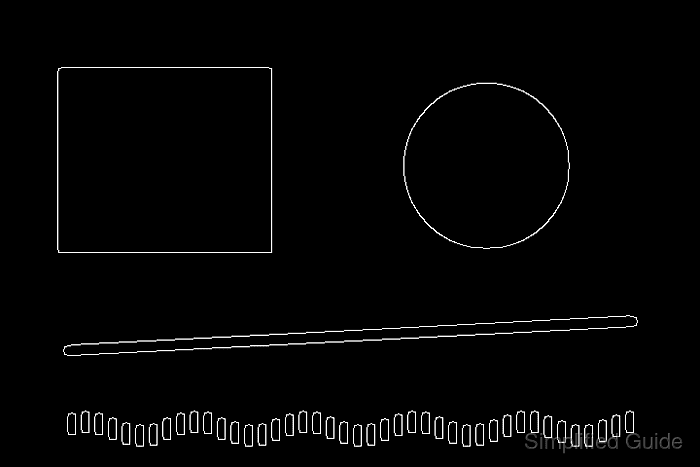
- Confirm that the saved edge map contains both background and detected-edge pixels.
$ python3 -c 'import cv2 as cv; image = cv.imread("output/edges.png", cv.IMREAD_GRAYSCALE); print(image.shape); print(image.min(), image.max()); print(cv.countNonZero(image))'
(480, 720)
0 255
3832
A missing image causes this command to fail, while a zero edge count shows that the selected thresholds retained no boundaries.

Mohd Shakir Zakaria is a cloud architect with deep roots in software development and open-source advocacy. Certified in AWS, Red Hat, VMware, ITIL, and Linux, he specializes in designing and managing robust cloud and on-premises infrastructures.


