A load balancer can send a user's next request to a different application instance. Open WebUI uses Redis to coordinate those instances, so live chat events and signed-out sessions are shared across replicas.
Redis complements shared storage rather than replacing it. Every replica needs the same PostgreSQL application database, a client-server vector database, an identical application secret, and access to the same uploaded files. Separate SQLite databases or separate upload directories leave users seeing different data even when Redis connects successfully.
Two Compose services on one Docker host can share an upload volume behind the host’s existing HTTPS Nginx proxy. Each application instance keeps one worker and its own local data volume. This arrangement distributes application traffic, but the host and the single Redis and PostgreSQL services remain points of failure.
Steps to configure Redis for Open WebUI scaling:
- Record the running application's image and mounts from the existing Compose project.
$ docker inspect --format '{{.Config.Image}} {{range .Mounts}}{{.Name}}:{{.Destination}} {{end}}' "$(docker compose ps -q open-webui)"
The existing service is named open-webui here; substitute its actual name. The replica names below are owui-a and owui-b. Both must use the same existing image, model-provider settings and persistent WEBUI_SECRET_KEY. Adding a replica must not silently upgrade the application.
- Back up the existing application data before changing its storage layout.
Replacing application containers interrupts active chats. Changing DATABASE_URL does not migrate SQLite accounts or chats, and changing VECTOR_DB does not migrate existing embeddings. Existing installations need a completed database migration and a vector reindexing plan before a second replica starts. The previous configuration, image, key, database backup and upload backup are the recovery set.
Related: How to back up and restore Open WebUI data - Save a protected copy of the current Compose definition.
$ install -m 600 compose.yaml compose.yaml.before-scaling
The copy may contain environment credentials. It belongs outside version control alongside protected backups.
- Open the existing .env beside compose.yaml in your text editor.
The PostgreSQL setup supplies POSTGRES_PASSWORD and WEBUI_SECRET_KEY here; it does not create a DATABASE_URL entry. This owner-only file and its existing keys stay in place.
- Add DATABASE_URL at the end of .env for the existing application database.
- .env
DATABASE_URL=postgresql://openwebui:${POSTGRES_PASSWORD}@postgres:5432/openwebui
This URL uses the published PostgreSQL setup’s existing openwebui role and database, postgres Compose service and POSTGRES_PASSWORD key. An existing DATABASE_URL entry is replaced rather than duplicated. A different database needs its own role, host, database and URL-encoded password; the URL must still select the database that already contains your accounts and chats. The existing application key and other entries remain unchanged.
- Save .env with the shared database URL.
- Stop the old single-instance application before changing its service definition.
$ docker compose stop open-webuiThis begins the maintenance interruption. The database and its backup remain intact. Restoring the saved Compose definition and starting its original service recovers the old layout only while its database schema and storage remain compatible.
- Prepare a shared PostgreSQL database with the vector extension.
CREATE EXTENSION IF NOT EXISTS vector;
The SQL runs in the application database through its administrator connection. A successful CREATE EXTENSION allows the pgvector adapter to initialize its tables. A missing extension or permission error needs the database administrator's attention before application startup. Existing embeddings need reindexing into this store.
- Open the existing compose.yaml in your text editor.
- Rename the existing open-webui service to owui-a while retaining its image and application volume.
- Copy that service definition to a second service named owui-b.
The next edits give the second service its own local data volume and disable its migrations. The first service retains any explicit volume name that identifies the original data. Fixed container_name values must be unique or omitted.
- Add a private Redis service under services and a persistent volume under the top-level volumes mapping.
services:
  redis:
    image: redis:8.4.8-alpine3.22
    restart: unless-stopped
    command: ["redis-server", "--appendonly", "yes"]
    mem_limit: 256m
    cpus: 1
    volumes:
      - redis-data:/data

volumes:
  redis-data:
There is no ports entry for Redis. Only trusted services in this Compose network should reach it. A Redis service across an untrusted network needs authentication and encrypted transport. Its persisted data includes token revocations; deleting it can make a revoked token usable again until that token expires.
- Define matching shared environment values on both application services.
environment:
  WEBUI_SECRET_KEY: "${WEBUI_SECRET_KEY:?retain the existing key}"
  DATABASE_URL: "${DATABASE_URL:?set the shared PostgreSQL URL}"
  VECTOR_DB: pgvector
  PGVECTOR_DB_URL: "${DATABASE_URL:?set the shared PostgreSQL URL}"
  PGVECTOR_CREATE_EXTENSION: "false"
  REDIS_URL: redis://redis:6379/0
  WEBSOCKET_MANAGER: redis
  WEBSOCKET_REDIS_URL: redis://redis:6379/0
  REDIS_KEY_PREFIX: open-webui
  ENABLE_WEBSOCKET_SUPPORT: "true"
  UVICORN_WORKERS: "1"
This mapping belongs in each replica's existing environment mapping, preserving its provider and other settings. The owner-only .env file supplies the existing key and the DATABASE_URL added earlier. All replicas need the same Redis server, database number and prefix; another deployment needs a different prefix.
REDIS_URL supports shared application state and token revocation; WEBSOCKET_MANAGER=redis selects the cross-replica event manager. WEBSOCKET_REDIS_URL can otherwise inherit REDIS_URL. These deployment settings take effect at container creation, not through an administrator-panel Save.
In Open WebUI 0.13.3, ENABLE_STAR_SESSIONS_MIDDLEWARE defaults to false. For an OAuth deployment that specifically needs Redis-backed callback sessions, ENABLE_STAR_SESSIONS_MIDDLEWARE: “true” selects the experimental Starsessions store on every replica with basic Redis. It is separate from JWT sign-in and sign-out revocation. Sentinel and Cluster are outside this setting's supported scope.
Related: OAuth middleware setting - Mount one shared upload volume at the same path on both replicas.
services:
  owui-a:
    volumes:
      - data-a:/app/backend/data
      - shared-uploads:/app/backend/data/uploads
  owui-b:
    volumes:
      - data-b:/app/backend/data
      - shared-uploads:/app/backend/data/uploads

volumes:
  data-a:
    external: true
    name: EXISTING_DATA_VOLUME
  data-b:
  shared-uploads:
    name: open-webui-shared-uploads
EXISTING_DATA_VOLUME is the exact volume name recorded before the old service stopped. These fragments merge into the existing services. The external first-replica volume preserves the original local data. The new open-webui-shared-uploads name must be unused before its initial copy. Two same-named Docker volumes on different hosts do not share bytes; multi-host replicas require a shared filesystem or object storage instead.
- Set ENABLE_DB_MIGRATIONS to “true” on owui-a and “false” on owui-b.
Only the first replica runs schema migrations. On an upgrade, other replicas stay stopped until that instance has finished migrating. Both replicas need the same image and sufficient memory for their own application process and local embedding model.
- Replace the ports mapping in each replica with its own loopback-only publication.
services:
  owui-a:
    ports:
      - "127.0.0.1:3000:8080"
  owui-b:
    ports:
      - "127.0.0.1:3001:8080"
The host Nginx reaches A on port 3000 and B on 3001. These entries replace the previous mappings, including any copied port 3000 on B. PostgreSQL and Redis have no published ports. The host’s existing HTTPS proxy and trusted certificate are prerequisites.
Related: How to configure Nginx reverse proxy for Open WebUI - Save compose.yaml with the two replica definitions and shared services.
- Validate the Compose definition without printing resolved secrets.
$ docker compose config --quiet
A zero exit status permits startup; a parsing or missing-variable error needs correction first. Plain docker compose config prints resolved credentials.
- Copy existing uploads into the new shared volume before either replica starts.
$ docker run --rm --network none \
  --mount type=volume,src=EXISTING_DATA_VOLUME,dst=/source,readonly \
  -v open-webui-shared-uploads:/dest \
  --entrypoint sh EXISTING_IMAGE \
  -c 'cp -a /source/uploads/. /dest/'
EXISTING_DATA_VOLUME and EXISTING_IMAGE are the volume and image recorded in the first step. The original is mounted read-only; Docker creates the destination volume if absent. The old application remains stopped so files cannot change during the copy. A failed copy blocks startup. A fresh installation without uploads can omit this copy. This copy preserves existing upload paths; it does not copy vector indexes or migrate database records.
- Start the private Redis service.
$ docker compose up -d redis
- Check Redis connectivity from the application network.
$ docker compose exec -T redis redis-cli ping
PONG
A failed connection needs the Redis service and network repaired. PONG alone does not prove that the application uses Redis or that events reach another replica.
- Recreate the first application replica with its shared-store settings.
$ docker compose up -d --wait owui-a
The old single-instance service must no longer accept traffic against an incompatible storage layout. Its protected configuration is the rollback path if startup fails; an older image must not be started against a newly migrated database without restoring the matching backup. No volume-removal command is needed.
- Start the second replica after the first replica is healthy.
$ docker compose up -d --wait owui-b
A startup failure needs its application log checked before traffic reaches it. Database connection errors point to the shared URL or permissions; vector-extension errors point to the database setup. A healthy endpoint does not prove sign-in or streaming.
- Back up the active host Nginx virtual host before changing its upstream.
$ sudo cp -p /etc/nginx/conf.d/openwebui.example.com.conf /etc/nginx/conf.d/openwebui.example.com.conf.before-scaling
This is the active host file created by the published proxy setup, with your hostname in its filename. A sites-available installation uses its existing active site file instead. The saved copy provides the routing rollback.
- Open the active host Nginx virtual host in your text editor.
$ sudoedit /etc/nginx/conf.d/openwebui.example.com.conf
- Replace the openwebui_backend upstream with the two loopback backends.
upstream openwebui_backend {
    zone openwebui 128k;
    server 127.0.0.1:3000;
    server 127.0.0.1:3001;
    keepalive 64;
}
The existing map, HTTPS server, certificates, forwarded headers, Upgrade headers, timeouts and disabled buffering remain as configured by the proxy guide. Its proxy_pass http://openwebui_backend; continues to select this upstream. The zone shares round-robin state between Nginx workers. WebSocket transport fits this routing; Socket.IO long-polling may additionally need session affinity.
- Add a temporary backend-identification header inside the existing HTTPS location / { block.
add_header X-OpenWebUI-Replica $upstream_addr always;
This diagnostic header distinguishes the two loopback ports in the streaming check and can be removed afterward. It reveals backend addresses to clients.
Tool: NGINX Proxy Headers Checker - Save the host Nginx virtual host with the revised upstream.
- Test the host Nginx configuration before reloading it.
$ sudo nginx -t
A successful test permits the reload. A syntax error blocks it; the error names the file and line to repair.
- Reload the host Nginx to route requests to both replicas.
$ sudo nginx -s reload
A routing failure after reload needs the loopback publications and upstream ports checked. Restoring the saved virtual host followed by a successful test and reload recovers the previous routing.
- Sign in through the proxy with an existing test account.
$ python3 -c '
import getpass, json, os, urllib.request
body = json.dumps({"email": input("Email: "), "password": getpass.getpass("Password: ")}).encode()
request = urllib.request.Request("https://openwebui.example.com/api/v1/auths/signin", data=body, headers={"Content-Type": "application/json"})
with urllib.request.urlopen(request) as response:
    account = json.load(response)
os.umask(0o077)
with open(".scaling-check.json", "x") as state:
    json.dump({"token": account["token"]}, state)
print("Proxy sign-in accepted")
'
Python 3 on the Docker and Nginx host runs the API requests. The URL uses your existing HTTPS hostname and trusted certificate; certificate errors block sign-in until trust is repaired. The password is hidden and the session token stays in a new owner-only .scaling-check.json in the Compose project directory, outside version control. A 401 needs the credentials checked; connection errors need proxy routing repaired. A fresh empty database requires its first administrator to be created through the local-only entry point before this sign-in.
- Check that the same sign-in token works on both application replicas.
$ python3 -c '
import json, urllib.request
state = json.load(open(".scaling-check.json"))
for replica, port in (("owui-a", 3000), ("owui-b", 3001)):
    request = urllib.request.Request("http://127.0.0.1:" + str(port) + "/api/v1/auths/", headers={"Authorization": "Bearer " + state["token"]})
    with urllib.request.urlopen(request) as response:
        assert response.status == 200
        print(replica, "authenticated", response.status)
'
A 401 on only one replica needs its application key and shared database checked. Two successful reads establish cross-replica authentication, independently of OAuth callback-session middleware.
- Stream a short model reply through each proxy backend.
$ python3 -c '
import json, urllib.request
state = json.load(open(".scaling-check.json"))
seen = set()
for attempt in range(12):
    body = json.dumps({"model": "qwen2.5:0.5b", "messages": [{"role": "user", "content": "Reply with only the words Scaling ready."}], "stream": True, "params": {"num_thread": 2, "num_ctx": 2048, "num_predict": 64, "temperature": 0}}).encode()
    request = urllib.request.Request("https://openwebui.example.com/api/chat/completions", data=body, headers={"Content-Type": "application/json", "Authorization": "Bearer " + state["token"]})
    text, finish, chunks, done = "", None, 0, False
    with urllib.request.urlopen(request, timeout=240) as response:
        upstream = response.headers["X-OpenWebUI-Replica"]
        for line in response:
            if not line.startswith(b"data: "): continue
            raw = line[6:].strip()
            if raw == b"[DONE]": done = True; continue
            for choice in json.loads(raw).get("choices", []):
                part = choice.get("delta", {}).get("content") or ""
                text += part
                chunks += bool(part)
                finish = choice.get("finish_reason") or finish
    assert text.strip() and chunks > 1 and finish == "stop" and done
    seen.add(upstream)
    print(upstream, "chunks=", chunks, "finish=", finish, "reply=", text.strip())
    if len(seen) == 2: break
assert len(seen) == 2, "Only one backend served the chat requests"
'
The model name is a replaceable value for a model already available through the deployment's provider. qwen2.5:0.5b requires an Ollama connection with that model installed; this command downloads no model. Reply wording and addresses vary. Two upstream addresses, multiple content chunks and finish= stop establish completed streams through both replicas. A single address needs the upstream pool checked; a timeout or incomplete stream needs provider connectivity and proxy buffering checked.
- Verify that an upload through the first replica is readable through the second.
$ python3 -c '
import json, urllib.request
state = json.load(open(".scaling-check.json"))
headers = {"Authorization": "Bearer " + state["token"]}
content = b"The north warehouse stores the cobalt lantern in cabinet 47."
boundary = "scaling-upload-boundary"
body = ("--" + boundary + "\r\nContent-Disposition: form-data; name=\"file\"; filename=\"scaling.txt\"\r\nContent-Type: text/plain\r\n\r\n").encode() + content + ("\r\n--" + boundary + "--\r\n").encode()
request = urllib.request.Request("http://127.0.0.1:3000/api/v1/files/?process=true&process_in_background=false", data=body, headers={**headers, "Content-Type": "multipart/form-data; boundary=" + boundary})
with urllib.request.urlopen(request, timeout=180) as response:
    uploaded = json.load(response)
request = urllib.request.Request("http://127.0.0.1:3001/api/v1/files/" + uploaded["id"] + "/content", headers=headers)
with urllib.request.urlopen(request) as response:
    assert response.read() == content
print("Upload on owui-a equals download on owui-b")
'
The default embedding model must be available before synchronous indexing can finish; an offline deployment needs its cache provisioned first. A missing file on the second replica means the upload mount or storage configuration differs. Matching bytes prove shared files, while retrieval quality is a separate vector-search check.
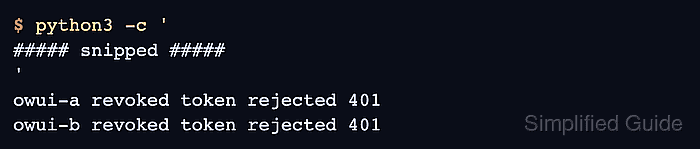
- Confirm that signing out invalidates the test token on both replicas.
$ python3 -c '
import json, urllib.error, urllib.request
state = json.load(open(".scaling-check.json"))
headers = {"Authorization": "Bearer " + state["token"], "Content-Type": "application/json"}
request = urllib.request.Request("http://127.0.0.1:3000/api/v1/auths/signout", data=b"{}", headers=headers)
with urllib.request.urlopen(request) as response:
    assert response.status == 200
for replica, port in (("owui-a", 3000), ("owui-b", 3001)):
    request = urllib.request.Request("http://127.0.0.1:" + str(port) + "/api/v1/auths/", headers=headers)
    try:
        urllib.request.urlopen(request)
    except urllib.error.HTTPError as error:
        assert error.code == 401
        print(replica, "revoked token rejected", error.code)
    else:
        raise RuntimeError(replica + " still accepts the signed-out token")
'
Both 401 results must follow the earlier successful authentication checks. A token still accepted on either replica points to its Redis connection or inconsistent shared settings. Redis errors in docker compose logs owui-a owui-b need attention even when health checks pass. For missing live events despite successful streams, the scaling troubleshooting checklist covers Redis event-manager settings and WebSocket upgrades.
- Remove the temporary test-token file from the Compose project directory.
$ rm .scaling-check.json
The two replicas, shared stores and uploaded test file remain in place.