Open WebUI stores users, chats, settings, prompts, API keys, and feature state in its application database. The default local database is convenient for a single container, but shared or scaled deployments need PostgreSQL so writes and migrations are handled by a database server instead of a file inside the data volume.
The database backend is selected when Open WebUI starts. Set DATABASE_URL to a PostgreSQL connection string before the application container is recreated, keep WEBUI_SECRET_KEY stable, and point every replica at the same database. A fresh PostgreSQL database is initialized through the normal migration path during startup.
Docker Compose keeps the database service, application service, persistent volumes, and environment values in one project. The Compose layout starts from an empty PostgreSQL database; an existing SQLite deployment with production data needs a backup and migration plan before the database URL is changed.
Steps to configure PostgreSQL for Open WebUI:
- Stop the running Open WebUI service before changing the database backend.
$ docker compose stop open-webui
[+] Stopping 1/1
 ✔ Container open-webui-open-webui-1  Stopped
Open WebUI does not copy existing SQLite data into PostgreSQL just because DATABASE_URL changes. Back up the existing data volume and plan the migration separately when accounts, chats, uploads, or settings already matter.
Related: How to back up and restore Open WebUI data - Store the PostgreSQL password and Open WebUI secret key in the Compose environment file.
COMPOSE_PROJECT_NAME=open-webui
OPEN_WEBUI_PORT=3000
POSTGRES_PASSWORD=replace-with-a-long-database-password
WEBUI_SECRET_KEY=replace-with-the-existing-or-new-webui-secret
Use the existing WEBUI_SECRET_KEY for a deployment that already has users. Changing it can invalidate sessions and break state that depends on the signing key.
Related: How to set WEBUI_SECRET_KEY in Open WebUI - Add PostgreSQL and DATABASE_URL to the Compose file.
services:
  postgres:
    image: postgres:16-alpine
    restart: unless-stopped
    environment:
      POSTGRES_DB: openwebui
      POSTGRES_USER: openwebui
      POSTGRES_PASSWORD: "${POSTGRES_PASSWORD:?set POSTGRES_PASSWORD in .env}"
    healthcheck:
      test: ["CMD-SHELL", "pg_isready -U openwebui -d openwebui"]
      interval: 10s
      timeout: 5s
      retries: 10
    volumes:
      - postgres-data:/var/lib/postgresql/data

  open-webui:
    image: ghcr.io/open-webui/open-webui:main
    restart: unless-stopped
    depends_on:
      postgres:
        condition: service_healthy
    ports:
      - "${OPEN_WEBUI_PORT:-3000}:8080"
    environment:
      WEBUI_SECRET_KEY: "${WEBUI_SECRET_KEY:?set WEBUI_SECRET_KEY in .env}"
      DATABASE_URL: "postgresql://openwebui:${POSTGRES_PASSWORD:?set POSTGRES_PASSWORD in .env}@postgres:5432/openwebui"
    volumes:
      - open-webui:/app/backend/data

volumes:
  postgres-data:
  open-webui:
For a managed PostgreSQL service, omit the local postgres service and replace the host, user, password, port, and database name in DATABASE_URL with the provider values. URL-encode special characters in the username or password.
Tool: Docker Compose Healthchecks Checker - Confirm that Compose reads both services.
$ docker compose config --services
postgres
open-webui
- Start the PostgreSQL service first.
$ docker compose up -d postgres
[+] Running 2/2
 ✔ Network open-webui_default       Created
 ✔ Container open-webui-postgres-1  Started
- Start Open WebUI after PostgreSQL is healthy.
$ docker compose up -d open-webui
[+] Running 2/2
 ✔ Container open-webui-postgres-1    Healthy
 ✔ Container open-webui-open-webui-1  Started
Start one Open WebUI instance first when several replicas share the same database. Let startup migrations finish before scaling out the remaining instances.
- Request the Open WebUI health endpoint through the mapped port.
$ curl -fsS http://127.0.0.1:3000/health {"status":true} - Check the startup log for PostgreSQL migration messages.
$ docker compose logs open-webui
open-webui-1  | INFO  [alembic.runtime.migration] Context impl PostgresqlImpl.
open-webui-1  | INFO  [alembic.runtime.migration] Will assume transactional DDL.
open-webui-1  | INFO  [alembic.runtime.migration] Running upgrade  -> 7e5b5dc7342b
open-webui-1  | INFO  [alembic.runtime.migration] Running upgrade 7e5b5dc7342b -> ca81bd47c050, Add config table.
##### snipped #####
The PostgresqlImpl line confirms that migrations are running against PostgreSQL instead of the default local database.
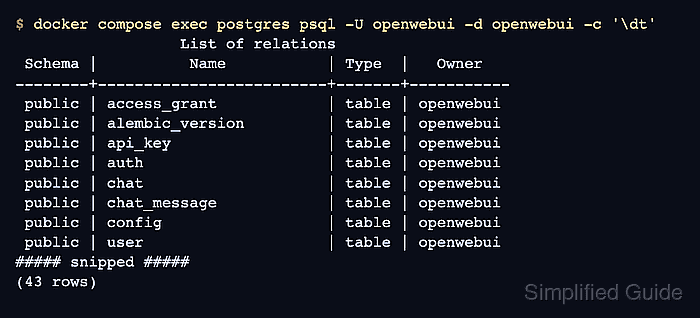
- List the Open WebUI tables in PostgreSQL.
$ docker compose exec postgres psql -U openwebui -d openwebui -c '\dt'
                  List of relations
 Schema |          Name           | Type  |   Owner
--------+-------------------------+-------+-----------
 public | access_grant            | table | openwebui
 public | alembic_version         | table | openwebui
 public | api_key                 | table | openwebui
 public | auth                    | table | openwebui
 public | chat                    | table | openwebui
 public | chat_message            | table | openwebui
 public | config                  | table | openwebui
 public | user                    | table | openwebui
##### snipped #####
(43 rows)
Tables such as alembic_version, chat, config, and user show that Open WebUI initialized its schema in the PostgreSQL database.

Mohd Shakir Zakaria is a cloud architect with deep roots in software development and open-source advocacy. Certified in AWS, Red Hat, VMware, ITIL, and Linux, he specializes in designing and managing robust cloud and on-premises infrastructures.


