External HTTP services become safer for chat use when the model sees only the documented operations it is allowed to call. An OpenAPI tool server lets Open WebUI read a standard schema, expose each operation as a tool, and keep the service code outside the Open WebUI process.
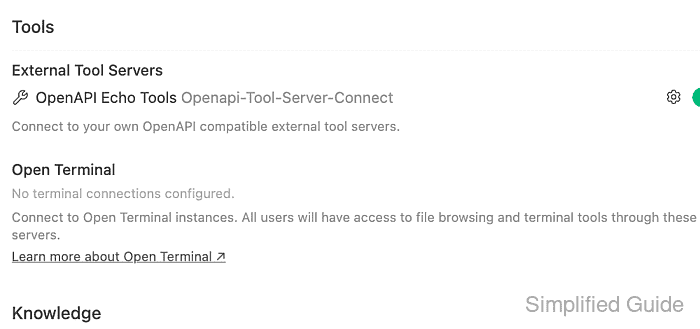
Open WebUI stores admin-managed external tool servers under Admin Panel → Settings → Integrations → Tools → External Tool Servers. The saved connection points to a base URL plus an OpenAPI schema path, usually /openapi.json, and the backend fetches that schema before the tools appear in chat.
The tool server must be reachable from the Open WebUI backend, not only from the operator's browser. For a tool server running on a Docker Desktop host, use a container-reachable URL such as http://host.docker.internal:8000; for a Compose stack, use the service name on the shared network. Keep tokens and private service names out of screenshots and only expose operations that are safe for the selected users and models.
Steps to connect an OpenAPI tool server in Open WebUI:
- Confirm that the tool server publishes an OpenAPI schema with the operation that should become callable.
$ curl --fail-with-body --silent --show-error "https://tools.example.com/openapi.json"
{
  "openapi": "3.1.0",
  "info": {
    "title": "OpenAPI Echo Tools",
    "version": "1.0.0"
  },
  "paths": {
    "/tools/echo": {
      "post": {
        "operationId": "echo_message",
        "summary": "Echo a message"
      }
    }
  }
}
Open WebUI discovers operations from standard OpenAPI path methods such as GET, POST, PUT, PATCH, and DELETE. Review the operation list before exposing the server to users.
Tool: OpenAPI Operation Coverage Checker - Open Admin Panel → Settings → Integrations and find Tools → External Tool Servers.
Some Open WebUI documentation refers to the same area as Settings → Connections or Settings → Tools. Use the admin page that lists External Tool Servers in the running version.
- Add a new external tool server with Type set to OpenAPI.
Type: OpenAPI
URL: https://tools.example.com
Path: /openapi.json
Auth: None
ID: openapi-tool-server-connect
Name: OpenAPI Echo Tools
Do not use localhost for a backend-managed server unless the tool server runs inside the Open WebUI backend container. In container deployments, localhost usually points at Open WebUI itself.
- Add authentication and custom headers only when the tool server requires them.
Auth: Bearer
Key: <api-key>
Headers: {"X-User-Email":"<user-email-template>"}
Leave Auth as None for an internal test server without a token. Open WebUI expands documented user and chat header templates when the tool call runs.
- Verify the connection before saving the server.
echo_message
  message: string
A successful verification should list one or more operation names from the OpenAPI schema. If verification fails, test the schema URL from the Open WebUI runtime and recheck the Path value.
- Save the server and confirm that it appears under External Tool Servers.
- Open a chat with a model that supports native tool calling, then enable the OpenAPI server from + → Integrations → Tools when it is not already active.
Admin-managed tool servers can be hidden in a new chat until the user enables them from the input menu. The selected model must support tool calling, or it may ignore the exposed operation.
- Ask for one safe result that clearly requires the OpenAPI operation.
User: Use the echo_message tool to echo: OpenAPI tool server connected
Assistant: The OpenAPI tool server returned: OpenAPI tool server connected.
The test is complete when the chat answer reflects the endpoint response and the tool server logs show the matching request, such as POST /tools/echo for the schema above.

Mohd Shakir Zakaria is a cloud architect with deep roots in software development and open-source advocacy. Certified in AWS, Red Hat, VMware, ITIL, and Linux, he specializes in designing and managing robust cloud and on-premises infrastructures.


