Many model gateways expose the OpenAI chat protocol even when the provider is not OpenAI itself. Connecting one to Open WebUI lets the same chat interface use models from a hosted API, local server, or proxy after an admin saves the provider base URL and key.
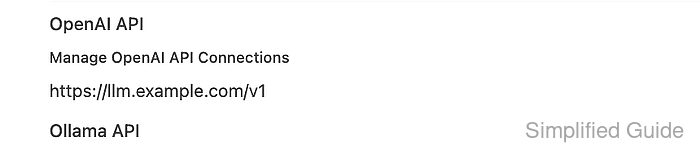
OpenAI-compatible connections live under Admin Panel → Settings → Connections → OpenAI. The URL should point at the provider's OpenAI-style base route, usually ending in /v1, and Open WebUI sends the saved key as a bearer credential when it lists models and requests chat completions.
Start with a provider endpoint that can answer /v1/models, or know the exact model IDs that must be added manually. The setup is complete when the provider model appears in Open WebUI and the selected model answers a short chat prompt.
Steps to connect an OpenAI-compatible provider to Open WebUI:
- Confirm that the provider lists the model IDs that should appear in Open WebUI.
$ curl --fail-with-body --silent --show-error "https://llm.example.com/v1/models" \
  -H "Authorization: Bearer <api-key>"
{
  "object": "list",
  "data": [
    {
      "id": "sg-fixture-chat",
      "object": "model",
      "owned_by": "openai-compatible"
    },
    {
      "id": "sg-fixture-vision",
      "object": "model",
      "owned_by": "openai-compatible"
    }
  ]
}
Use the same base URL and provider key that will be saved in Open WebUI. Some providers do not implement /v1/models; add those model IDs manually in Model IDs (Filter) when the chat completion endpoint still works.
- Open Admin Panel → Settings → Connections → OpenAI, add the provider endpoint, and click Save.
Set URL to the base route, such as https://llm.example.com/v1, and set API Key to the provider-issued key. If Open WebUI runs in Docker while the provider runs on the host, use a container-reachable name such as http://host.docker.internal:<port>/v1 instead of http://localhost:<port>/v1.
- Refresh the Open WebUI model list and check for the provider model.
$ curl --fail-with-body --silent --show-error "https://openwebui.example.com/api/models?refresh=true" \
  -H "Authorization: Bearer <open-webui-token>"
{
  "data": [
    {
      "id": "sg-fixture-chat",
      "name": "sg-fixture-chat",
      "object": "model"
    },
    {
      "id": "sg-fixture-vision",
      "name": "sg-fixture-vision",
      "object": "model"
    }
  ]
}
The request uses an Open WebUI token, not the provider key. If the provider model is missing here but the provider endpoint works, re-save the connection or add the model ID in the connection allowlist.
Related: How to refresh the Open WebUI model list - Open a new chat, select the connected provider model, and send a short prompt.
Reply with one short sentence that says the OpenAI-compatible provider works.
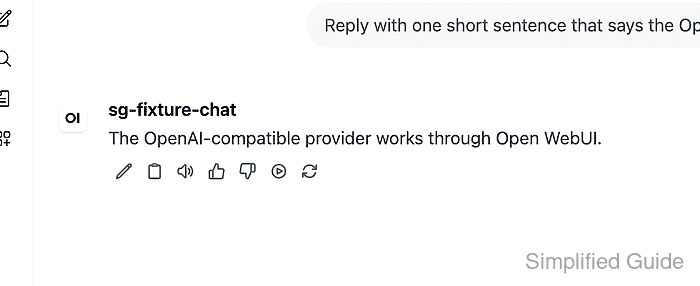
The response proves the saved base URL, provider key, model ID, and /v1/chat/completions route together.
Related: How to troubleshoot Open WebUI provider connection errors

Mohd Shakir Zakaria is a cloud architect with deep roots in software development and open-source advocacy. Certified in AWS, Red Hat, VMware, ITIL, and Linux, he specializes in designing and managing robust cloud and on-premises infrastructures.


