Internal certificate authorities sign the HTTPS certificates of many self-hosted model servers, and TLS-intercepting proxies re-sign outbound traffic with certificates of their own. Open WebUI refuses those connections with CERTIFICATE_VERIFY_FAILED until its container trusts that authority, so the model selector stays empty even though the server is running.

The Open WebUI image trusts only the public certificate authorities shipped inside it. SSL_CERT_FILE replaces that list for the backend's model connections and for Python HTTPS requests in the container, and REQUESTS_CA_BUNDLE does the same for the separate library that reaches document extraction servers such as Apache Tika and Docling. Both point at one bundle that keeps the public roots and adds the internal CA certificate, because a bundle holding only the internal certificate breaks every connection to public HTTPS services, including model downloads.
Disabling verification with AIOHTTP_CLIENT_SESSION_SSL=false also silences the error, but then any server or proxy able to intercept the connection receives prompts and replies without a warning. Trusting the specific CA keeps verification on. Open WebUI reads these variables only when its container is created, so the fix ends with a container re-creation that briefly interrupts every user.
Steps to fix certificate verification errors in Open WebUI with Docker:
- Click the model selector in a new Open WebUI chat.
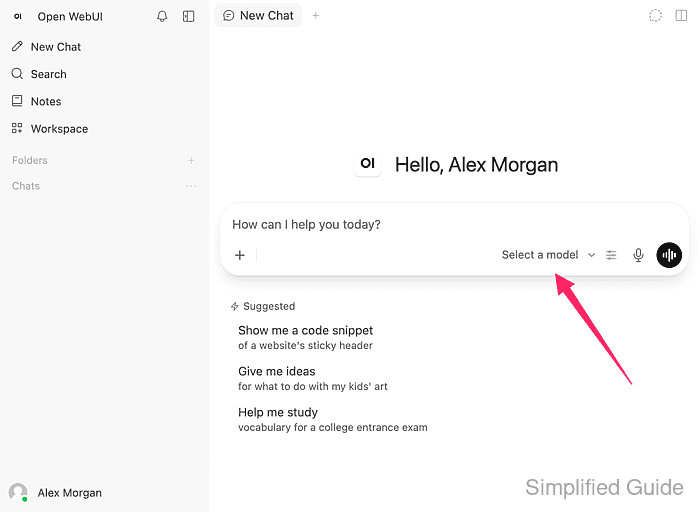
- Confirm that the list shows No models available instead of the models on the HTTPS model server.
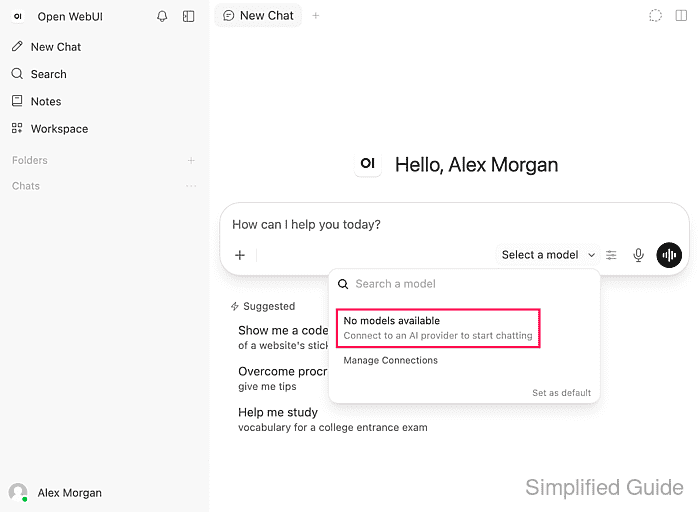
The model server can be running while the list stays empty, because Open WebUI leaves out the models of a connection it cannot reach and shows no certificate error on this screen.
- Search the Open WebUI container log for the certificate error.
$ docker logs open-webui 2>&1 | grep -m 1 CERTIFICATE_VERIFY_FAILED
2026-11-14 09:04:54.528 | ERROR    | open_webui.routers.ollama:send_get_request:88 - Connection error: Cannot connect to host ollama.lab.internal:443 ssl:True [SSLCertVerificationError: (1, '[SSL: CERTIFICATE_VERIFY_FAILED] certificate verify failed: unable to get local issuer certificate (_ssl.c:1011)')]
ollama.lab.internal is the HTTPS model server saved under Connections, and open-webui is the container name. unable to get local issuer certificate means the server's certificate was signed by an authority the container does not trust. A different reason, such as certificate has expired or Hostname mismatch, needs a corrected server certificate rather than a new trusted CA.
Related: How to view Open WebUI Docker logs - Repeat the HTTPS request from Python inside the container.
$ docker exec open-webui python3 -c "import urllib.request; print(urllib.request.urlopen('https://ollama.lab.internal/api/version').read().decode())"
Traceback (most recent call last):
##### snipped #####
urllib.error.URLError: <urlopen error [SSL: CERTIFICATE_VERIFY_FAILED] certificate verify failed: unable to get local issuer certificate (_ssl.c:1011)>
The same failure outside Open WebUI's own code shows that the container's list of trusted authorities, not the saved connection, is at fault. /api/version is an Ollama endpoint; for an OpenAI-compatible server, use its /v1/models URL instead. Any HTTP reply, even an authentication error, means the certificate check passed.
- Display the subject and issuer of the certificate that the model server presents.
$ docker exec open-webui sh -c 'openssl s_client -connect ollama.lab.internal:443 -servername ollama.lab.internal </dev/null 2>/dev/null | openssl x509 -noout -subject -issuer'
subject=CN=ollama.lab.internal
issuer=O=Example Lab, CN=Example Lab Internal Root CA
The issuer line names the CA certificate to trust. Behind a TLS-intercepting proxy, the issuer is the proxy's own CA rather than the provider's, and the proxy CA is the one the container needs. When the issuer is an intermediate CA, the bundle needs both that intermediate certificate and the root that signed it.
- Change to the ~/open-webui directory that holds open-webui.env.
$ cd ~/open-webui
The directory, env file, open-webui container and open-webui data volume match a standard single-container installation. An installation that uses other names needs them substituted.
Related: How to run Open WebUI with Docker - Copy the issuing CA certificate in PEM format to internal-ca.crt in ~/open-webui.
The certificate comes from the team that runs the internal CA or the proxy, or from your own local CA. Only the public certificate is needed, never the CA private key. A PEM file starts with -----BEGIN CERTIFICATE-----, and a binary DER file converts with openssl x509 -inform der -in ca.cer -out internal-ca.crt.
Related: How to create a local certificate authority using OpenSSLEvery certificate that a trusted CA signs passes verification inside the container, so only a CA that your organisation controls belongs in the bundle.
- Display the subject of internal-ca.crt.
$ openssl x509 -in internal-ca.crt -noout -subject
subject=O=Example Lab, CN=Example Lab Internal Root CA
The subject must match the issuer line from the model server. A different name belongs to another CA, and trusting it would leave the error in place after the container is re-created.
- Copy the image's public root certificates into a new ca-bundle.pem file.
$ docker exec open-webui sh -c 'cat "$(python3 -m certifi)"' > ca-bundle.pem
python3 -m certifi prints the path of the public root list inside the image, and the redirection writes its contents to ca-bundle.pem on the host. These roots keep public HTTPS services such as model downloads working. The copy matches this image release, so a later image update calls for building the bundle again.
- Append the internal CA certificate to ca-bundle.pem.
$ cat internal-ca.crt >> ca-bundle.pem
The bundle holds only public certificates and no private keys.
- Open open-webui.env in your text editor.
The file already holds the WEBUI_SECRET_KEY line, which stays unchanged because a different key signs every user out and can make stored integration credentials unreadable.
- Add the following lines at the end of open-webui.env.
- open-webui.env
SSL_CERT_FILE=/etc/ssl/open-webui/ca-bundle.pem
REQUESTS_CA_BUNDLE=/etc/ssl/open-webui/ca-bundle.pem
Both paths name the location where the replacement container mounts ca-bundle.pem, and the Open WebUI 0.13.3 image reads SSL_CERT_FILE and REQUESTS_CA_BUNDLE for its HTTPS connections. AIOHTTP_CLIENT_SSL_CERT_FILE, which Open WebUI also accepts, applies a bundle to its own outbound connections, such as model providers, tool servers and sign-in providers, and leaves Python requests made in the container unchanged.
An impostor server could receive prompts, replies and API keys if AIOHTTP_CLIENT_SESSION_SSL=false is set instead, because it turns off certificate checks for model provider connections and most integration connections.
- Save open-webui.env.
The file must stay readable only by its owner because it holds the secret key.
- Display the image that the current open-webui container runs.
$ docker inspect --format '{{.Config.Image}}' open-webui
ghcr.io/open-webui/open-webui:v0.13.3
The replacement container uses this same image, so trusting the CA does not also upgrade Open WebUI.
Related: How to update Open WebUI in Docker - Stop the open-webui container.
$ docker stop open-webui
open-webui
Open WebUI is unavailable to every user from now until the replacement container finishes starting.
- Remove the stopped open-webui container.
$ docker rm open-webui
open-webui
This removes only the container. Users, chats and saved connections stay in the named open-webui volume for the replacement container.
- Start a replacement open-webui container with the CA bundle mounted.
$ docker run --detach \
  --name open-webui \
  --publish 127.0.0.1:3000:8080 \
  --add-host=host.docker.internal:host-gateway \
  --env-file open-webui.env \
  --mount type=volume,source=open-webui,target=/app/backend/data \
  --mount type=bind,source="$PWD/ca-bundle.pem",target=/etc/ssl/open-webui/ca-bundle.pem,readonly \
  --restart unless-stopped \
  ghcr.io/open-webui/open-webui:v0.13.3
The last line must name the image that docker inspect displayed, so the replacement keeps the same Open WebUI release, and the command prints the new container ID. The second --mount places the host's ca-bundle.pem read-only at the path named in open-webui.env, so the file must stay in ~/open-webui for later re-creations. Every other option repeats the original container, so an installation started with extra environment variables, ports or mounts needs those options here too. docker restart would keep the old environment and the old trust list.
- Repeat the HTTPS request from Python inside the replacement container.
$ docker exec open-webui python3 -c "import urllib.request; print(urllib.request.urlopen('https://ollama.lab.internal/api/version').read().decode())"
{"version":"0.40.16"}
The model server's reply replaces the earlier CERTIFICATE_VERIFY_FAILED error, with certificate verification still on. A repeated error means the container started without the two variables or the CA in ca-bundle.pem is not the issuer shown earlier.
- Click the model selector again in a new Open WebUI chat.
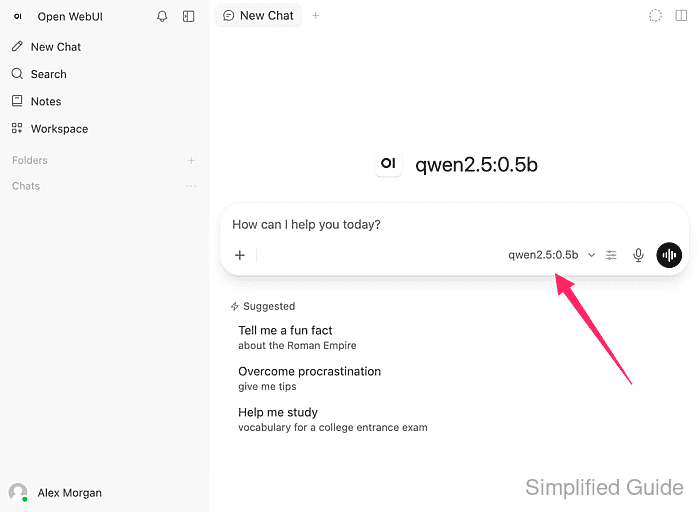
Startup can take up to a minute after the container starts.
- Confirm that the models from the HTTPS model server appear in the list.
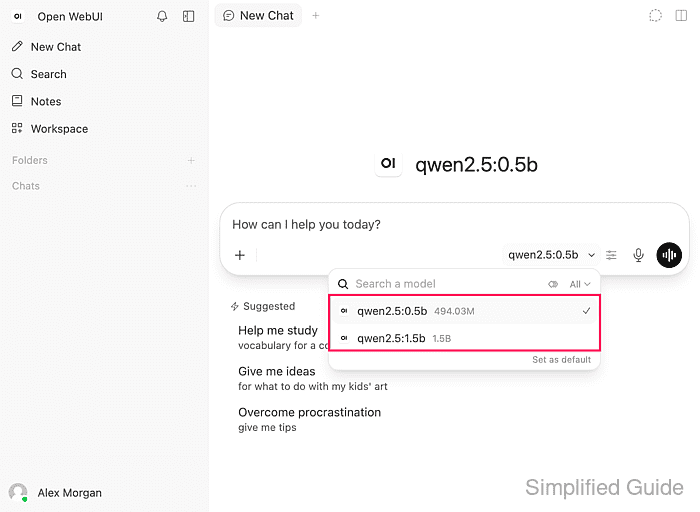
qwen2.5:0.5b and qwen2.5:1.5b are the models on this Ollama server, loaded through the same connection that failed before. A list that is still empty while the Python request succeeds needs the connection itself checked.
Related: How to refresh the Open WebUI model list