A picture's colors and objects are information that a text prompt alone cannot supply. A vision request to the Ollama API includes the image itself so a local model can describe what is visible.
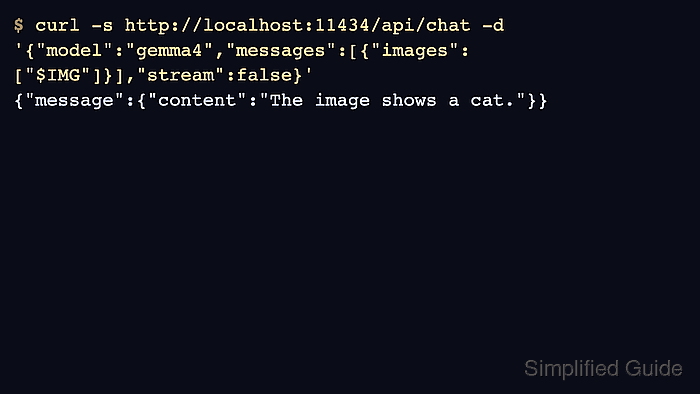
The REST API expects base64-encoded image data in the images array of a chat message. A file path alone does not attach an image, and the selected model must support vision rather than only text.
A running local Ollama server with granite3.2-vision:2b already installed is required. A POSIX shell, curl with support for –fail-with-body, and Python 3 provide the client and create a small picture with a known color.
Steps to run a vision request with the Ollama API:
- Check that the installed granite3.2-vision:2b model supports vision.
$ ollama show granite3.2-vision:2b
  Model
    architecture        granite
    parameters          2.5B
    context length      16384
    embedding length    2048
    quantization        Q4_K_M
    template source     gguf_chat_template

  Capabilities
    tools
    completion
    vision
##### snipped #####
The Capabilities section must include vision. A missing model or unavailable server stops the request before image processing.
Related: How to start the Ollama server
Related: How to pull an Ollama model - Create vision-circle.png containing a red circle on a white background.
$ python3 - <<'PY'
import struct
import zlib
from pathlib import Path

size = 128
rows = []
for y in range(size):
    pixels = b"".join(
        b"\xff\x00\x00" if (x - 64)**2 + (y - 64)**2 <= 40**2 else b"\xff\xff\xff"
        for x in range(size)
    )
    rows.append(b"\x00" + pixels)

def chunk(kind, data):
    return struct.pack(">I", len(data)) + kind + data + struct.pack(">I", zlib.crc32(kind + data))

header = struct.pack(">IIBBBBB", size, size, 8, 2, 0, 0, 0)
png = b"\x89PNG\r\n\x1a\n" + chunk(b"IHDR", header)
png += chunk(b"IDAT", zlib.compress(b"".join(rows))) + chunk(b"IEND", b"")
Path("vision-circle.png").write_bytes(png)
PY
The image contains no private photograph or document. Image data sent to a remote Ollama endpoint is disclosed to that server; base64 is encoding, not encryption.
- Encode vision-circle.png as one base64 string.
$ IMG=$(base64 < vision-circle.png | tr -d '\n')
Removing line breaks keeps the encoded bytes valid inside the JSON string. The images entry contains raw base64 without a data-URL prefix.
Tool: Image to Base64 Encoder - Submit the image question to the local chat endpoint.
$ curl --fail-with-body --silent --show-error http://127.0.0.1:11434/api/chat \
  -H 'Content-Type: application/json' \
  --output vision-response.json \
  --data-binary '{
    "model": "granite3.2-vision:2b",
    "messages": [{
      "role": "user",
      "content": "What color is the circle? Answer with the color only.",
      "images": ["'"$IMG"'"]
    }],
    "stream": false
  }'
The prompt does not name the color. stream: false returns the answer as one JSON object in vision-response.json. Image processing can take time on a CPU; an HTTP error makes curl exit unsuccessfully and retains the error body in the file.
- Confirm that the completed answer identifies the circle as red.
$ python3 - <<'PY'
import json
from pathlib import Path

response = json.loads(Path("vision-response.json").read_text())
assert response["done"] is True and response["done_reason"] == "stop", response
message = response["message"]
assert message["role"] == "assistant", response
answer = message["content"].strip()
assert "red" in answer.lower().split(), answer
assert "blue" not in answer.lower(), answer
print(answer)
PY
red
The check reads message.content from the saved response and rejects an incomplete reply or the wrong color. The generated PNG and response remain available; wording may vary even when the model identifies the color.