Related arrays often need to cross a process boundary without being split into separate files or flattened into text. An NPZ archive keeps those arrays in one NumPy-native container while preserving each member's shape and dtype.
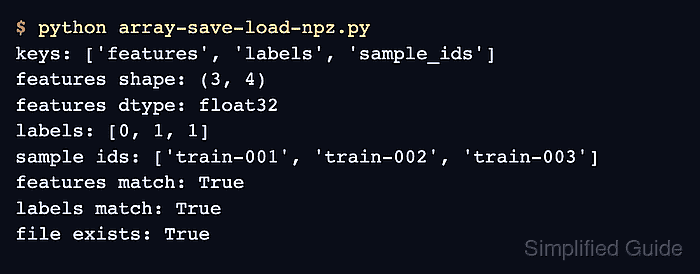
The np.savez_compressed() function stores each keyword argument under that keyword, so descriptive names such as features and labels replace positional names such as arr_0. Compression reduces archive size at the cost of more work while writing; np.savez() provides the same multi-array layout without ZIP compression.
Loading an NPZ archive returns a dictionary-like NpzFile whose members are read by key. A context manager closes the underlying file handle, and allow_pickle=False keeps this numeric example from accepting pickled object arrays.
Related: Save and load NPY
Related: Memory-map an NPY array
Related: Write CSV data
Steps to save and load NumPy arrays with NPZ:
- Create array-save-load-npz.py containing the archive path plus two source arrays.
- array-save-load-npz.py
import numpy as np
from pathlib import Path

path = Path("model-batch.npz")
features = np.arange(12, dtype=np.float32).reshape(3, 4)
labels = np.array([0, 1, 1], dtype=np.int64)
- Add the compressed archive write below the source arrays.
np.savez_compressed(path, features=features, labels=labels)
The keyword arguments become the features and labels member names inside the archive.
- Add the archive round-trip block below the save call.
with np.load(path, allow_pickle=False) as archive:
    print("keys:", archive.files)
    features_loaded = archive["features"]
    labels_loaded = archive["labels"]
    print("features shape:", features_loaded.shape)
    print("features dtype:", features_loaded.dtype)
    print("labels dtype:", labels_loaded.dtype)
    print("features match:", np.array_equal(features, features_loaded))
    print("labels match:", np.array_equal(labels, labels_loaded))
The context manager closes the NpzFile after both named arrays have been read.
- Run the completed script in the target archive directory to verify the round trip.
$ python3 array-save-load-npz.py
keys: ['features', 'labels']
features shape: (3, 4)
features dtype: float32
labels dtype: int64
features match: True
labels match: True

Mohd Shakir Zakaria is a cloud architect with deep roots in software development and open-source advocacy. Certified in AWS, Red Hat, VMware, ITIL, and Linux, he specializes in designing and managing robust cloud and on-premises infrastructures.


