Delimited text is a common handoff format for numeric results that need to move from Python into a spreadsheet, report, or another program. A CSV file fits this job when the array is rectangular and the receiving system needs readable rows rather than NumPy metadata.
The np.savetxt() function writes one-dimensional or two-dimensional arrays as text. Its fmt value controls the precision stored in the file, while comments=“” keeps the header as an ordinary first row instead of prefixing it with #.
This method suits numeric columns without missing values or quoted text fields. Use NPY or NPZ when another NumPy process must retain dtype and shape metadata, or use Python's csv module when fields can contain commas, quotes, or line breaks.
Related: Read CSV data
Related: Save and load NPY
Related: Save and load NPZ
Tool: Comma-Separated Values (CSV) Converter
Steps to write a CSV file with NumPy:
- Create csv-write.py with the output path and numeric array.
- csv-write.py
from pathlib import Path

import numpy as np

path = Path("sensor-readings.csv")
readings = np.array(
    [[18.25, 42.0, 0.98], [18.50, 41.5, 0.99], [18.75, 41.0, 1.01]],
    dtype=np.float64,
)
np.savetxt() replaces an existing file at the same path when the program runs. The sample name is safe only when sensor-readings.csv does not already contain data that must be kept.
- Append the CSV export call after the readings array.
np.savetxt(
    path,
    readings,
    delimiter=",",
    header="temperature,humidity,calibration",
    comments="",
    fmt="%.2f",
)
The comma delimiter and empty comment prefix produce a normal CSV header. The fmt=“%.2f” value stores two digits after each decimal point.
- Append the reload check after the np.savetxt() call.
loaded = np.loadtxt(path, delimiter=",", skiprows=1)
values_match = np.allclose(loaded, np.round(readings, 2))

print(path.read_text(), end="")
print("reloaded shape:", loaded.shape)
print("values match two-decimal export:", values_match)

if loaded.shape != readings.shape or not values_match:
    raise RuntimeError("CSV reload does not match the exported array")
skiprows=1 excludes the plain-text header when np.loadtxt() reads the numeric rows back.
- Run the completed csv-write.py program.
$ python3 csv-write.py
temperature,humidity,calibration
18.25,42.00,0.98
18.50,41.50,0.99
18.75,41.00,1.01
reloaded shape: (3, 3)
values match two-decimal export: True
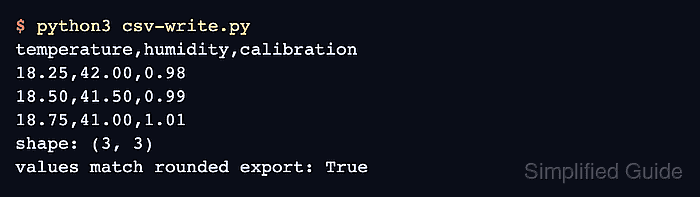
The exported text shows the header and formatted rows, while the reload check fails with an exception if the CSV shape or rounded values do not match the source array.

Mohd Shakir Zakaria is a cloud architect with deep roots in software development and open-source advocacy. Certified in AWS, Red Hat, VMware, ITIL, and Linux, he specializes in designing and managing robust cloud and on-premises infrastructures.


