A single NumPy array often needs to survive beyond the Python process that created it. The NPY format keeps the array in a NumPy-native binary file so later code can restore its values, shape, and data type together.
The np.save() function writes one array to a .npy file, while np.load() reconstructs that file as an ndarray. Setting allow_pickle=False keeps numeric data on the non-pickle path and prevents Python object deserialization.
An NPY file suits one array that will return to NumPy. Use NPZ for multiple named arrays, CSV for text interchange, or memory mapping when a large NPY file should be sliced without loading all of it into memory.
Related: Save and load NPZ
Related: Memory-map an array
Related: Write CSV data
Steps to save and load a NumPy array with NPY:
- Create array-save-load-npy.py with the output path and numeric array.
- array-save-load-npy.py
import numpy as np

path = "calibration-readings.npy"
readings = np.array(
    [[18.25, 18.50, 18.75], [19.00, 19.25, 19.50]],
    dtype=np.float32,
)
- Append the NPY write call below the array definition.
np.save(path, readings, allow_pickle=False)
- Append the NPY read and equality-check section below the save call.
loaded = np.load(path, allow_pickle=False)
np.testing.assert_array_equal(loaded, readings, strict=True)

print("loaded array:")
print(loaded)
print("shape:", loaded.shape)
print("dtype:", loaded.dtype)
print("matches original:", np.array_equal(loaded, readings))
allow_pickle=False works for numeric dtypes. Object arrays require pickling and should be loaded only from trusted data.
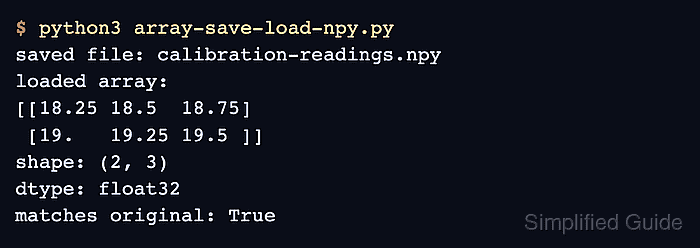
- Run the completed script to exercise the NPY round trip.
$ python3 array-save-load-npy.py
loaded array:
[[18.25 18.5  18.75]
 [19.   19.25 19.5 ]]
shape: (2, 3)
dtype: float32
matches original: True
np.testing.assert_array_equal(…, strict=True) raises an AssertionError if the reloaded values, shape, or dtype differ from the original array.

Mohd Shakir Zakaria is a cloud architect with deep roots in software development and open-source advocacy. Certified in AWS, Red Hat, VMware, ITIL, and Linux, he specializes in designing and managing robust cloud and on-premises infrastructures.


