Large numerical datasets often outgrow the memory available to one Python process even when a calculation needs only a small slice at a time. A NumPy memory map keeps the array in a disk file while retaining familiar indexing and assignment operations.
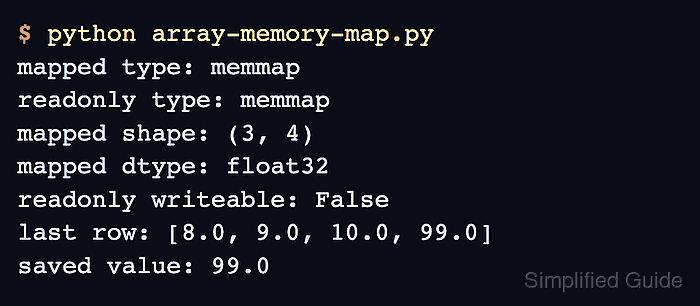
The numpy.lib.format.open_memmap() function creates an NPY-formatted file with its shape and data type recorded in the file header. Later processes can therefore reopen it with np.load() instead of repeating those layout details.
Mode w+ creates or replaces the file and permits writes, while mmap_mode=“r” exposes an existing file without allowing assignments. Call flush() before another process reads newly written values, and avoid concurrent writers unless the surrounding application provides its own coordination.
Related: Save and load NPY
Related: Check view or copy state
Steps to memory-map a NumPy array:
- Create array-memory-map.py with the imports, file path, and fixed array layout.
- array-memory-map.py
from pathlib import Path

import numpy as np
from numpy.lib.format import open_memmap

path = Path("sensor-readings.npy")
mapped = open_memmap(path, mode="w+", dtype=np.float32, shape=(3, 4))
Mode w+ overwrites an existing file at the same path; a different path preserves existing NPY data.
- Append the sample array assignments after the open_memmap() call.
- array-memory-map.py
mapped[:] = np.arange(12, dtype=np.float32).reshape(3, 4)
mapped[-1, -1] = 99
- Append the flush and summary lines after the assignments.
- array-memory-map.py
mapped.flush()
print("mapped type:", type(mapped).__name__)
print("mapped shape:", mapped.shape)
print("mapped dtype:", mapped.dtype)
print("last row:", mapped[-1].tolist())
print("saved file:", path)
flush() writes modified array pages to the NPY file before another process opens it.
- Run array-memory-map.py to create and populate the mapped NPY file.
$ python array-memory-map.py
mapped type: memmap
mapped shape: (3, 4)
mapped dtype: float32
last row: [8.0, 9.0, 10.0, 99.0]
saved file: sensor-readings.npy
- Load sensor-readings.npy through a read-only mapping in a separate Python process.
$ python -c "import numpy as np; mapped = np.load('sensor-readings.npy', mmap_mode='r'); assert isinstance(mapped, np.memmap) and not mapped.flags.writeable and mapped[-1, -1] == 99; print('mapped type:', type(mapped).__name__); print('writeable:', mapped.flags.writeable); print('saved value:', float(mapped[-1, -1]))"
mapped type: memmap
writeable: False
saved value: 99.0
A memmap type, writeable: False, and the persisted value show that the file remains reusable without loading the full array into memory. Mode mmap_mode=“r+” permits a later process to save edits.

Mohd Shakir Zakaria is a cloud architect with deep roots in software development and open-source advocacy. Certified in AWS, Red Hat, VMware, ITIL, and Linux, he specializes in designing and managing robust cloud and on-premises infrastructures.


