Enabling HTTP/2 in Nginx lets one client connection carry many requests at the same time, which usually reduces connection overhead and head-of-line waiting on pages with many small assets.
On HTTPS listeners, Nginx negotiates HTTP/2 during the TLS handshake with ALPN, so browsers that advertise h2 switch automatically while older clients keep using HTTP/1.1 without a separate site configuration.
The syntax depends on the installed Nginx version and build options. The standalone http2 directive appeared in 1.25.1, while older builds still require the listen ... http2 parameter, so the safest flow is to check the running version first, update the existing TLS server block on port 443, test with nginx -t, and then verify negotiation from a client.
Related: How to improve Nginx performance
Related: How to enable HTTP/3 in Nginx
Steps to enable HTTP/2 in Nginx:
- Check the installed Nginx version before editing the server block syntax.
$ nginx -v
nginx version: nginx/1.28.3 (Ubuntu)
Use http2 on; on Nginx 1.25.1 and newer. On older builds, keep the http2 parameter on the listen line instead because the standalone directive is not available there. Custom builds also need the ngx_http_v2_module module.
- Confirm that the site already serves HTTPS on port 443.
$ curl -I https://example.com/
HTTP/1.1 200 OK
server: nginx/1.28.3
date: Sat, 06 Jun 2026 11:38:03 GMT
content-type: text/html
content-length: 10671
Any successful HTTPS response is enough for this check. The protocol line may still be HTTP/1.1 before HTTP/2 is enabled.
- Locate the TLS server block that handles the target hostname.
$ sudo grep -R -n 'server_name example.com;' /etc/nginx/
/etc/nginx/conf.d/example.com.conf:5:    server_name example.com;
Edit the enabled file that contains the target server_name and the matching listen 443 ssl line in the same server block. Common layouts include /etc/nginx/nginx.conf, /etc/nginx/conf.d/*.conf, and /etc/nginx/sites-enabled/.
- Update that HTTPS server block with the correct HTTP/2 syntax for the installed version.
$ sudoedit /etc/nginx/conf.d/example.com.conf
server {
    # Nginx 1.25.1 and newer
    listen 443 ssl;
    listen [::]:443 ssl;
    http2 on;

    # Nginx before 1.25.1
    # listen 443 ssl http2;
    # listen [::]:443 ssl http2;

    server_name example.com;
    ##### snipped #####
}
Use only one syntax branch in a given server block. On older builds, remove http2 on; and use the older listen … http2 form instead. If the site also listens on IPv6, keep the 443 listener style consistent between the IPv4 and IPv6 lines.
- Test the updated configuration before reloading the service.
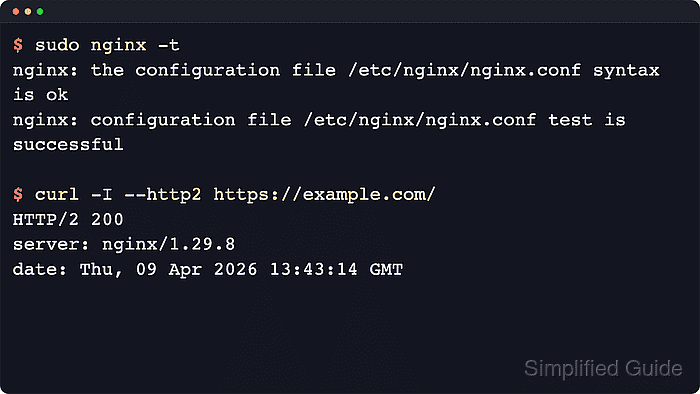
$ sudo nginx -t
nginx: the configuration file /etc/nginx/nginx.conf syntax is ok
nginx: configuration file /etc/nginx/nginx.conf test is successful
On current builds, listen ... http2 still works but prints a deprecation warning. On older builds, http2 on; fails with an unknown-directive error, which means that host still needs the older listen syntax.
Related: How to test Nginx configuration
- Reload Nginx so the updated listener takes effect.
$ sudo systemctl reload nginx
If the host does not use systemd, send the supported direct reload signal with sudo nginx -s reload instead.
Related: How to manage the Nginx service
- Verify that a client now negotiates HTTP/2 with the site.
$ curl -I --http2 https://example.com/
HTTP/2 200
server: nginx/1.28.3
date: Sat, 06 Jun 2026 11:38:03 GMT
content-type: text/html
content-length: 10671
If curl reports that --http2 is unsupported, the local curl build lacks HTTP/2 support. If the response still shows HTTP/1.1, the client fell back because the request did not reach the updated TLS server block or the server could not negotiate ALPN.
- Confirm that the TLS handshake selected h2 through ALPN.
$ openssl s_client -brief -alpn h2 -connect example.com:443 -servername example.com </dev/null
CONNECTION ESTABLISHED
Protocol version: TLSv1.3
Ciphersuite: TLS_AES_256_GCM_SHA384
Peer certificate: CN = example.com
Verification: OK
ALPN protocol: h2
DONE
If the ALPN line shows http/1.1 or is absent, the listener is still negotiating a different application protocol.

Mohd Shakir Zakaria is a cloud architect with deep roots in software development and open-source advocacy. Certified in AWS, Red Hat, VMware, ITIL, and Linux, he specializes in designing and managing robust cloud and on-premises infrastructures.


